
You are here:
Data Filters with Enhanced Subscriber Features in Marketing Cloud Engagement
A data filter is a group of criteria that segments a subscriber list or data extension. You can segment a subscriber list or data extension using data filters and use the segments during an automation. Data Filters can be used with accounts that have enhanced subscriber features turned on in Email Studio.
Refer to Data Filter if your account doesn’t have enhanced subscribers features enabled.
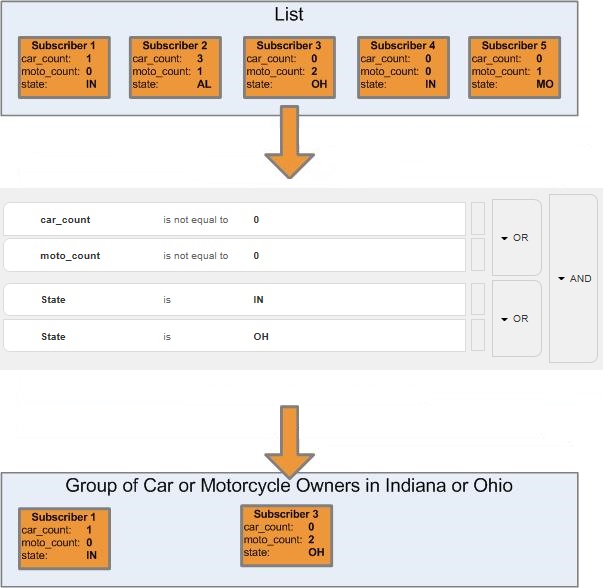
A data filter is a group of criteria that segments a subscriber list or data extension. Use a data filter to apply complex segmentation rules to your subscriber lists or data extensions. Complex segmentation makes it easier for you to precisely target your message to the specific subscriber.
The item in the list being filtered must satisfy the criteria to be included in the segment.

When you create a standalone filter definition and don’t associate it with a subscriber list or data extension, you can reuse the same filter definition with many lists or data extension. You can create different groups or different filter activities that use the same data filter. You can select only one list or data extension per group or Automation Studio filter activity.
- Create a Marketing Cloud Engagement Data Filter from Profile Attributes
Follow these steps to create a data filter from profile attributes for subscribers in Email Studio. - Create a Data Filter from a Data Extension
Follow these steps to create a data filter from a data extension in Email Studio. - Copy a Marketing Cloud Engagement Data Filter
Follow these steps to copy an existing data filter in Email Studio. This process creates a new data filter when copying a data extension. - Save a Data Extension Filter
You can create and save a data filter based on the filter settings of a data extension in Marketing Cloud Engagement. You can include more filtered data extensions using the filter as a starting point in Email Studio. - Delete Data Filters in Marketing Cloud Engagement
Follow these steps to delete one or more data filters in Email Studio. - Data Filter Scenario in Marketing Cloud Engagement
You can use the data filter feature in Email Studio to segment a subscriber list with the filter activity. - Data Filter Definition for Marketing Cloud Engagement
You can create a data filter definition on the Subscribers tab in Email Studio. Choose whether to create a filter that segments a subscriber list or a data extension. - Filter Activity in Marketing Cloud Engagement
If you use interactions in Email Studio, you can use data filters to segment subscriber lists or data extensions. Select the data filter when you create a filter activity. - Data Filters in a Marketing Cloud Engagement Group
You can use data filters to segment subscriber lists by selecting the data filter when you create a group, regardless of whether you use interactions in Email Studio.
