
You are here:
Publication Lists in Email Studio
Use publication and suppression lists to manage opt-ins for your email account in Email Studio. Use either publication lists or suppression lists to control how subscribers receive your sends. Choose a publication list when sending email messages and SMS messages to a sendable data extension.
Prerequisites
This document is intended for email users who are responsible for sending and managing email and SMS message sending. An understanding of data extensions and the Web Service API may be required when working with publication lists.
Publication Lists
A publication list helps you manage how subscribers receive several different categories of emails or SMS messages. For example, send newsletters, advertisements, and alerts. Each of these is a different category, so create a separate publication list for each category. When you send a newsletter, associate the send with the newsletter publication list to identify to the system what kind of content is inside the publication.
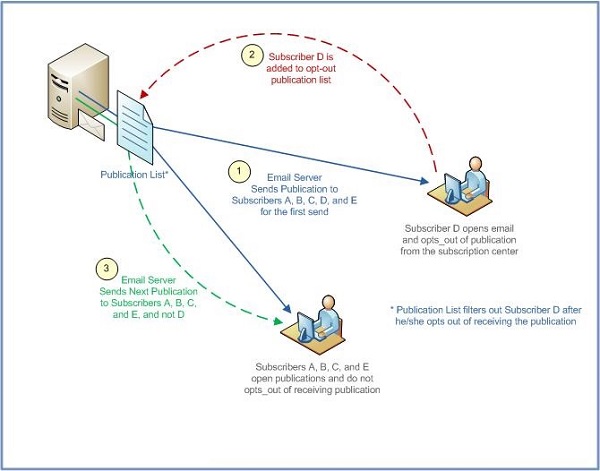
Publication lists help you manage subscribers' unsubscribe or opt-out actions. Having a separate publication list for each communication type enables you to honor an opt-out request from one publication type without unsubscribing that person from all previously subscribed-to publications. If you use only one publication list for all of a subscriber's communications and if that person opts out of one publication, that subscriber will be opted out automatically from all publications. Additionally:
- Use a publication list to filter the audience of an email send, which ensures your publications are sent to the subscribers who want to see them.
- Use a publication list to show and adhere to regulatory compliance to CAN-SPAM laws.
- Use a publication list for each communication type, such as newsletter, weather alerts, and coupons.
- Use a publication list to control who receives particular communications from a company. In Enterprise 2.0, publication lists can be shared between parent and child business units.
- Publication Lists in Email Studio
Send an email or SMS messages using Email Studio in Marketing Cloud Engagement. - Create a Publication List in Marketing Cloud Engagement
Create a publication list in Email Studio. - Apply a Publication List to a Marketing Cloud Engagement Send
Apply publication lists to guided sends, and user-initiated emails in Email Studio.
