You are here:
Understand International Sends
The International Sends feature in Email Studio lets you select the specific language encoding for your email and provides translated supporting pages for your subscribers.
The International Sends feature gives your emails the best chance of being received and rendering correctly, and your standard landing pages automatically appear in your subscribers’ preferred language.
Choose the Encoding Standard for Your Email
When International Sends is enabled for your account, the language field sets the content-type value in the email header. Changing the language option does not update the meta tag in the HTML. You can change the encoding selection for any existing emails (they default to US-ASCII encoding). We recommend Unicode UTF-8 for most international audiences, but it can be more appropriate to select a specific, local language encoding for all or a portion of your subscribers. Using the correct encoding is critical because it simultaneously improves your email's chance of being delivered successfully and improves the ability of the subscriber's PC to display the characters correctly.
Example
When reviewing your email tracking results, you see that your English emails have been successful in Europe, but have high bounce rates and low open and click rates in China. You are not a surprised because most PCs in China are configured only for Chinese and can’t display English well.
You decide to have your emails translated into Chinese by a localization service. Then you send the English emails (with Unicode UTF-8 encoding) to your European subscribers and the Chinese emails (with Chinese Big-5 encoding) to your Chinese subscribers.
As a result, the delivery, open, and click rates all increase for the Chinese emails. The Chinese email servers were expecting Chinese encoding, so your Chinese-encoded email looked less like spam. The Chinese PCs could easily decode Chinese encoded text, so the emails displayed properly.
The following language encodings are supported:
- Big5 - Chinese (Traditional)
- EUC-KR- Korean
- GB2312 - Chinese (Simplified)
- ISO-8859-1 - Western European: Danish, Dutch (partial), English, Faroese, Finnish (partial), French (partial), German, Icelandic, Irish, Italian, Norwegian, Portuguese, Rhaeto-Romanic, Scottish Gaelic, Spanish, and Swedish. Also: Albanian, Indonesian, Afrikaans, and Swahili.
- ISO-8859-2 - Central European: Bosnian, Polish, Croatian, Czech, Slovak, Slovenian, and Hungarian.
- ISO-2022-JP - Japanese
- KOI8-R - Russian, Bulgarian
- Shift-JIS - Japanese
- UTF-8 (Unicode) - Most languages, gaining universal acceptance in most areas of the world
- US-ASCII - English: United States (default for non-International emails)
Automatically Translated Landing Pages
In addition to encoding emails, the International Sends feature provides translated versions of the standard landing pages:
- Profile Center
- Subscription Center
- Unsubscribe Confirmation
- Forward to a Friend
These pages have been translated into 21 languages. The language that appears when a subscriber visits the landing pages depends on the language preference the subscriber has set in the browser, even if that language is different than the email language.
Translated landing pages are available in these languages.
- Chinese
- Czech
- Danish
- Dutch
- Finnish
- French
- German
- Greek
- Hungarian
- Italian
- Japanese
- Korean
- Norwegian
- Polish
- Portuguese
- Romanian
- Russian
- Spanish
- Swedish
- Thai
- Turkish
Example
Your subscriber in France has their web browser configured to prefer French language for web pages. When they click the Profile Center link in your email, we send the French version of their Profile Center.
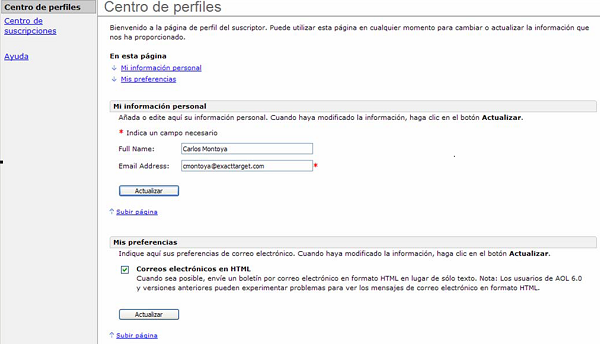
The following screenshots are examples of landing pages in the subscriber's language.
The Profile Center page displayed in Spanish:
The Subscription Center page displayed in Japanese:
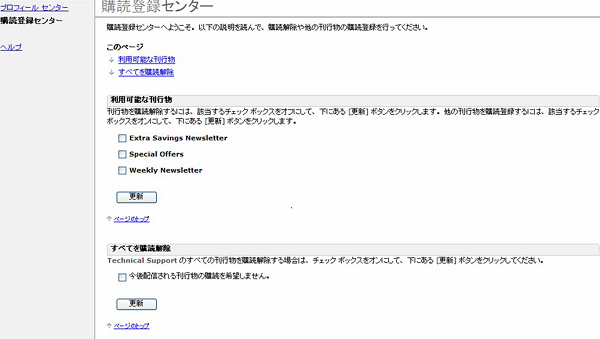
Attribute names and values are not translated on the landing pages. For example, the attribute names Full Name and Email Address appear in English. Likewise, the actual field values can only be saved as English text and appear here as English text, as well. There is limited support for some Western European characters. We highly recommend that you extensively test this feature with your live data.
Automatically Translated Forward-to-a-Friend Messages
When a subscriber clicks a forward-to-a-friend link in your email, a forward-to-a-friend landing page appears in the language indicated in the subscriber's browser preferences. When the subscriber completes and submits the forward-to-a-friend form, the system forwards the message to the email address the subscriber provided.
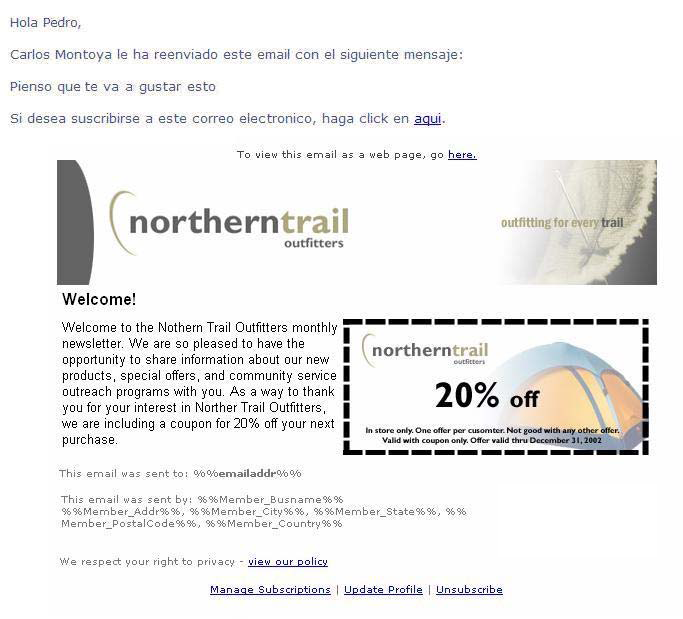
The message that the friend receives contains an introduction, a personal message, and the body of the message being forwarded:
- The introduction explains who forwarded the email and contains a link to opt in to the mailing list. The introduction appears in the same language as the forward-to-a-friend landing page it was sent from.
- The personal message is the text that the subscriber entered when filling out the forward-to-a-friend form. The personal message appears in the language the subscriber wrote it.
- The body of the forwarded message is the same as the message the subscriber originally received. It appears in the original language, even if the email is in a different language than the forward-to-a-friend landing page.
English-language email forwarded through a Spanish forward-to-a-friend page: