
You are here:
Universal Unsubscribe
A universal unsubscribe occurs when a subscriber unsubscribes from every email your company sends. When a subscriber uses the universal unsubscribe option, their status is set to Unsubscribed on all your lists and your universal list.
For example, if a subscriber is on three of your lists and uses the universal unsubscribe option to unsubscribe from one of your emails, they appear as Unsubscribed on all your lists.
A subscriber can unsubscribe from the universal list in various ways:
Import
You can unsubscribe a subscriber from the universal list via subscriber List imports by including an Unsubscribed status in the import file and importing into the All Subscribers list.
API
You can unsubscribe a subscriber from a list via the API's Subscriber Update call by passing in the All Subscribers ListID and Subscriber Status of unsubscribed.
Subscriber Properties
Follow this procedure to perform an unsubscribe from the universal list on a user within the application:
- Click the Subscribers tab.
- Click my lists on the folder containing the subscriber.
- Select the subscriber you want to unsubscribe.
- Click View Properties
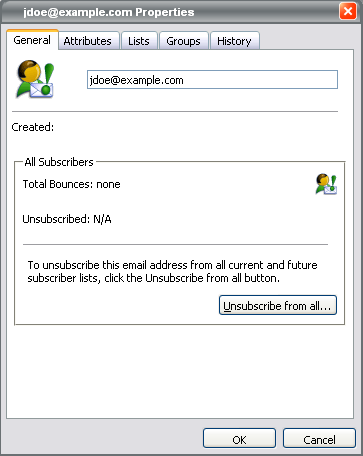
- Click Unsubscribe from all...
The Unsubscribe window appears where you can enter a reason if applicable and unsubscribe from the universal list. When you return to the General tab, the Unsubscribed field is populated with the unsubscribe date and the icon in the upper left corner is red. The subscriber has a red icon when viewing the All Subscribers list.
Unsubscribe Center
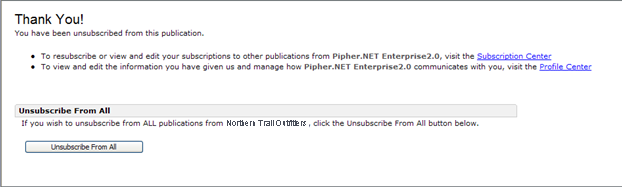
Subscribers can unsubscribe from the universal list in the Unsubscribe Center. Subscribers can reach the Unsubscribe Center by clicking the Manage Subscriptions link at the bottom of the email. Next, they click the Unsubscribe From All button that appears at the bottom of the window.
Subscription Center
Subscribers can unsubscribe from the universal list in the Subscription Center. Subscribers can reach the Subscription Center by clicking the Manage Subscription link at the bottom of the email.
To unsubscribe from the universal list, select the I no longer wish to receive any future publications checkbox and click the Update button at the bottom of the section.
Profile Center
Subscribers can also unsubscribe from the universal list in the Profile Center. Subscribers can reach the Profile Center by clicking the Update Profile link at the bottom of the email.
To unsubscribe from the universal list, select the I no longer wish to receive any future publications checkbox and click the Update button.
Reply Mail Management
If the account uses Reply Mail Management, the subscriber can unsubscribe from the universal list by replying to the email and typing an appropriate request in either the subject line or body.
