
You are here:
Anniversary Campaigns
Even a simple reminder campaign in Journey Builder can help build a relationship with your clients and increase brand engagement. Typical anniversary campaigns focus on a special date for a customer, like a birthday or sign-up date. These yearly messages can be part of a renewal strategy. You can also celebrate your company’s milestones or send a reminder to customers who haven’t purchased in a while.
Here are examples of when to use an anniversary campaign.

Simple Anniversary Email
Send a single email to a customer on a specific date on a regular cadence. A simple reminder campaign can help build a relationship with your clients and increase brand engagement.
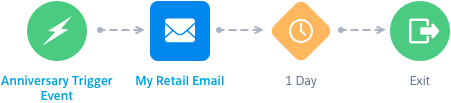
Typical anniversary campaigns focus on a special date for customers, like their birthday or sign-up date. In this single-message journey, you send a message to your customers triggered by a specific date. The goals of a simple anniversary campaign are:
- Strengthen your relationship with your customers.
- Encourage engagement with your brand.
- Drive renewal or repeat purchases.
Entry Source
Depending on how you set up your anniversary campaign, you can use a date-based event or a data extension entry source. For example, if you want to use a client’s birthday or service anniversary, you can use a date-based event. You can create a data extension that includes contacts who haven’t purchased anything in the last 60 days or are due for renewal.
If you use a date-based event, make sure that you have the data you need, like a client’s birthday, in your Contact Builder data model. Also, consider timing. You can set the journey start before or after the date. Think about the best time for your clients to get the information: on the specific date, like a birthday message, or a month before the renewal date.
Message Sequence and Content
In this simple campaign, you send a single message.
| Email 1 | Communicate the message clearly and succinctly (birthday or renewal). Provide necessary details and calls to action, like a link to your website or timing of renewal. |
Journey Path
The nice thing about this simple journey is that you can build on it later by copying or versioning the journey and adding more messages or splits. By starting with a simple journey, you learn the steps for setting up an automated campaign and get some baseline engagement statistics. When you’re comfortable, you can add complexity to your campaigns.
For example, you can add engagement splits to send reminders based on opens or clicks. Or, add timed waits and explain the benefits of renewal through a series of messages.
Birthday Journey
Make your customers feel special with a birthday coupon. Celebrating birthdays is a great way to engage with your customers and let them know how much you appreciate their business.
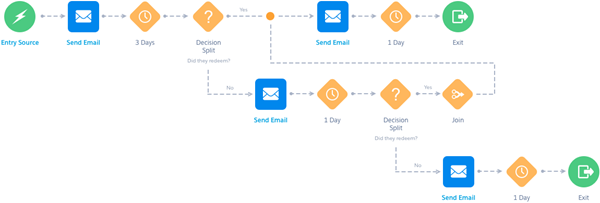
The journey is personalized, using the information you know about the contact, and can remind them of your brand and products or services on a regular cadence. A birthday journey can:
- Delight your customers by wishing them a Happy Birthday.
- Send them a coupon or redeemable discount to drive conversions.
- Link them to your website, reminding them of your product and services.
- Provide a gift guide and the ability to make a shopping list for family and friends.
Entry Source
Use a date-based event to place contacts into a journey based on data stored in Contact Builder. For birthday journey campaigns, we recommend that you send the first message a few days before the birth date. This plan allows time for them to redeem the coupon.
Select the attribute in the Contact model where the birthday is stored. If contact demographic data is stored in multiple places, be sure to select the attribute from the correct data location. Set the re-entry to Yearly.
Message Sequence and Content
The first email in an anniversary campaign series sends your happy thoughts about the customer's important day and reestablishes your brand. For coupon redemption, provide the coupon or link to the website and any details that are important, like expiration and limitations.
Ensure that you have a way to capture coupon redemption so you can send reminder emails only if necessary. Personalize subject lines and provide a clear call to action within the email.
| Email 1 | Send well wishes for the customer’s happy day and any offer or celebration coupon, including any information about expiration or limitations. |
| Email 1a | If the customer hasn’t redeemed their coupon, remind them about the coupon and emphasize their special day. |
| Email 1b | If after the customer receives the first reminder, they still haven’t redeemed their coupon, send them a second reminder and emphasize the expiration date. |
| Email 2 | Re-emphasize your customer’s special day and thank them for their continued engagement with your brand. |
Journey Path
To increase the odds of coupon redemption, you can use decision splits to provide timely reminders. Using a decision split, you can check to see if a customer redeemed their coupon before sending a reminder, eliminating unnecessary customer contact.
You must be able to import customer data from your point of sale into Marketing Cloud Engagement and Contact Builder in a timely manner. That way, the decision split uses the most recent data.
Waits are important to time the delivery of messages. Send the birthday message and coupon to your customers anywhere from a few days to a week or two before their birthday. You want to give them enough time to redeem the coupon before the first decision split and send the reminders before the offer or coupon expires.
To set up the waits and decision splits, start with the contact’s birthday or coupon expiration date, and work backward to figure out your timing. Don’t forget to schedule the data import or update to Contact Builder as part of this planning.
