
You are here:
Personalization in the Journey Builder Email Activity
Personalize email content sent by Journey Builder using the Marketing Cloud Engagement email personalization features.
Considerations
- In Journey Builder, email personalization replaces the personalization string in the email with the matching attribute value found in journey data. Each personalization string is replaced with the specified attribute value as it exists when the contact enters the journey.
- Dynamic content also uses journey data, similar to personalization.
- If you use Send Logging with custom Send Log attributes and expect contact attributes to be updated during the journey, your Send Log records could be incorrect. To resolve this issue, open a support case through Salesforce Help.
How Personalization Works
To personalize an email, include personalization strings in your email content. Personalization strings are made up of percent signs combined with an attribute's column name, such as %%FirstName%%. When the email is sent, it’s validated and each personalization string is rendered, showing the intended attribute value by calling it from journey data. Journey data differs from contact data because it preserves the state of a contact's data at the moment an entry event fires. The journey uses that initial data throughout a journey.
If you’re more experienced, use AMPscript for personalization. Use the %%=Lookup()=%% function to personalize an email with data not found in journey data, or contact data that has changed since the journey started.
Personalization strings operate on a hierarchy for matching field names:
- If the field name exists in the entry data, Journey Builder uses the associated value.
- If the field’s value is null in the entry source, but there’s a field with the same name in Profile Attributes for the All Subscribers list, Journey Builder uses the Profile Attributes field for personalization.
- If the value isn’t found in Profile Attributes, Journey Builder doesn’t insert a value.
When you use a date-based event, there’s no entry source data extension related to the journey. There’s no entry data to check. If there’s a match Profile Attributes, Journey Builder uses that value. If there isn’t an attribute matching Profile Attribute for an email sent from a journey that is configured with a date-based entry event, the email doesn’t pass validation and the journey doesn’t activate. To use a value from any data extension when using a journey in this scenario, use AMPscript.

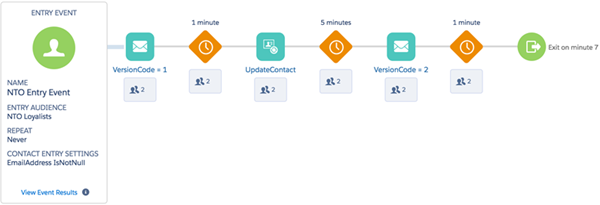
A Northern Trail Outfitters (NTO) marketer creates a journey that sends different versions of emails to NTO customers. The marketer stores contact data about NTO’s customers. Contact data includes data that isn’t likely to change, such as FirstName, LastName, and DateOfBirth, and data that is expected to change often. One contact data attribute that changes often is VersionCode, which determines the email version customers receive.
The email activity calls journey data to render personalization strings. Since journey data doesn’t change throughout the journey, use simple personalization strings to reference attributes that aren’t expected to change. The NTO marketer uses %%FirstName%%, %%LastName%%, and %%DateOfBirth%% strings in the email.
However, the marketer knows the VersionCode attribute to change after contacts enter the journey because the journey includes an Update Contact activity. This activity is configured to update the VersionCode attribute from ‘Version_1’ to ‘Version_2’ between the first and second email activities. The second email uses ‘Version_2’ email content. Since the email activity only calls journey data, which has ‘Version_1’ as the VersionCode value, the marketer must reference contact data directly. Referencing contact data ensures that ‘Version_2’ is correctly used in the second activity. So the marketer uses the AMPscript Lookup() function to call the VersionCode attribute.
Consider learning and using AMPscript to personalize emails using contact data attributes to capture the up-to-date attribute value.

