
You are here:
Welcome Campaigns
Welcome email campaigns are a good way to greet new customers when they sign up or opt in for marketing communications. You can use Journey Builder to improve the customer experience by expanding from a single email to a series of messages.
A welcome series is your chance to create a great first impression for your new client. A welcome series:
- Keeps you from trying to do too much in a single email.
- Emphasizes different aspects of your company or products in a series of messages.
- Sets expectations about the content, quality, and cadence of communications with your company.
- Customizes the messages and delivery based on customer interactions with your messages, or actions customers take on your website.
Here are examples of when and how to use a welcome series:

Welcome Journey
Use a Data Extension entry source and timed waits to introduce yourself and your brand to a new customer. If you’re new to Journey Builder, you can use this template to get started quickly and establish baseline engagement metrics. This Welcome Series template uses a data extension entry source to start the journey and create a timed sequence of emails to promote features or services.

New Purchase: Beginner Welcome Series Example
A retailer updates new customer data through a daily import to Marketing Cloud Engagement from a web shopping cart. This data is stored in the New Customers data extension, which is used as the entry source for the New Purchase Journey. After the import, new customers in the data extension receive an email that congratulates them on their purchase and prompts them to complete their online profile. After a set amount of time, customers receive a second email that showcases product features or products related to the customer’s purchase. Following another wait, customers receive a third email that promotes extra features or services. When the sequence is complete, the customer exits the New Purchase Journey.
Entry Source
This Welcome Series template uses a Data Extension entry source. Before you create the data extension, confirm that the customer data used for personalization or dynamic content is stored in Engagement. The target audience is selected through the entry source configuration wizard in Journey Builder.
Message Sequence and Content
For the Welcome Series with timed waits, we recommend three emails.
| Email 1 | Confirm subscription, introduce your brand, and set expectations for future content and cadence. |
| Email 2 | Provide an offer or coupon as a thank you, or showcase a feature or service such as loyalty club membership or social media programs. |
| Email 3 | Follow up on the offer or coupon with a reminder or showcase more features or services. |
Welcome Journey with Engagement Splits
Step up your game by incorporating Engagement Splits into your Welcome Series. Using an automation to populate your data extension allows you to place contacts into the journey more frequently. Engagement Splits allow you to customize the journey based on customer engagement (opens, bounces, or clicks) with your emails.
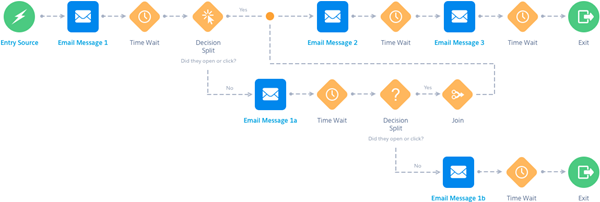
The Intermediate Welcome Series uses a data extension as the entry source to add customers who meet the criteria more frequently. Flow control elements like Engagement Splits and Decision Splits allow you to customize the journey for your customers. For example, you include more emails to re-engage with customers who don’t respond to your welcome series. Goals let you track customers’ progress toward the journey’s objective.
New Purchase: Example
To update New Customer data frequently, use Automation Studio to import customers into the data extension and admit contacts to the Welcome Journey throughout the day. Use splits to identify customers who don't open their emails or download the mobile app. Then, send follow-up emails to those customers to promote the message from the first email.
If a customer engages with the email, send a sequence of messages as outlined in the Basic Welcome Series. You can set a journey goal to measure engagement against your marketing objective. For example, create a goal for the percentage of customers who open emails or download the app.
Message Sequence and Content
For the Welcome Series with timed waits, we recommend three emails. The following suggestions show how messages can vary in content and focus.
| Email 1 | Confirm subscription, introduce your brand, and set expectations for future content and cadence. |
| Email 1a | If the customer doesn’t engage with your first message, consider personalizing subject lines, offer a discount or coupon, or highlight specific brand offerings. |
| Email 1b | This email could be your last chance to engage with the customer. Try altering the placement of your call to action or consider emphasizing your brand with logos and pictures instead of text-based content. |
| Email 2 | Provide an offer or coupon as a thank you, or showcase a feature or service such as loyalty club membership or social media programs. |
| Email 3 | Follow up on the offer or coupon with a reminder, or showcase more features or services. |
