You are here:
Use Next Keyword
Next Keyword sets up what the keyword for the next response should be. Contacts can text in without a keyword, and MobileConnect automatically appends the Next keyword to the contact’s response. You can use Next Keyword functionality to transition seamlessly from one message to the next, like a conversation. For example, enable the Next Keyword functionality on an outbound message to proceed to a text response message. When a subscriber receives the outbound message, that message includes a request for a response. The subscriber’s response triggers the text response message.

- Plan your conversation to ensure that you create the appropriate workflow with all necessary keywords.
-
Create the two keywords to be used in the conversation, as necessary.
Note Next Keyword responses must be a minimum of 2 characters.
- Create the two messages.
- Set the Next keyword for the first message as the keyword for the second message.
- Set both messages to be active at the same time.

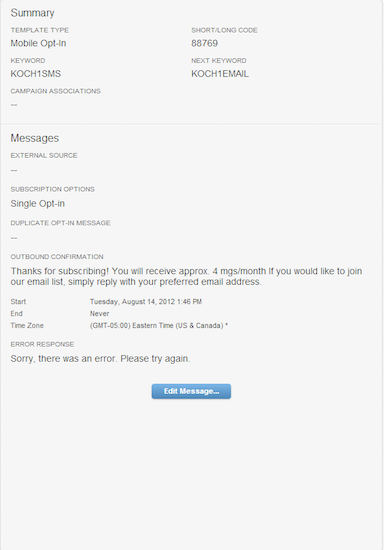
Northern Trail Outfitters uses a mobile opt-in message with the keyword KOCH1SMS and Next keyword KOCH1EMAIL to prompt customers to sign up for SMS alerts for their new campaign. In the mobile opt-in confirmation message, they ask customers to text in an email address to receive more messages.
They also set up an email opt-in message with the keyword KOCH1EMAIL and Next keyword KOCH1MORE. In the email opt-in confirmation message, they ask customers to text in their first name to receive customized messages.
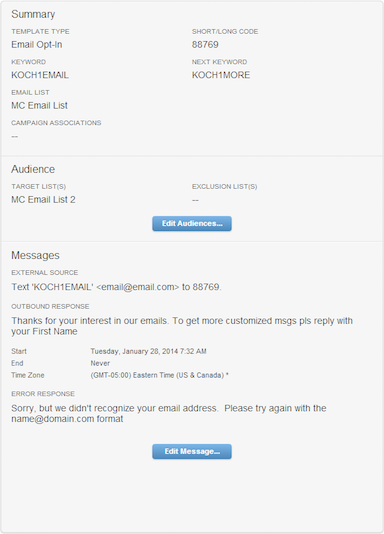
After customers text in their email address in response to the mobile opt-in confirmation message, KOCH1EMAIL is appended to their response, and the conversation switches to the email opt-in message.
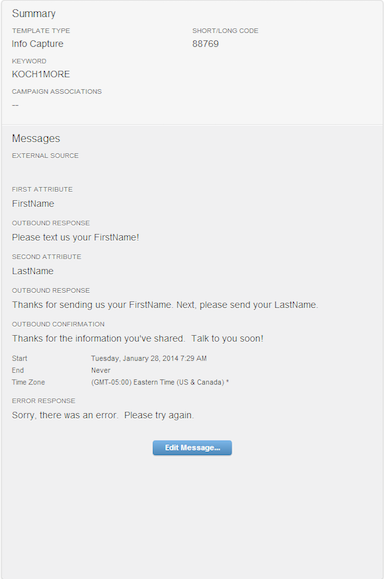
Northern Trail Outfitters sets up an info capture message with the keyword KOCH1MORE to capture the customer’s first name. In the info capture confirmation message, they also ask customers to text in their last name. After customers text in their last name, they receive a confirmation message and the conversation ends.