
You are here:
Provide a Dynamic Image in a Rich Push Message
Rich push notifications include an image. For example, you can send your contact an abandoned cart push notification that contains an image of the item left in their cart to entice them to complete the purchase. You can personalize the image that your contact receives by using a recurring send, a data extension that tracks the abandoned cart items, and AMPscript to populate the push notification’s image URL.
-
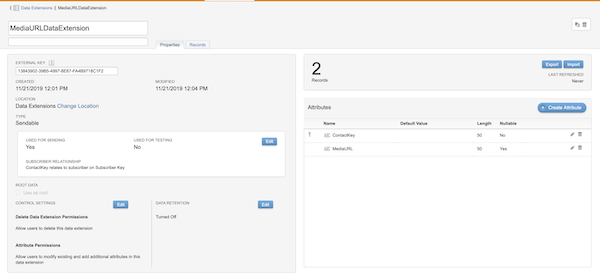
Create a data extension in Contact Builder.
- Include a column for ContactKey and Media URL.
- Map your ContactKey to the Subscriber Key.
-
Create your Push Notification. Check out more information about rich push.
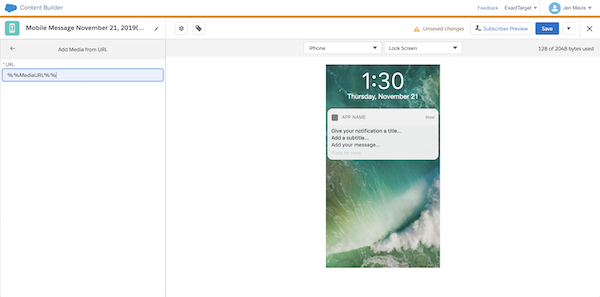
- In Content Builder, click Create and select Push Notification.
- In MobilePush, click Create and select the Outbound template.
-
Input AMPscript %%MediaURL%% into the Media URL field of your push
notification.
 Note If the column in your data extension isn’t titled MediaURL, use the column name in the data extension column that contains the media URL.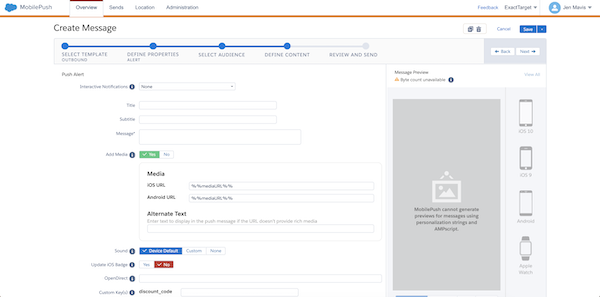
-
Use your data extension as the entry source or audience.
- If you send via Journey Builder, use the data extension you created in step 1 as your entry source.
- If you send via MobilePush in MobileStudio, use the data extension you created in step 1 as your audience.
Did this article solve your issue?
Let us know so we can improve!
