
You are here:
Manage Einstein Recommendations Customer Profile Data Privacy
To honor subscriber privacy and data protection preferences, manage consent, data deletion, and restriction of processing for a customer profile in Einstein Recommendations. To export Einstein Recommendations data, contact your account executive for assistance.
For details about the contact information stored in Einstein Recommendations, see Customer Profiles.
- Under Einstein Recommendations, select either Email Recommendations or Web Recommendations.
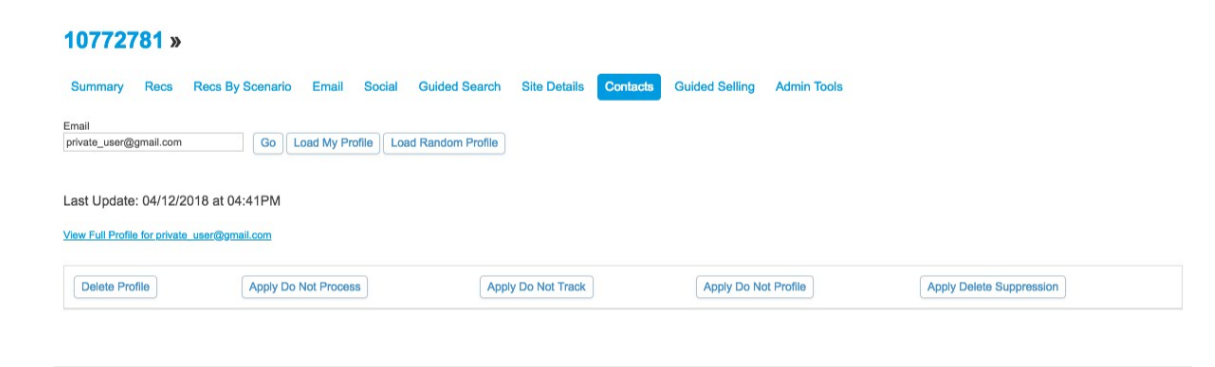
- On the Reporting tab, click Contacts.
- Enter the customer’s email address, and click Go.
-
Scroll to the bottom of the customer profile and click the button that
corresponds with the requested privacy setting.
- Delete Profile: Permanently deletes the customer profile including all past behavioral data.
- Delete Suppression: Set a period to delay data deletion for up to 30 days of the request.
- Do Not Track: Retains past behavioral data, but future interactions are ignored.
- Do Not Profile: Collects behavioral data but it’s not used for recommendations.
- Do Not Process: Retains past behavioral data, and future interactions are collected but ignored.
- Click OK.
To remove Do Not Track, Do Not Profile, or Do Not Process restrictions, click the corresponding button again. To remove or change a suppression period, see Configure Suppression for Personalization Builder.
Privacy settings configured in Einstein Recommendations are also applied to Web & Mobile Analytics but not Contact Builder. To view the status of the request, go to the Personalization Builder Privacy Status Dashboard.
