
You are here:
Einstein Web Recommendations
Einstein Web Recommendations use Einstein’s capabilities to observe behavior, build preference profiles, and deliver the next-best personalized content to each website visitor. Use scenarios in the application to refine recommendations to match your specific business rules. Predictive content is surfaced in placeholders for recommendations on your website.
Web Recommendations are delivered in two ways, via a JSON response or HTML/JS. The JSON response is the best practice delivery method unless the web team can’t work with JSON. The JSON method is the most flexible and allows a web team to style and use the recommendation data in any way. Because of the nature of the web recommendation and the JSON response, you’re responsible for parsing and styling the recommendation within the user’s web environment.
Here’s an example of the response for a web recommendation.
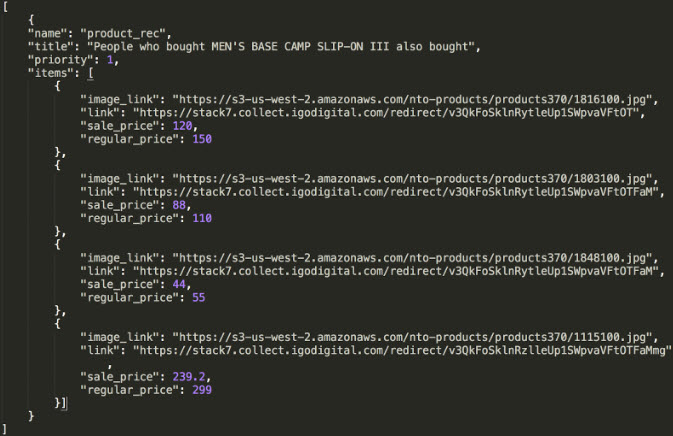
You can pull any catalog field into the web recommendation call, so it’s important to understand which data generates the recommendation during catalog setup.
A unique web recommendation call is created for each type of page. Include the Home, Product, Category, Cart, and Conversion pages as a best practice, but you can set up as many pages as you want in the UI. Einstein Recommendations uses page templates, so a Product Page is a template used to build personalized recommendations for a product page.
Each type of page template can have different scenarios and a different context. For example, your product page can include recommendations based on the product a visitor is viewing based on that added context. However, your homepage recommendations are based on the overall user affinity because we don’t have more context.
If you have a service engagement, the State of Work sets the number of pages services configures. However, you can add as many as you need.
- Einstein Web Recommendation Dashboard
The web recommendation dashboard in Einstein Recommendations displays a list of available recommendations. From here, you can edit or delete a recommendation or create a new one. - Create an Einstein Web Recommendation
Use Einstein Recommendations to create product or content recommendations to display on your website. The Einstein Recommendation Engine requires at least three active items in your product catalog.
