
You are here:
Funnels Report
Use the Funnels report to view the stages or steps your visitors take, and the order in which they take them, based on a series of actions. When you configure a funnel, you select and order the actions that a user takes to move through the funnel.
The primary objective of the funnel report is to show the progression of individuals through the Personalization platform using selected actions, treating them as stages within a process. The report isn’t designed to count the number of times a specific action is performed.
Common funnel reports include progressive activities (or stages) associated with customer interactions. For example, a customer can:
Search for a product → View the product → Add the product to the cart → Purchase the product
Two optional requirements enable you to control funnel interactions for customers who meet certain criteria.
| Setting | Description |
|---|---|
| User returns to the 1st action, even when the funnel has not been completed | Defines how Personalization counts actions for individuals who return to the initial funnel action without completing the funnel. If an individual performs one or more actions, but leaves before completing the funnel, Personalization counts the actions individually. When this option is not selected (the default), and the individual restarts the funnel, Personalization doesn’t recount any already-completed actions. When this option is selected, and the individual restarts the funnel, Personalization counts all actions again and increments the values for each stage. |
| User has been in the funnel for more than 30 minutes | Enables you to limit tracking for individuals who have been in the funnel for more than 30 minutes. When this option is not selected (the default), Personalization continues tracking individuals, regardless of how long they are in the funnel. When this option is selected, if the individual hasn’t completed all funnel steps in 30 minutes, Personalization resets the individual’s progress to the start of the funnel. |
When interpreting funnel results, keep the following considerations in mind.
- The funnel report shows where individuals primarily enter and exit the funnel. It isn’t intended to report action counts. The values in the funnel report don’t align with the actions report, which tracks activity organized by actions recorded in the dataset.
- A user can enter a funnel at any stage. Personalization counts the funnel as completed for any user who finishes the final funnel stage, even when users don’t complete all previous funnel stages, or they completed them out of order.
- When an individual completes the funnel, the count starts over for that individual. However, previous counts for that individual aren’t removed.
- Selected time ranges and checkbox options can influence the data displayed.
- Personalization remembers individuals, even if they leave a funnel and reenter at a later date. As a result, Personalization can count an individual entering one stage on one date, and entering different stages on different dates. Depending on how you set the date range filter, this kind of scenario can complicate data interpretation.
- An individual's activity in a funnel represents that individual's journey. Unless an individual completes the funnel, or the funnel count restarts, all actions are grouped and counted as the same instance. For example, if an individual adds a product to a cart on two separate occasions, without checking out and completing the funnel, Personalization treats the add to cart action as one instance.
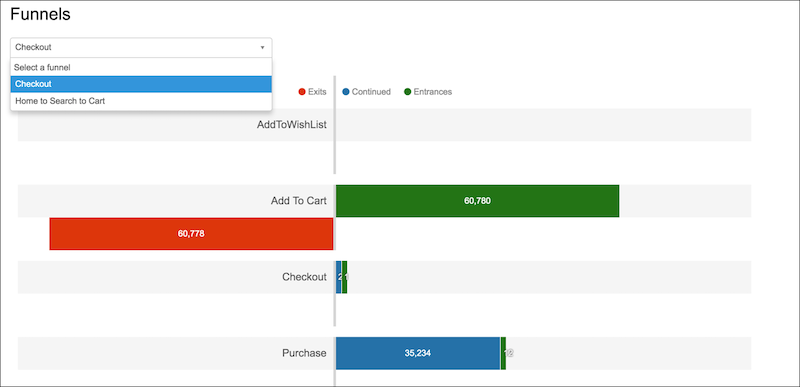
- The colored bars in the report provide information about individual transition from one stage to the next. For example, a green bar shows how many individuals entered a stage. A red bar shows how many individuals left a stage but didn’t progress to the next stage. A blue bar shows how many individuals continued to the stage from a previous stage.
