
You are here:
MDP Configure Data Stream Refresh and Frequency
If you’re creating or editing an API connector data stream, you can define the frequency and schedule for refreshing the data stream.
- Navigate to the Import tab.
- Expand Data Streams List.
- Select the data stream that you want to modify.
-
At the top right-hand corner of the page, click Automate Data
Refresh.
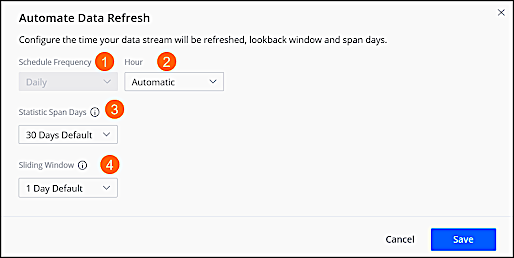
- To determine when the data stream refreshes, select the Frequency from the dropdown.
- To determine the time the data stream refreshes, select the Hour from the dropdown.
- To define the number of days that you want to allow for span days, select the Statistic Span Days from the dropdown. For example, you select 10 days and your sliding window is defined for 30 days. When you run the report, you see three different files, each showing 10 days.
- To define the number of days back that you want to retrieve data whenever the data stream is processed, starting from yesterday, select the Sliding Window from the dropdown.
Did this article solve your issue?
Let us know so we can improve!
