
You are here:
MDP Send Data via Email to the Data Stream
This method allows you to send files via email to the data stream. Every data stream has its own unique email address and can accept attachments or files downloaded through links.
You typically use this method when a data stream is updated regularly. You can set up the automatic data stream update when creating a new data stream or within an existing data stream.
Available for TotalConnect data streams.
- Navigate to the Import tab.
- Expand Data Streams List.
- Select the data stream that you want to modify.
-
At the top right-hand corner of the page, click Automate Data
Refresh.
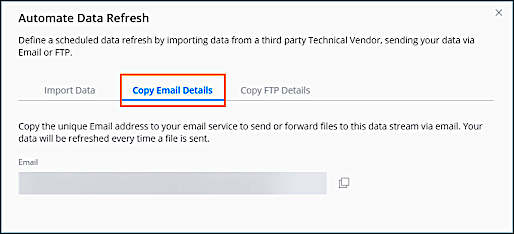
- Click Copy Email Details.
- To forward a file to a TotalConnect data stream via email, add it as an attachment to the email, or include a direct download link in the email’s body. If you’re using a link, make sure that it isn’t login-protected and that it allows for non-restricted downloads of the file you’re uploading.
Did this article solve your issue?
Let us know so we can improve!
