
You are here:
Create a Segment with AI in Marketing Cloud Next
Create segments using natural language and Einstein generative AI capabilities. You edit and publish Einstein segments the same way as your other marketing segments. An admin must enable generative AI for segments.
Required Editions
| Available in: Salesforce Enterprise and Unlimited Editions with Marketing Cloud Next Growth or Advanced Edition |
| User Permissions Needed | |
|---|---|
| To create segments: | Marketing Cloud Admin permission set OR Marketing Cloud Manager permission set |
Einstein excludes demographics from segments to reduce bias. To reduce bias and outliers in segments, Einstein excludes demographics and attributes with fewer than 10 results in the population. Find out more about data use in Einstein Segments in Data 360.
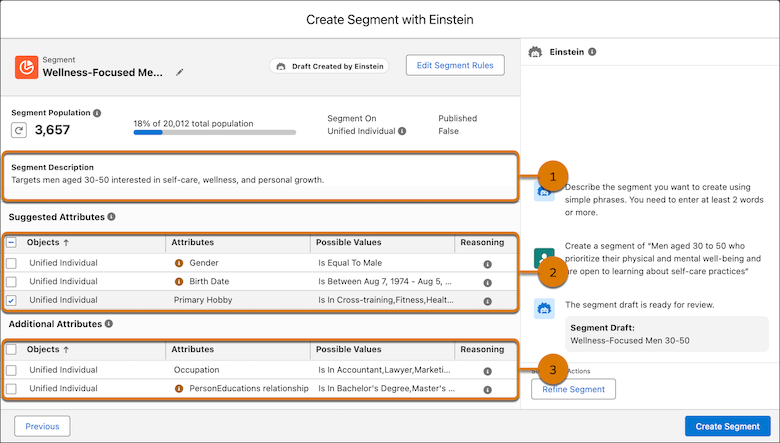
To get suggested related attributes that are based on the data that’s found in your org, describe your ideal segment in the Einstein chat. A segment description is created based on the phrase that you entered (1), and the attributes related to the description are created. For example, Einstein generative AI translates “physical and mental well-being” into different values by using the Primary Hobby attribute. Attributes are divided into suggested attributes (2) and additional attributes (3). The suggested attributes are the most relevant to your description and are selected by default. The additional attributes aren’t necessarily relevant to your description. You can deselect any of the suggested attributes and select any of the additional attributes.
Before you start building segments with Einstein, review our recommendations on writing effective prompts. Einstein Segment Creation results are optimized with Einstein Data Prism. To get the best results with Einstein Data Prism, use Metadata Studio to review the generated descriptions for objects and fields, enter missing information, and remove obsolete objects from the data source.
- From the Segments page, click New and create your segment with Einstein.
- Select the default data space.
- Segment on the Unified Individual object.
-
To open the Einstein Segment Creation chat, click Next.
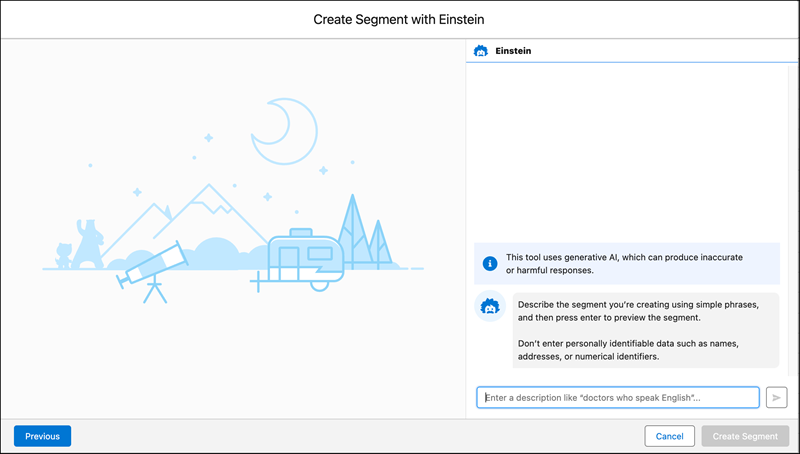
- Enter a segment description using simple language and phrases, and then press Enter.
- To refine the segment with more or different information, click Refine Segment.
- For the latest population number, click Count Population and allow time for the recount to finish.
- When you’re satisfied with the segment and its attributes, click Create Segment.
The new segment appears on the Segment list view, and you can edit it. To use the segment with marketing content, publish it.
