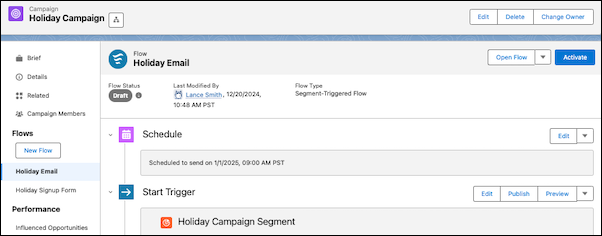
A campaign record shows information about each flow in the campaign, and it's designed
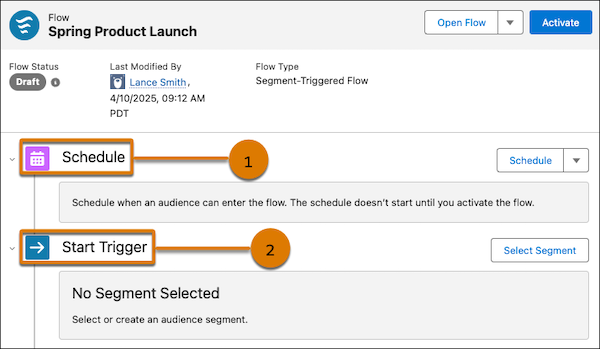
to reflect certain elements from the Flow Builder canvas. Note, however, that some features and
settings appear in Flow Builder that aren't available on the campaign record, and vice
versa.
Required Editions
Available in: Salesforce
Enterprise and Unlimited Editions with
Marketing Cloud Next Growth or Advanced
Edition, and in Starter and Pro
Suite Editions. Your edition determines the options that you have.
Creating a Campaign Flow
When you create a campaign, select a Blank campaign option or a Quick Start option that
comes with a preconfigured flow. The default flow name is based on the name of the campaign
record.
Although it's possible to create a flow before the campaign, we typically don't recommend
it. If you must create a flow first, verify that the flow type is compatible with Marketing Cloud Next, and add a related campaign the Associated Record field.
Skipping these steps can break relationships, personalization, and reporting.
Campaign Record: Sidebar
In the campaign sidebar, access related assets and switch between flows. After an admin
adds performance components to campaign layouts, the sidebar is where you can find available
campaign metrics also.
The sidebar also contains these items, when they're available.
Campaign Insights—Engagement data across flows in your campaign, such as email opens and
clicks. See Set Up Marketing Performance.
Influenced Opportunities—Revenue attributed to a campaign with Opportunity Influence.
See Enable Opportunity Influence.
Campaign Record: Flow Summary
The main content area of a campaign record shows the flow summary. The components vary
depending on the type of flow you’re working with, but you can always open the flow in Flow
Builder from the campaign.
The summary shares information about the Start element of the flow, as well as any message
or time-based wait elements. When a flow contains more than 5 elements, the messages are
listed in a table.
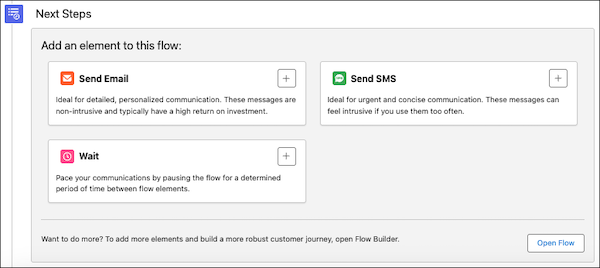
For flexibility in creating, selecting, or previewing segments, use the campaign record
options. For most basic campaigns, add message or wait elements in the Next Steps section of
the campaign record.
Flow Builder: Canvas
To add additional content or actions to a flow and to configure certain wait elements, work
in Flow Builder. Flows can support advanced elements, such as decision branching. For
details about available flow elements, see Flow Builder Elements for Marketing Cloud Next.
Did this article solve your issue?
Let us know so we can improve!
Loading
Salesforce Help | Article
Cookie Consent Manager
General Information
Required Cookies
Functional Cookies
Advertising Cookies
General Information
We use three kinds of cookies on our websites: required, functional, and advertising. You can choose whether functional and advertising cookies apply. Click on the different cookie categories to find out more about each category and to change the default settings.
Privacy Statement
Required Cookies
Always Active
Required cookies are necessary for basic website functionality. Some examples include: session cookies needed to transmit the website, authentication cookies, and security cookies.
Functional Cookies
Functional cookies enhance functions, performance, and services on the website. Some examples include: cookies used to analyze site traffic, cookies used for market research, and cookies used to display advertising that is not directed to a particular individual.
Advertising Cookies
Advertising cookies track activity across websites in order to understand a viewer’s interests, and direct them specific marketing. Some examples include: cookies used for remarketing, or interest-based advertising.