
You are here:
Manage Data Sources for Personalizing Content
To embed personalized data in your marketing content, add a data source. A data source represents an object or element from your org that contains fields and data. After you select a data source, its fields and attributes are available to use in merge fields, expressions, repeater components, and dynamic content.
Required Editions
| Available in: Salesforce Enterprise and Unlimited Editions with Marketing Cloud Next Growth or Advanced Edition, and in Starter and Pro Suite Editions. Your edition determines the options that you have. |
When you’re editing content, in the Data Sources tab, view, add, and manage data sources.
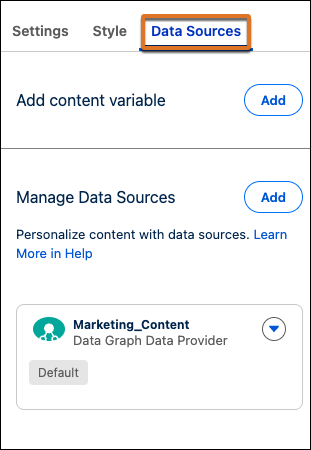
When you’re working with data sources, keep these considerations in mind.
- If you change a data source after its attributes are used in merge fields, to save the content, delete those merge fields. Then, add a new data source and recreate the merge fields.
- If you combine content types that contain data sources, make sure the data sources match. For example, if you add a form to a landing page, the data graph for the form must be the same as the data graph in the landing page.
| Data Source Type | Editions | Content Types |
|---|---|---|
| Data Graph |
|
|
| Unified Individual Data Model Object |
|
|
| Event |
|
|
| Offer |
|
|
| Personalization Recommender | Marketing Cloud Next Advanced with Personalization Decision Credits |
|
| Content Variable |
|
|
| Salesforce Record |
|
|
| Lookup Data Graph |
|
|
| Apex Class |
|
|
| Activation |
|
|
Data Graph
A data graph is a data object provided by Data 360 that’s built from a primary data model object (DMO) and its related objects. It combines this data to create a streamlined table of data that you need for common tasks. The data graphs that you use when personalizing marketing content are usually profile data graphs, which contain details about people and are based on the Unified Individual DMO. For example, you can refer to data from a contact record and attributes from related objects, like a recent product purchase or service case.
A data graph can be either standard or real-time. Real-time data graphs provide faster response times, but they can cost a bit more. See Billing Considerations for Data Graphs.
When a default data graph is configured in Setup, it appears in the Data Sources panel with a Default badge.
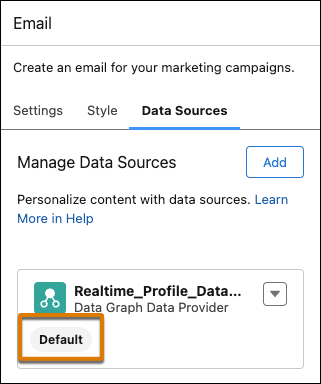
When working with data graphs, keep these considerations in mind.
- In an email or email content block, the default data graph is sufficient for most personalization tasks.
- If an email contains any dynamic content variations or a Personalization recommender data source, you can’t remove or replace the data graph.
- For a landing page, we recommend that you use a real-time data graph for faster response times and better performance. In a landing page content block, you can't remove or replace the data graph when the block is published.
- In SMS and WhatsApp messages, only the default data graph is available. It doesn’t appear in the Data Source panel, but you can still use its data in merge fields.
Unified Individual Data Model Object
Even when you don’t have a data graph or data source, you can still add merge fields based on the Unified Individual DMO.
In emails created in Starter and Pro Suite, you can only personalize content with merge fields that refer to the Unified Individual DMO.
Event
An event is a specific activity that can trigger a flow, such as an order confirmation or subscription sign-up. Learn more about campaigns and flows or about marketing tasks based on events.
- A content item can contain only 1 event data source, such as an email series that’s triggered each time a certain form is submitted.
- In emails, repeater components don’t support custom event data.
- You can't remove or replace an event when content is published.
Offer
Deliver tailored promotions by activating offers directly in your email content. When you’re creating an email, add an offer as a data source. Then, add merge fields to populate message content with offer details such as an offer name, description, or coupon code. Define rules for dynamic content to show different offers to different recipients based on attributes, such as loyalty tier. You can add up to 5 offer data providers per email.
Personalization Recommender
A recommender is an element of Salesforce Personalization that shows recommendations to customers based on their interests. In emails, you can use recommender data only in a repeater component and in merge fields within that component.
- When you add a recommender data source, you can only select from trained recommenders that are based on the same data graph as the email.
- When you want to use a new recommender, allocate time for the training period so that there’s at least one successful refresh.
- You can replace but not remove recommender data sources.
In emails created in Marketing Cloud Next, dynamic content and Personalization Recommenders aren’t available until you add a data graph as a data source.
Content Variable
Add your own custom content variables to define dynamic placeholders in your content. You can map these content variables to any data source available in Salesforce Flow, including MuleSoft and HTTP connectors. Flow populates the content variables at run time.
Salesforce Record
To use the most current business data to personalize emails, you can add merge fields to your message content that are based on Salesforce Objects. Add a Salesforce Record as a data source to reference objects, such as Cases or Leads.
Lookup Data Graph
You can define a lookup data graph that uses non-profile data from Data 360, such as a product catalog, to complement the default data graph or unified individual. When you add a lookup data graph as a data source, specify a primary key to filter the lookup data graph and get data related to a message recipient.
- Lookup data graph data providers can't be nested under other lookup data providers.
- You can add a maximum of 5 lookup data graph data providers per content item.
Apex Class
With the Apex data provider, you can select an Apex class as a data source to pass data from a flow directly to your content. Pass simple parameters, such as a name and assigned sales rep. Pass more complex, structured data, such as entire order collections, to build highly personalized transactional messages like order confirmations.
A message can use only one Apex class data source at a time.
Activation
Reference Data 360 segment data for data-driven email targeting. The Activation data provider refers to a Data 360 segmentation activation and makes segment attributes of recipient data available in your marketing content. Use activation data in your email merge fields to target messages based on real-time audience insights.
A message can use only one activation data source at a time.
