
You are here:
How Dynamic Content and Salesforce Personalization Work Together
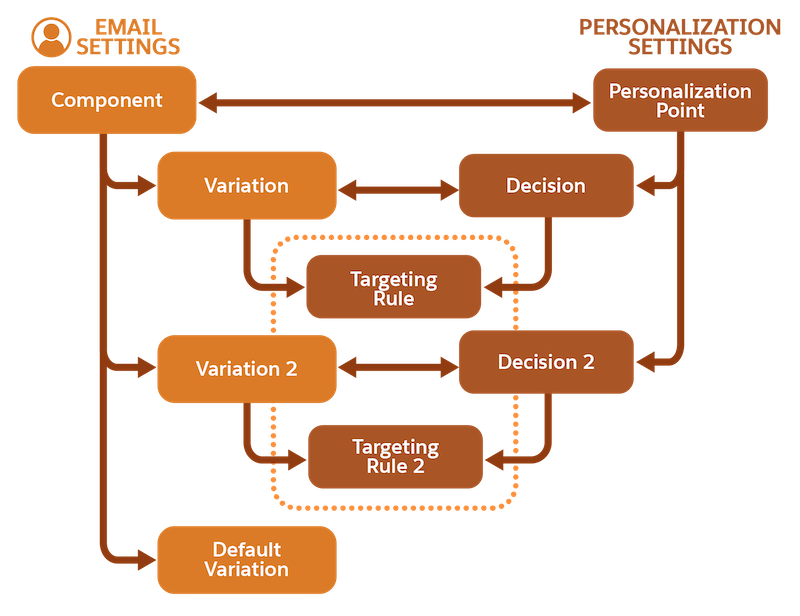
Dynamic content in Marketing Cloud Next improves conversations and relationships with customers, and it can lead to more effective campaigns. Personalization points, decisions, and targeting rules from Salesforce Personalization power dynamic content. Dynamic components and fields are associated with personalization points, and variations are associated with decisions and targeting rules.
Required Editions
| Available in: Salesforce Enterprise and Unlimited Editions with Marketing Cloud Next Growth or Advanced Edition |
Salesforce Personalization is a Customer 360 Personalization app that centralizes connected and personalized experiences across clouds. It uses Data 360 to provide real-time personalization functionality.
Dynamic content is available in emails and landing pages. Although you can create dynamic content in Marketing Cloud Next without being a personalization expert, it’s helpful to understand how personalization points, decisions, and targeting rules work together to power dynamic content.
| Term | Definition |
|---|---|
| Personalization point | A personalization point represents an element of content that’s eligible for a personalization decision. For example, an email’s subject line and preheader or an image component within the email are “points” that you can personalize. Each component or field with variations is associated with a personalization point. The personalization point controls the component’s personalization settings. When you configure the first variation of an email component or field, a personalization point is automatically created and associated with that component or field. In dynamic content, each variation is associated with a decision and a targeting rule. |
| Personalization decision | A personalization decision determines who’s eligible to receive a personalization response based on the associated targeting rules. Each variation that you create is related to a decision, and the related variation and decision have the same name. Decisions are associated with a specific personalization point. |
| Targeting rule | The targeting rule defines the conditions for showing a specific variation. It determines who’s eligible to receive personalized content based on data points, such as attributes, related attributes, calculated insights, or segment memberships. |
This diagram shows the relationship between the personalization settings—the personalization point, decisions, and targeting rules—and an email’s components. If a recipient doesn’t match any targeting rule criteria, they receive the default variation. These relationships also apply to dynamic components on landing pages.

You’re a marketer for an outdoor clothing company, and you’re planning a summer marketing campaign. Your customers are interested in hiking and trail running. Use dynamic content to create an email for your campaign that’s personalized for each audience. You start by personalizing the subject line and the first image at the top of your email.
Create a variation of the subject line and preheader named “Hiking,” and set a targeting rule for individuals interested in hiking. Draft a unique subject line and preheader to get a hiker’s attention. Create another variation named “Running,” and set a targeting rule for the trail running audience. Then draft a subject line and preheader catered for the running audience. When you create the first variation, the subject line and preheader fields are associated with a personalization point.
Add an image component to the top of your email, create hiking and running variations, and set targeting rules for the different audiences, like you did for the subject line and preheader. Then, add an image to each variation. The image component is associated with a new personalization point.
When your marketing campaign goes live, the subject line, “Versatile Summer Hiking Pants,” appears in a hiker’s inbox. When they open the email, they see a pair of popular hiking pants. For a trail runner, the subject line reads “Run Faster in Our Lightweight Shorts,” and the email shows a photo of new running shorts for the season.
Dynamic Content Considerations
- In an email, the subject line and preheader fields count as one component, and you personalize them together when creating a variation.
- A single email or landing page can have 25 personalization points. You can personalize 25 components, with each one associated with a unique personalization point. Or, you can personalize more than 25 components by linking multiple components to one personalization point. See Linked Personalization Points in Dynamic Content.
- Each component can have up to 15 variations.
- When you create dynamic content in emails, the personalization points, decisions, and targeting rules also appear in Salesforce Personalization. Anyone who uses Personalization can view these personalization points, decisions, and rules. To edit them, users must go to the email or landing page in the marketing workspace where they were created.
- You can't export or import content that contains variations.
