
You are here:
SMS Message Length in Marketing Cloud Next
To avoid sending multiple messages and using extra message credits, be mindful of the length of your SMS message. When you exceed the character limit for a single message, the message count increases. Using non-GSM characters, links, or merge fields increases message length.
Required Editions
| Available in: Salesforce Enterprise and Unlimited Editions with Marketing Cloud Next Growth or Advanced Edition and the Salesforce Message Credits - SMS add-on |
When you edit an SMS message, the Character Count and Message Count fields update as you work. Use these values to monitor the length of your message.
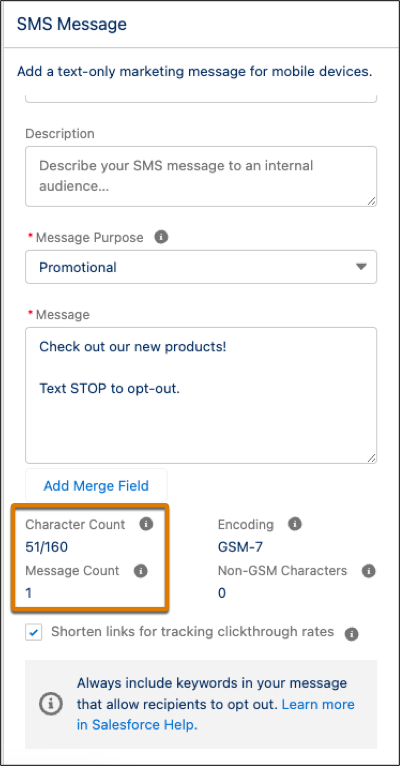
Character Count
The Character Count field tracks the number of characters in your message compared to the limit, which changes based on the message encoding. SMS messages can be encoded with GSM or Unicode characters.
The Global System for Mobile Communications (GSM) is used for most Latin-based languages and includes characters such as digits 0–9 and common punctuation marks. When you include these characters, the message is encoded as GSM-7, and the character limit is 160.
The Unicode Standard supports a wide variety of characters including emoji, technical or academic symbols, and characters from non-Latin languages such as Chinese and Arabic. If you include Unicode or other non-GSM characters in your message, the message is encoded as UCS-2, and the character limit decreases to 70. If your message contains any Unicode character, the encoding is UCS-2. To find out how many Unicode characters are in your message, check the Non-GSM Characters field.
When your message exceeds the character limit, it's split into multiple segments. A 6-byte header is then added to each segment, which reduces the character limit to 153 for GSM and 67 for UCS-2. For example, a 153-character message with one non-GSM character will be sent as three separate segments when encoded as UCS-2.
Message Count
When your message exceeds the character limit, the message count increases and more message credits are spent.
Multiple SMS messages are usually delivered together as one continuous message. However, some factors, such as the sender code, the recipient’s carrier, or location, can prevent concatenation. When concatenation isn’t supported, your recipient receives multiple messages instead of one continuous message.
Considerations for Message Length
When you include merge fields or links in your SMS message, the character and message count values are approximate. For each merge field you include, the character count estimates an increase of 10 characters. Because merge fields don’t resolve until send time, the actual character and message counts vary.
Links also vary at send time. If you set up a branded URL shortening domain, the length of the link depends on the length of your custom domain. Otherwise, links use the default shortened domain, and the character count estimates an increase of 28 characters. To minimize the character count, always enable Shorten links for tracking clickthrough rates.

You personalize your message and include the First Name merge field, which adds approximately 10 characters to your message.
Hey {!$unifiedIndividual.ssot__FirstName__c}! Check out our new products. Text STOP to opt out. (65/160 characters)
When you send the message, the merge field resolves, and the actual character count for the message varies depending on each recipient’s first name:
Hey Leo! Check out our new products. Text STOP to opt out. (58/160 characters)
Hey Veronica! Check out our new products. Text STOP to opt out. (63/160 characters)
