Loading
Prepare for Email to Become the Default Login ExperienceRead More
Salesforce Enforces New Security Requirements in Summer 2026Read More
Market to Your Customers with Account Engagement
Filter Prospects with Conditional Completion Actions

Filter Prospects with Conditional Completion Actions

For more control over which prospects you take action on, add conditional completion actions to your marketing assets. While standard actions execute on all prospects who interact with an asset, conditional actions execute only on prospects who also meet criteria that you define. You can combine both types of actions on one asset to target your prospects more effectively.

Required Editions

Available in: All Account Engagement Editions

How Conditional Actions Work

Conditional actions offer an added layer of control by letting you choose prospect criteria as a condition for the action. Filter based on system data such as email opens or prospect fields such as City or Territory. Conditional actions execute on prospects who meet the trigger criteria and also meet the prospect criteria you define.

To add conditional actions, you first add a conditional group. For each conditional group, you define prospect criteria and add conditional actions. Conditional actions only execute if prospects meet the trigger criteria and the prospect criteria for that group. You can have up to six conditional groups per asset trigger.

Use Cases

Use a single conditional action to target specific prospects, or combine multiple standard and conditional actions for more robust targeting.

Example
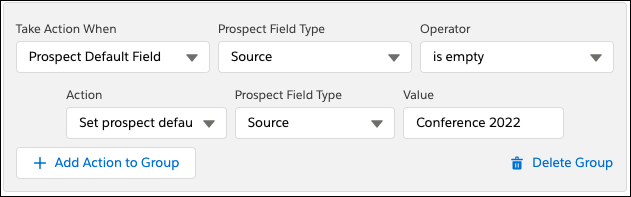
Example You have a signup form for a new industry conference you’re hosting. You want to set the lead source for new prospects who sign up without changing the lead source for existing prospects.

Add a conditional group and specify criteria to limit actions in that group to prospects with an empty source field. Then, use the Change prospect default field value action to update the source field to the value you want, such as Conference 2022.

Screenshot showing the example.
Example
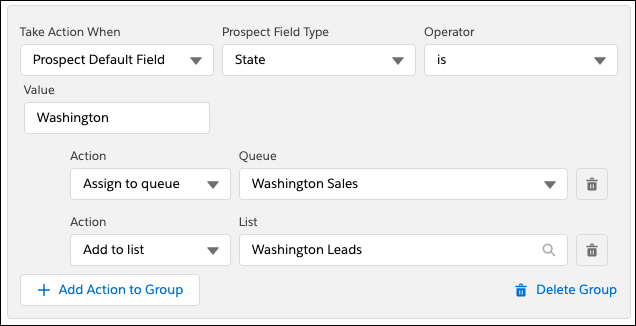
Example When prospects submit your signup form, you want to send a welcome email. But, you also want to add prospects to the appropriate sales queue and email list based on whether they live in California or Washington.
  • To send your welcome email to anyone who completes the form, add a standard Send autoresponder email completion action.
  • Add a conditional group and specify criteria for prospects who live in California. Use the Assign to queue action to add them to the California sales queue. In the same group, use the Add to list action to add them to your California leads mailing list.
  • Add another conditional group and specify criteria for prospects who live in Washington. Use the Assign to queue action to add them to the Washington sales queue. In the same group, use the Add to list action to add them to your Washington leads mailing list.
Screenshot showing example.
  • Conditional Group Prospect Criteria
    To add conditional completion actions to assets, create a conditional group based on prospect criteria. The criteria are available in the first dropdown when you add a conditional group.
 
Loading
Salesforce Help | Article