
You are here:
Real-Time Profile Data Graphs in Personalization Points
Use real-time profile data graphs for latency sensitive channels, like web and mobile. Using a real-time profile data graph with a personalization point ensures that Salesforce Personalization has the most up-to-date understanding of individuals, including any in-session behavior, when evaluating decision or experiment eligibility and when making personalized decisions.

Important
Personalization points available for selection in
the Web Personalization Manager (WPM) are restricted to only display personalization points
that are built against a real-time profile data graph.
When Salesforce Personalization receives a request for a personalization point configured using a real-time profile data graph, it performs these steps.
Salesforce Personalization Pipeline for Real Time Profile Data Graph
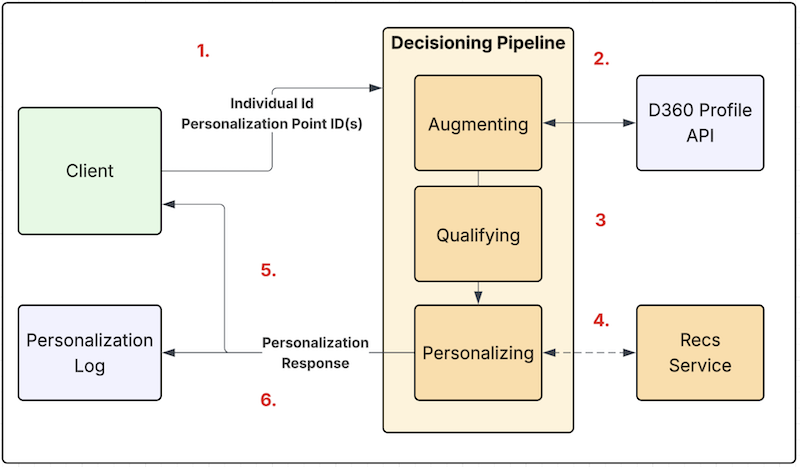
- The requesting application makes a request (containing personalization point IDs and an individual ID) to Salesforce Personalization’s decisioning API.
- Salesforce Personalization calls the Data 360 profile API to retrieve the real-time profile.
- Based on profile data, Salesforce Personalization determines if an individual qualifies for an experiment or decision based on the targeting rules configured.
- If qualified, Salesforce Personalization executes the decision:
- Manual Content: Returns the text configured for personalization attributes to the page.
- Recommendations: Calls the recommendation service with the profile data graph and recommender ID to generate a set of recommendations.
- Personalization returns the decision to the requesting application for rendering.
- Logs the decision in Data 360.
See Also
Did this article solve your issue?
Let us know so we can improve!
