You are here:
Using Data Graphs With Personalization
Salesforce Personalization requires the Data 360 profile data graph and item data graph. The profile data graph provides real-time data to determine personalization eligibility. The item data graph provides data to the Personalization recommenders that are used to generate recommendations.
You build a data graph from a primary data model object (DMO) and select objects and fields to include. Depending on the data graph, you can also add related objects, Data 360 segments, and Data 360 insights. Data from these selected components is processed and transformed into a single, flattened, read-only data graph record that Personalization uses when making decisions, filtering, and selecting content for recommendations.
Profile Data Graph
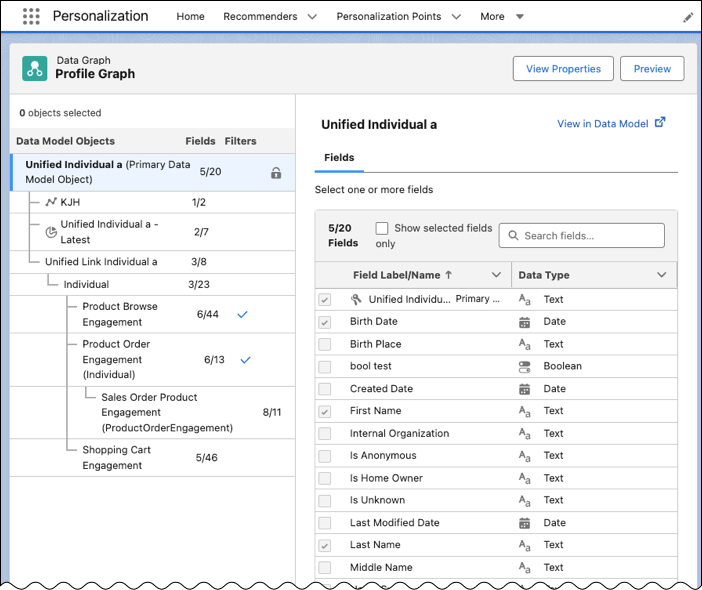
The profile data graph maps individuals to a unified profile as they interact with your website or app. To accommodate the need for faster response times when interacting with individual activity, the profile data graph must be a real-time data graph. A real-time data graph provides faster response times than a standard data graph, enabling Personalization to resolve individual identities from various sources, map them to a single unified profile, and deliver personalized content in milliseconds.
When creating the profile data graph, use the Unified Profile object as the data graph’s primary DMO to take advantage of its real-time identity resolution capabilities. To refine which data is made available to Personalization for eligibility decisions and recommendation filters, you can include other data options, such as direct and related objects, segments, and insights.
Item Data Graph
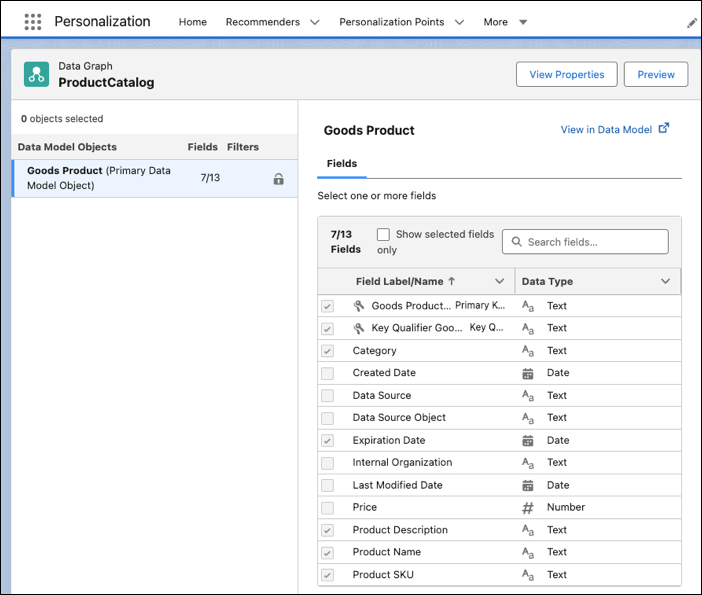
Personalization uses the item data graph to reference content (products, articles, blogs, and so on) for personalized recommendations and attributes associated with each item for use in filtering. When creating this data graph, you can use a standard, near real-time data graph configuration. A near real-time data graph provides data when speed and accuracy are important but real-time, millisecond response times aren’t required.
A near real-time data graph transforms data into new, materialized views that Personalization can use to deliver more-targeted recommendation content. This precalculated data results in fewer calls, ensuring queries respond in near real time.
When defining the item data graph, in addition to the primary data model object, you can include calculated insights to use in creating rule-based recommendations.