
You are here:
How Conversation Transitions Work in WhatsApp Unified Messaging
With Unified Messaging, a marketing interaction and a service interaction can occur in the same WhatsApp conversation between a customer and your business.
| Available in: Salesforce Enterprise and Unlimited Editions for Service Cloud AND Enterprise and Unlimited Editions with Marketing Cloud Next Growth and Advanced Editions |
| Enterprise and Unlimited Editions for Marketing Cloud Engagement Growth and Advanced Editions |
| Not supported in Government Cloud Plus |
What Determines a Conversation’s Default Context
If a customer interaction in WhatsApp is considered service-related, Omni-Channel routes the message to a bot or service agent. If the interaction is considered marketing-related, Journey Builder determines how the interaction is handled.
By default, all incoming Unified Messaging WhatsApp conversations are treated as service interactions and routed according to your Omni-Channel settings. You can view your default app setting by clicking a number on the Your Numbers page in Setup and finding the Configure Incoming Message Settings section. If you connected both the Marketing Cloud Engagement and the Digital Engagement apps, we recommend using Digital Engagement (Service Cloud) as your default app.
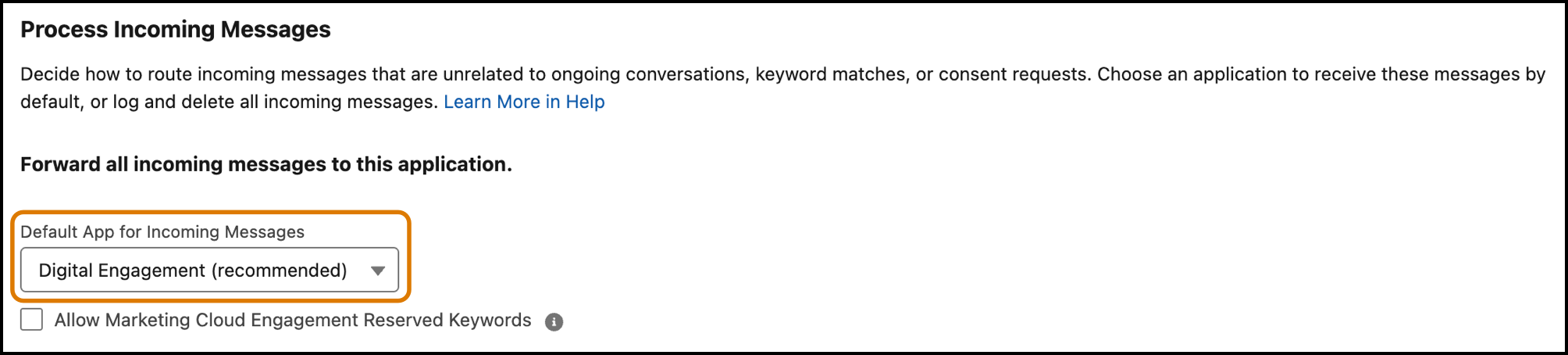
Alternatively, you can select Marketing as your default app to treat all incoming interactions as marketing interactions by default. Incoming interactions are then controlled by Journey Builder if the user isn’t involved in an open Service Cloud messaging session.
If you’ve only set up one only application in Unified Messaging, the default context is the application you’ve installed. For example, if only Marketing is set up, all incoming messages are treated as marketing interactions and handled by Journey Builder.
Marketing-to-Service Transitions
Sometimes a conversation switches from a marketing to a service context. As part of this switch, the underlying engine controlling the conversation switches from Journey Builder to Omni-Channel. Let’s find out how that looks in Unified Messaging.
Mary signs up for WhatsApp messages to stay in the loop about a new clothing brand she’s interested in. As a result, Mary receives multiple marketing messages in WhatsApp about the brand’s latest offerings. If Mary responds to one of these marketing messages with an invalid response or a request for support, the conversation transitions to a service interaction including an Einstein bot, a service agent, or both. Here’s what that looks like in Journey Builder.
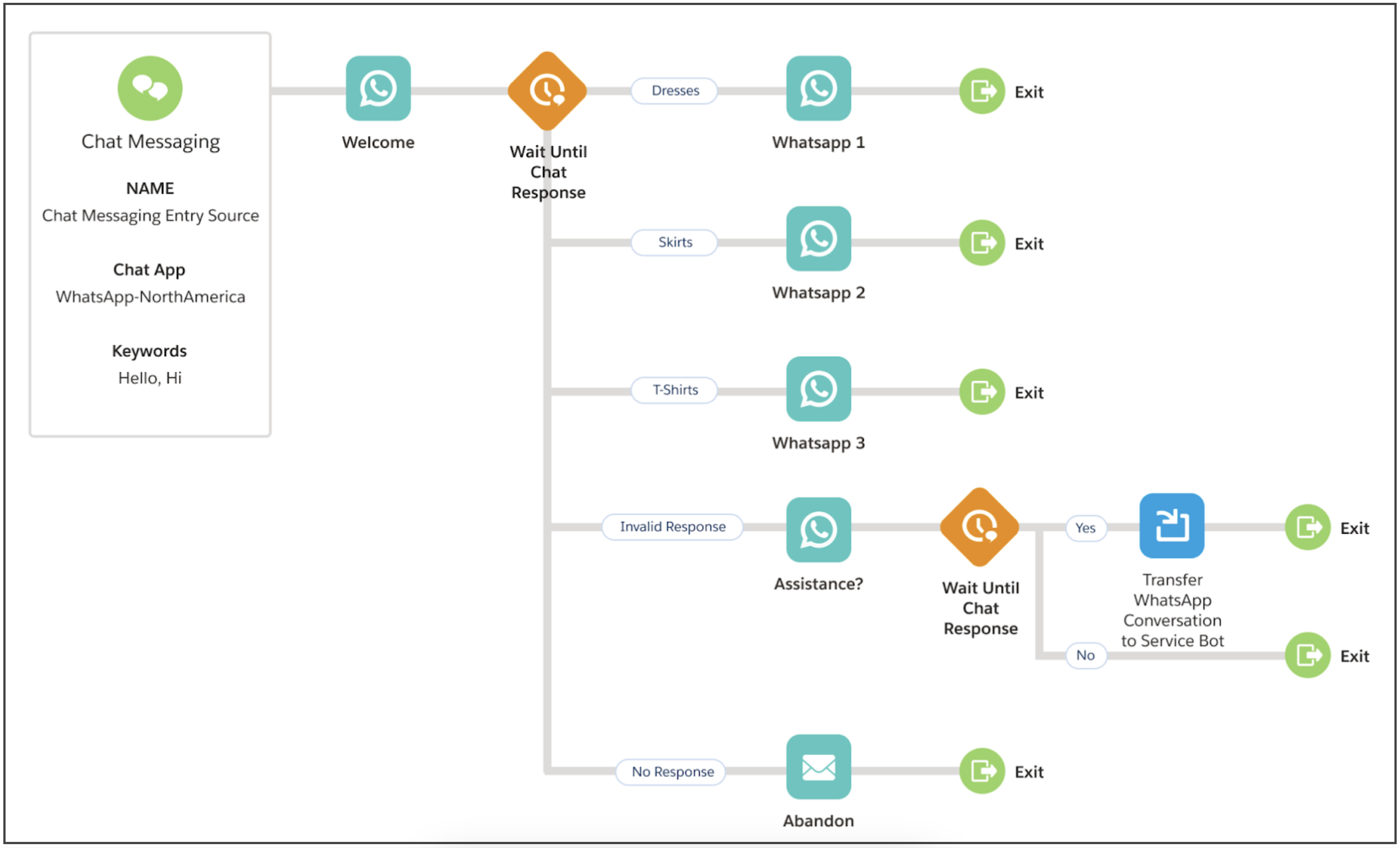
The service agent sees Mary’s previous interactions with your company in WhatsApp, both service and marketing-related, and with this context, can help her more effectively.

Service-to-Marketing Transitions
Other times, a conversation switches from a service to a marketing context when the end user sends a marketing keyword. If Allow Marketing Cloud Engagement Reserved Keywords is selected in your number settings, the underlying engine controlling the conversation switches from Omni-Channel to Journey Builder when a marketing keyword is sent. If both apps are connected, we recommend selecting this option.
For example, suppose a customer sends a keyword that you’ve defined in Journey Builder, such as “coupon.” If the customer’s last messaging session in a service context is complete, meaning its status is Ended or Error, sending the keyword causes Journey Builder to take over the handling of the interaction.
