When an exception occurs, code execution halts. Any DML operations that were
processed before the exception are rolled back and aren’t committed to the database.
Exceptions get logged in debug logs. For unhandled exceptions, which are exceptions that the
code doesn’t catch, Salesforce sends an email that includes the exception information. The
end user sees an error message in the Salesforce user interface.
Available in: Performance, Unlimited, Developer,
Enterprise, and Database.com Editions
User Permissions
Needed
To access the Apex Exception Email Setup page
View Setup
To write Apex code
Author Apex
To use Tooling API
API Enabled
Note To protect the privacy of your data, make sure that test error messages and exception
details don’t contain any personal data. The Apex exception handler and testing
framework can’t determine if sensitive data is contained in user-defined messages and
details. To include personal data in custom Apex exceptions, we recommend that you
create an Exception subclass with new properties that hold the personal data. Then,
don’t include subclass property information in the exception's message string.
Unhandled Exception Emails
When unhandled Apex exceptions occur, emails are sent that
include the Apex stack trace, exception message, customer’s org and user ID, org
and user name, and My Domain name. No other data is returned with the report.
Unhandled exception emails are sent by default to the developer specified in the
LastModifiedBy field on the failing class or trigger.
In addition, you can have emails sent to users of your Salesforce org and to
arbitrary email addresses. These email recipients can also receive process or
flow error emails. To set up these email notifications, from Setup, enter
Apex Exception Email in the Quick
Find box, then select Apex Exception
Email. The entered email addresses then apply to all managed
packages in the customer's org. You can also configure Apex exception emails
using Tooling API object ApexEmailNotification.
Note If duplicate exceptions occur in Apex code that runs synchronously or
asynchronously, subsequent exception emails are suppressed and only the first email
is sent. This email suppression prevents flooding of the developer’s inbox with
emails about the same error.
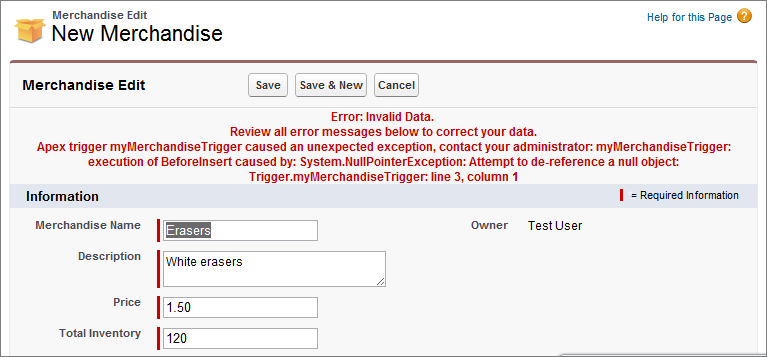
Unhandled Exceptions in the User Interface
If an end user runs into an exception that occurred in Apex code while using the
standard user interface, an error message appears. The error message includes text
similar to the notification shown here.
We use three kinds of cookies on our websites: required, functional, and advertising. You can choose whether functional and advertising cookies apply. Click on the different cookie categories to find out more about each category and to change the default settings.
Privacy Statement
Required Cookies
Always Active
Required cookies are necessary for basic website functionality. Some examples include: session cookies needed to transmit the website, authentication cookies, and security cookies.
Functional Cookies
Functional cookies enhance functions, performance, and services on the website. Some examples include: cookies used to analyze site traffic, cookies used for market research, and cookies used to display advertising that is not directed to a particular individual.
Advertising Cookies
Advertising cookies track activity across websites in order to understand a viewer’s interests, and direct them specific marketing. Some examples include: cookies used for remarketing, or interest-based advertising.