
You are here:
Checkpoint Inspector
Use checkpoints to investigate the objects in memory at a specific point of execution and see the other objects with references to them.
Go to the Checkpoints tab and double-click a checkpoint to view the results in the Checkpoint Inspector. The Checkpoint Inspector provides more details on variables than the Log Inspector, including individual items in collections.
The Checkpoint Inspector has two tabs:
- The Heap tab displays all objects in memory at the time the line of code at the
checkpoint was executed. Items are listed and grouped by data type.
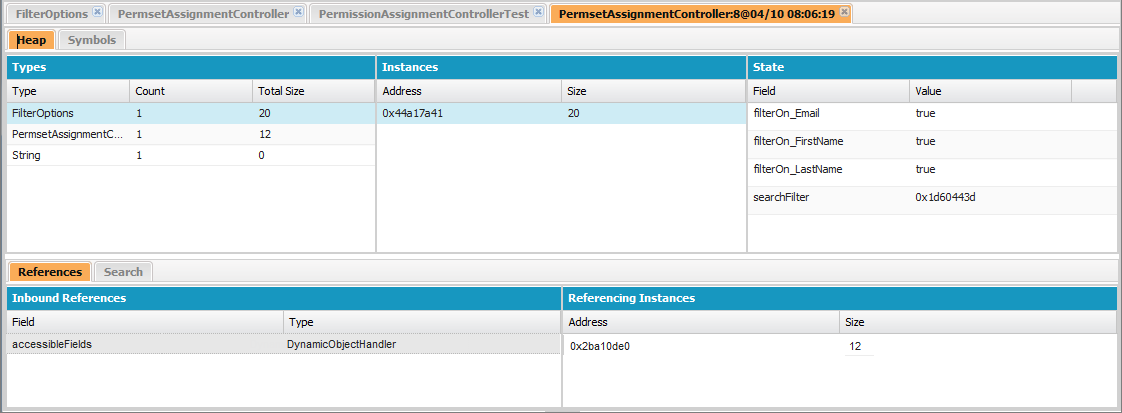
- The Types column is a flat list of the classes of all instantiated objects in memory at the checkpoint, with a count of how many are instantiated, and the amount of memory consumed in bytes. Click an item to see a list of those objects in the Instances column, with their address in the heap and memory consumed. Click an instance to view the variables currently set in that object in the State column.
- The References tab provides two lists to display relationships between symbols held in memory. Use the Inbound References list to locate the symbols that can hold references to objects of a particular type. Use the Referencing Instances list to find specific instances holding references to a symbol. Double click to find that instance elsewhere in the heap.
- The Search tab lets you find symbols in the heap by value or address. Search matches partial symbol values, but addresses must be exact. To quickly search for a value, click the search icon that appears to the right of it when you hover over it in the State panel.
- The Symbols tab displays a tree view of all symbols in memory at the checkpoint. Use
it to quickly review the state of the system at the specific line of code (and
iteration) where the checkpoint was set.


Important If you don’t see scroll bars in the Checkpoint Inspector
panels on a Mac, open and set Show scroll bars to Always.
Did this article solve your issue?
Let us know so we can improve!
