
Set Up a Custom Domain That Uses the Salesforce CDN
You can set up the Salesforce content delivery network (CDN) for your custom domain in Experience Builder, Salesforce Tabs, and Visualforce sites. Within each production environment, you can define multiple domains in a sandbox, but only one custom domain associated with a sandbox org can use the Salesforce CDN.
Required Editions
| Available in: both Salesforce Classic and Lightning Experience |
| Available in: Enterprise, Performance, and Unlimited Editions. |
| Applies to: LWR, Aura, and Visualforce sites |
| User Permissions Needed | |
|---|---|
| To create an Experience Cloud site: | Create and Set Up Experiences AND View Setup and Configuration |
| To customize an Experience Cloud site: | Be a member of the site AND Create and Set Up Experiences OR Be a member of the site AND an experience admin, publisher, or builder in that site |
| To publish an Experience Cloud site: | Be a member of the site AND Create and Set Up Experiences OR Be a member of the site AND an experience admin or publisher in that site |
| To add a domain: | Manage Custom Domains OR View Setup and Configuration plus either a Site.com Publisher license or Create and Set Up Experiences |
| To edit a domain: | Manage Custom Domains |
| To add, edit, and delete custom URLs: | Manage Custom Domains OR View Setup and Configuration AND either Create and Set Up Experiences OR a Site.com Publisher license |
Before you add a custom domain that serves your Experience Cloud site with the Salesforce CDN, review these important considerations.
- To minimize disruption for your users, provision and activate our CDN when your site traffic is low.
- To create or activate a custom domain for testing in a sandbox, log in to the production org that owns the sandbox and go to the Domains Setup page.
- With this option, Salesforce hosts your domain with one of Salesforce’s CDN partners. If a third party hosts your domain or if you use a third-party CDN or a web-application firewall (WAF), see Use a Third-Party Service or CDN to Serve Your Custom Domain.
- When updating Domain Configuration Options for a domain, avoid selecting Serve the domain with the Salesforce Content Delivery Network (CDN), then selecting the checkbox Use the Salesforce CDN for Commerce LWR sites or sites hosted on Experience Delivery more than 2 times in one week as it may cause domain onboarding delays.
- Salesforce partners with CDN providers to optimize our content delivery network. If you have an existing domain hosted outside of Salesforce, such as www.example.com, and that domain isn’t currently registered with the Salesforce CDN partner that will serve your domain, moving to the Salesforce CDN is a two-step process. First, set up a custom domain that points to our CDN partner as a third-party CDN. See Use a Third-Party Service or CDN to Serve Your Custom Domain. Then change the HTTPS option for that custom domain to the Salesforce CDN.
- This option is unavailable for Salesforce Sites and for registrable domains, such as example.com without the www subdomain. To serve a registrable domain or a Salesforce Site with a CDN, see Use a Third-Party Service or CDN to Serve Your Custom Domain.
- You don’t have to create a custom domain to test the Salesforce CDN in a sandbox. You can also use the system-managed *.sandbox.my.site.com Experience Cloud URL, which uses our CDN partner, to serve your content with the Salesforce CDN in sandboxes.
Before you activate this feature, read the considerations and complete the prerequisites for the Salesforce CDN. Then complete the custom domain prerequisites.
- On your DNS provider’s site, verify that the two required canonical name (CNAME) records exist for your domain and the _acme-challenge subdomain. See Point Your Custom Domain to Your Salesforce Org.
- From Setup, in the Quick Find box, enter Domains, and then select Domains.
- Select Add a Domain.
-
Enter the domain name.
Salesforce validates ownership based on the fully qualified domain name (FQDN) that you enter when you add a domain to your org. If you get an error message, point your custom domain to your org, and then wait for the changes to propagate. After you update your domain’s DNS record, it can take up to 20 hours for that change to take effect worldwide.
- For orgs launching Commerce LWR sites or sites hosted on Experience Delivery, select the Domain Configuration option, Serve the domain with the Salesforce Content Delivery Network (CDN), then select the checkbox Use the Salesforce CDN for Commerce LWR sites or sites hosted on Experience Delivery. With this option, your domain uses a single certificate which displays only one host name. Five branded certificates are available for use with the Salesforce CDN partner and unlimited traffic are available. Contact your account representative if you need additional certificates. You can’t use the same domain name across multiple organizations. If you delete a domain name from one organization and plan on reusing it in another, wait at least 48 hours between deleting the domain name and adding it back in.
-
For all other digital experiences using Experience Cloud, Commerce, or Industries
licenses, select the Domain Configuration Option Serve the domain with the
Salesforce Content Delivery Network (CDN). With this option, your domain
uses a single certificate, which displays only one host name. Ten branded certificates for
use with the Salesforce CDN partner and 48 terabytes of traffic per year are available for
Experience Cloud licenses that adopt a single certificate CDN. If you need more
certificates, contact your account representative.
Here’s the Domain page when you select this domain configuration option.
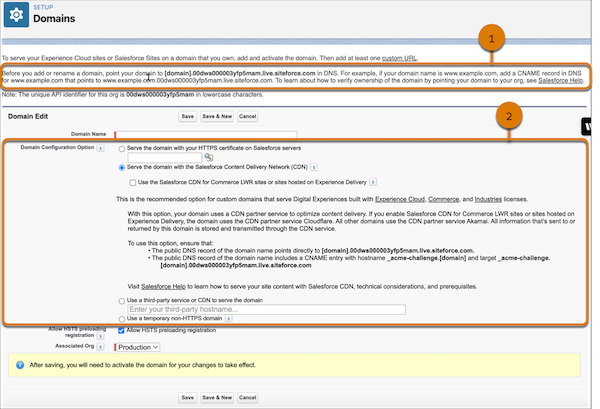
The top of the page includes your 18-digit org ID and the format for the CNAME in DNS to point your domain to your org (1). When you select the option to serve your domain with the Salesforce CDN, additional guidance includes the targets for both CNAME records in DNS (2). Replace
[domain]with your domain name, such as www.example.com. -
For Associated Org, select the org from which you want this custom domain to
serve site content.
For example, to serve the sites in your production org, select Production. Or select a sandbox where you want to test this custom domain.
This field only appears in production orgs with associated sandboxes. You can edit this field only from production orgs. For more information, see Test Your Custom Domains in a Sandbox.
-
Save your domain.
After you save your new domain, Salesforce provisions the domain or gets it ready to be used. The Salesforce CDN provisioning process can take up to 24 hours. When that process is complete, the domain’s status on the Domains Setup page changes from Provisioning to Awaiting Activation and you receive an email.
Newly created custom domains use HTTP, not HTTPS, until you activate the domain.
-
To activate your domain, on the Domains Setup page, select
Activate next to your custom domain name.
 Note Custom domains in a sandbox are edited and activated in production.
Your site can be unavailable for 5–10 minutes, so activate your custom domain when your site traffic is low. When your site is active, the status changes from Awaiting Activation to Completed, and the Current Domain Configuration Option changes to the Salesforce CDN partner.
-
To serve your sites via your activated domain, add a custom URL.
Note For your domain to serve your site, at least one custom URL is required.
Changing the Salesforce CDN affects SAML Single Sign-On Settings for all custom URLs in that domain. Reconfirm the SAML Single Sign-On Settings for each HTTPS custom URL in that domain after activating a change. Login Settings are available in Experience Workspaces | Administration | Login & Registration.
-
To avoid vulnerabilities during HTTP redirects, enable HTTP Strict Transport
Security (HSTS) preloading on the registrable domain for your custom
domain.
HSTS preloading ensures that HTTPS connections are always used in supported browsers. Configure this option by adding an HTTP header on the registrable domain for your custom domain. For example, if your custom domain is https://shop.example.com, you add the header to https//example.com. Because the Salesforce CDN doesn’t support registrable domains, Salesforce can’t configure this header for you, and the Allow HSTS preloading registration option has no effect.
This diagram shows the routing of traffic when Salesforce serves your custom domain
with the Salesforce CDN. Dotted lines ( ) represent DNS configurations, and the solid
line (
) represent DNS configurations, and the solid
line ( )
represents user traffic flow through HTTPS. The gray lines represent traffic that
originates outside Salesforce, and the blue line represents traffic that originates
in Salesforce. In this example, the domain name is www.example.com and the 18-digit
org ID is 00d000000000000013.
)
represents user traffic flow through HTTPS. The gray lines represent traffic that
originates outside Salesforce, and the blue line represents traffic that originates
in Salesforce. In this example, the domain name is www.example.com and the 18-digit
org ID is 00d000000000000013.
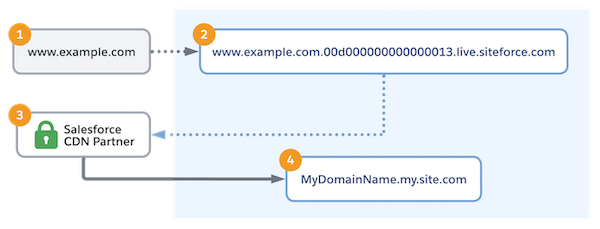
With your DNS provider, you point your custom domain (1) to the Salesforce internal CNAME (2), which includes your org ID. Within Salesforce, user traffic is routed to the Salesforce CDN partner (3), which acts as an intermediary for your Salesforce content (4).
