
Content Delivery Networks (CDNs) and Salesforce
Optimize page load times and site performance with our content delivery network (CDN). Salesforce partners with a CDN provider to efficiently deliver publicly cacheable content to users on your Experience Cloud sites.
Required Editions
| Available in: both Salesforce Classic and Lightning Experience |
| Available in: Enterprise, Performance, and Unlimited Editions. |
| Applies to: Salesforce Sites and LWR, Aura, and Visualforce sites |
What’s a CDN?
A content delivery network is a geographically distributed network of servers that store cached versions of web assets. To optimize page load times and site performance, a CDN efficiently delivers publicly cacheable content to users. CDNs are the industry standard for web applications because they provide faster and more secure content delivery.
All the assets used to develop your Experience Cloud sites or Salesforce Sites are stored on your Salesforce instance. Your instance is stored on one Salesforce server. The farther away your users are from that server, the longer it takes to get data to their computer and your site’s pages.
The CDN minimizes delays in loading web page content by reducing the distance between the server and the user. CDNs also increase the number of requests that the server can respond to because the CDN offloads a large portion of hits to your site. By reducing the distance between the server and the user and increasing content availability and redundancy, CDNs improve website load times and site performance.
Learn more about CDNs and see one in action in this short video.
CDN Options for Sites
For sites, you can get the benefits of a CDN in three ways.
-
Use the default Experience Cloud site domain. When you enable Experience Cloud sites, Salesforce creates a system-managed domain for your site. The host name for that system-managed domain ends in *.my.site.com and that domain uses the Salesforce CDN.
Government Cloud Plus orgs can opt out of the Salesforce CDN for *.my.site.com domains. To opt out, from Setup, in the Quick Find box, enter My Domain, and then select My Domain. Then in the Routing section, deselect Use Content Delivery Network (CDN) by default when enhanced domains are enabled for Experience Cloud sites.
- Set up a custom domain such as https://www.example.com that serves your Experience Cloud site content with the Salesforce CDN. This option isn’t available for registrable domains. If you have Digital Experiences, including those built with Experience Cloud, Commerce, and Industries licenses, we recommend this option to serve your custom domain. For considerations, prerequisites, and set up instructions, see Serve Your Experience Cloud Site with the Salesforce Content Delivery Network (CDN).
- Set up a custom domain such as https://www.example.com that serves content from your Experience Cloud site or Salesforce Site with a third-party CDN outside of Salesforce. A non-Salesforce CDN is the only available option to serve a registrable domain or Salesforce Site via a CDN. Commerce LWR sites can’t use a CDN outside of Salesforce. See Use a Third-Party Service or CDN to Serve Your Custom Domain.

Who Can Use the Salesforce CDN for a Custom Domain
The Salesforce CDN is available for custom domains that serve Experience Cloud sites. If you use Marketing Cloud Account Engagement (Pardot) in a Professional Edition org, you must use the Salesforce CDN for your domains.
To get the benefits of a CDN for a domain that serves content from a Salesforce Site, use a CDN outside of Salesforce. Also, Salesforce is unable to serve a registrable domain, such as example.com, using our CDN. We only serve subdomains, such as www.example.com or parts.example.com. To serve your site content on a registrable domain served from a CDN, host it on a CDN outside of Salesforce.
If you’re creating a Commerce LWR store, you can use the system-managed *.my.site.com URL or a custom domain to enable the Salesforce CDN.
How a CDN Works
By reducing the distance between the server and the user and increasing content availability and redundancy, CDNs improve website load times and site performance.
This diagram illustrates this effect for the Salesforce CDN for Experience Cloud sites. The principle also applies to external CDNs and the Lightning CDN for Salesforce orgs.
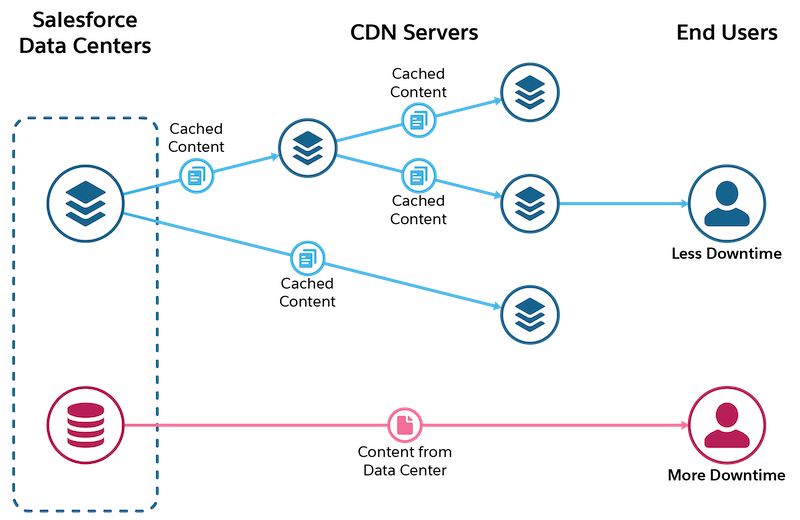
The Salesforce CDN includes an image optimization feature that makes your site pages load faster for guest users, whether they’re viewing your site on their phone, tablet, or desktop computer. In addition, the Salesforce CDN comes with configurable availability pages. You can display a custom Service Not Available page when your site is down or a custom Too Many Requests page when your site is in high demand.
