
You are here:
Merge Conflicts
Merge conflicts can occur when multiple work items contain one or more of the same components, especially when multiple developers are making changes that impact the same components in different development environments. DevOps Center warns you about potential merge conflicts so you can investigate to ensure that you don’t inadvertently overwrite desired changes.
In this example scenario, two developers are adding new fields to the same standard object, which creates potential merge conflicts in the page layouts.
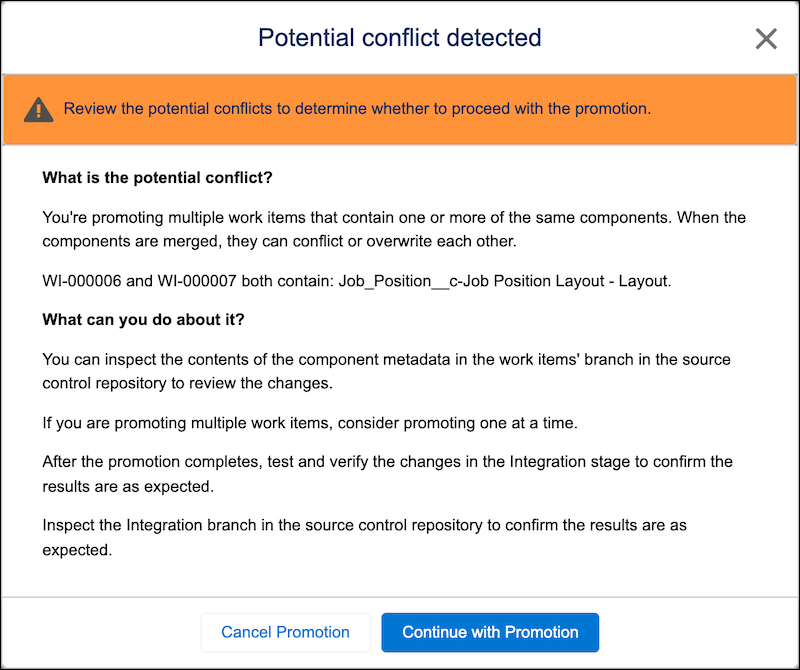
Before you proceed, read the information about the potential conflict to determine what to do next.
Continue with Promotion
Based on the conflict description, you feel comfortable that the changes don’t overwrite each other.
Cancel Promotion
Based on the conflict description, you’re uncertain that the changes don’t overwrite each other, or you’d like to look at the pull request for the work item, which indicates whether the source control repository has detected merge conflicts. After you complete your investigation, you either resolve the merge conflicts in the source control repo, sync the changes in the development environments, or continue with the promotion, which could fail if there’s a merge conflict.
If the Promotion Fails
If the promotion fails, here are some options:
- Promote each work item individually.
- If all individual work items are promoted to the next stage successfully, your work is done (for now).
- If some work items are promoted successfully and some aren’t, review the change request to resolve the merge conflicts manually in the branch in the source control system.
- Sync the development environments, or resolve the conflicts directly in the development environments, then try the promotion process again.
- Custom promotion in next-generation DevOps Center: Promote individual work items from a stage. See Custom Promotion.
