Resolve Merge Conflicts in Next Generation DevOps Center
Next-generation DevOps Center uses Agentforce to streamline conflict resolution for
both low-code admins and developers. By integrating with Agentforce Vibes, DevOps Center
provides AI-assisted guidance whether you work in the UI or the IDE.
Required Editions
Available in: Lightning Experience in Professional (API access required),
Enterprise, Performance, Unlimited, and Developer
Editions
Available in: Government Cloud Plus as interoperable. Turning on DevOps
Center in Government Cloud Plus orgs can send data outside the authorization boundary.
Contact your Salesforce account executive for more details.
Not available in: EU Operating Zone. EU Operating zone is a special paid
offering that provides an enhanced level of data residency commitment. DevOps Center
is supported in orgs in the EU that aren’t part of EU OZ, per standard
product terms and conditions.
Resolve Conflicts from the UI (Low-Code)
If you're a low-code
developer or admin, use DevOps Center MCP tools to manage conflicts without writing
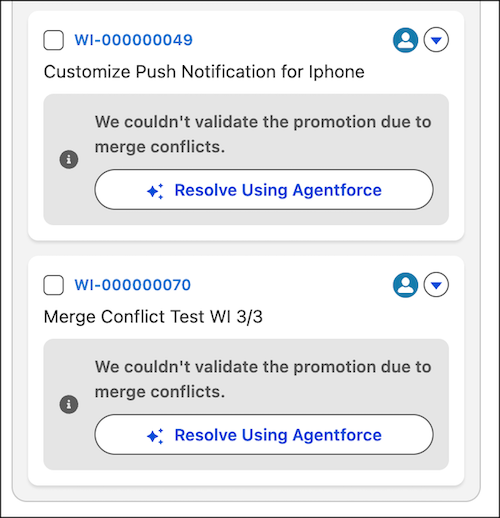
commands. When DevOps Center detects a conflict during a promotion, the pipeline highlights
the specific blocked work item with an error notification.
Click the
Resolve with Agentforce button to automatically launch Agentforce
Vibes IDE. DevOps Center preloads the specific error message and context into the prompt.
You can interact with Agentforce to review the conflicting files and accept the recommended
fixes.
Resolve Conflicts Using DevOps MCP Tools
Use DevOps Center MCP tools to detect, analyze, and resolve conflicts programmatically. When
working within Agentforce Vibes IDE, Agentforce automatically detects the merge conflict. It
adds the error details to the prompt. Ask Agentforce Vibes to explain the differences
between the files or suggest a solution.
We use three kinds of cookies on our websites: required, functional, and advertising. You can choose whether functional and advertising cookies apply. Click on the different cookie categories to find out more about each category and to change the default settings.
Privacy Statement
Required Cookies
Always Active
Required cookies are necessary for basic website functionality. Some examples include: session cookies needed to transmit the website, authentication cookies, and security cookies.
Functional Cookies
Functional cookies enhance functions, performance, and services on the website. Some examples include: cookies used to analyze site traffic, cookies used for market research, and cookies used to display advertising that is not directed to a particular individual.
Advertising Cookies
Advertising cookies track activity across websites in order to understand a viewer’s interests, and direct them specific marketing. Some examples include: cookies used for remarketing, or interest-based advertising.