
You are here:
What’s The Difference Between the Stages and Environments Tabs?
After the pipeline is activated, the Stages tab appears as a first tab on the Pipeline page.
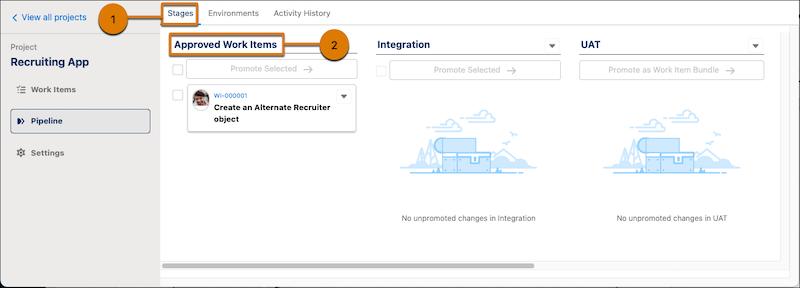
The Stages tab (1) is where you promote work items through the pipeline. Work items appear in
the Approved Work Items column (2) after they have been marked Ready
to Promote.
In the Environments tab, you can:
- Continue to configure the pipeline stages, if the pipeline is not active.
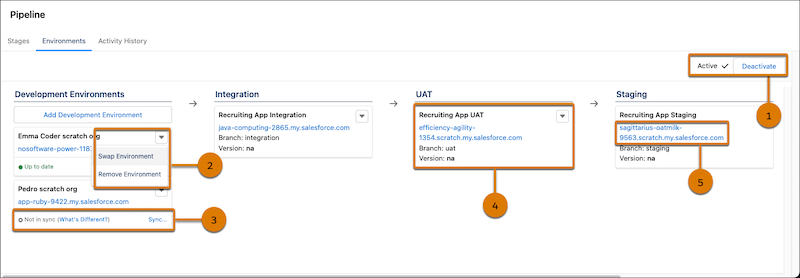
- Deactivate your pipeline (1), if you haven’t promoted any work items. After a work item has been promoted, you can no longer deactivate it.
- Remove or swap an environment (2). You can remove a dev environment only if changes haven’t been committed in a work item. You can remove a pipeline environment only if the pipeline isn’t activated.
- Initiate a synchronization process if a development environment is out sync with the next pipeline stage (3). Available after pipeline is activated.
- View version information about each stage (4). This information provides a quick visual comparison regarding what version exists in each pipeline stage relative to the other stages. In the example, the version for each pipeline is “na” because nothing has been promoted yet.
- Access environments directly with a click (5).
Did this article solve your issue?
Let us know so we can improve!
