
You are here:
Fix a Stalled Promotion When Deployment Succeeds But Merge to Branch Fails
After you determine that the deployment succeeded but the changes aren’t reflected in the associated pipeline branch, update the status of the Async Operation Result record, then try the promotion again.
To determine the cause of the stalled promotion, see Stalled Promotions.
- In the org in which DevOps Center is installed, launch Developer Console, then select the Query Editor tab.
- To find the promotion record that’s still In Progress, enter this SOQL query.
In this example, line breaks were added for readability purposes. If you copy this query, remove the line breaks before running it.
SELECT Id, sf_devops__Status__c FROM sf_devops__Work_Item_Promote__c WHERE sf_devops__Status__r.sf_devops__Status__c = 'In Progress' - Click to highlight the record, then click Open Detail Page.
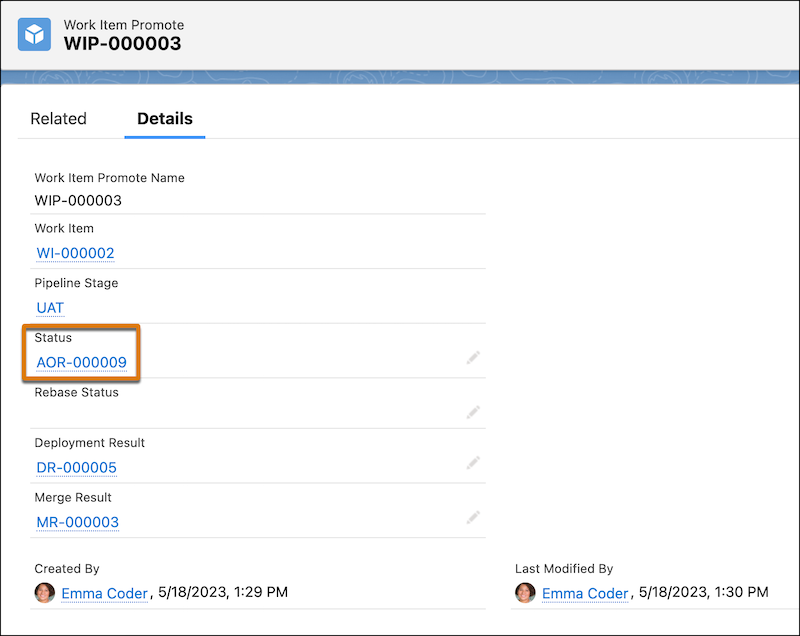
- In the Work Item Promote record, click the link in the Status field to view the associated
Async Operation Result record.
- In the Async Operation Result record, change the Status to Error, then click Save.
- In DevOps Center, refresh the Pipeline Stages view to remove the Stalled Promotion error.
- Promote your changes.
Did this article solve your issue?
Let us know so we can improve!
