
You are here:
What Happens When a Sandbox Is Refreshed
Refreshing a sandbox creates a new copy of the sandbox based on the production or sandbox org you copy it from.
Required Editions
| Permission Sets Needed | |
|---|---|
| To manage environments: | DevOps Center Manager |
| To access the named credentials required to authenticate to environments: | sf_devops_InitializeEnvironments |
The sandbox refresh procedure creates a new org, copies the metadata and data from the source org, then deletes the old org after activation. Because the sandbox refresh results in deletion of the original org, DevOps Center loses connection with the original environment, but provides you the ability to swap the existing connected environment with the new environment. As part of the swap process, DevOps Center also ensures that the new environment is current with the latest source in the pipeline stage’s branch.
The way you initiate the swap is different depending on if you’re swapping a development environment or a pipeline environment.
How to Tell That Your Dev Sandbox Was Refreshed
After a refreshed sandbox is activated, the connection is lost within DevOps Center because the refreshed sandbox has a new org ID. You’ll notice some clues when you go to update a work item that was connected to the sandbox.
- In the work item Changes tab, you now see Can’t determine the files to pull - Log in to development environment.
- You try to pull or commit changes, and you’re asked to log in.
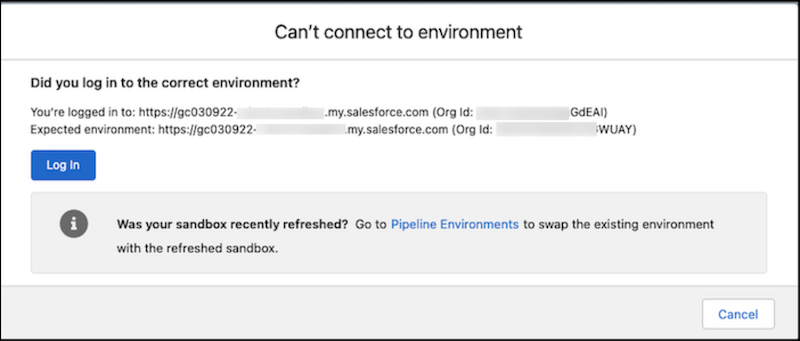
When you try to log in, you get confirmation that the sandbox you’re trying to log into is no longer valid. Click the link to go to the Pipeline Environments page, where you can swap the sandbox and reconnect to it.
How to Tell That a Pipeline Sandbox Was Refreshed
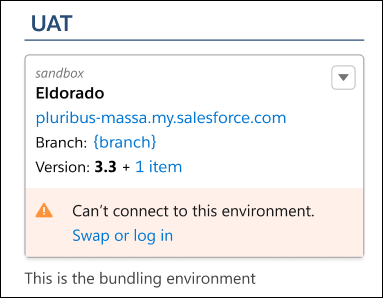
In Pipeline Environments, you see a message on the pipeline stage telling you that DevOps Center can’t connect to the environment.
- Swap a Development Environment
Swap a development environment with another development environment. If your development environment is a Developer or Developer Pro sandbox that was recently refreshed, the connection to the existing environment is no longer valid. You must swap the sandbox to reestablish the connection to it in DevOps Center. - Swap a Pipeline Environment
Swap a pipeline environment with another environment. If the pipeline environment is a sandbox that was recently refreshed, you must swap it before anyone can promote changes to the associated pipeline stage. The DevOps Center connection to the current environment is no longer usable.
