
You are here:
Generate a Manifest and Retrieve Metadata From the Org
In Salesforce Extensions for VS Code, use Salesforce CLI to generate the manifest that contains the metadata types you want to retrieve from the production org.
Before you begin, authorize the source org in Salesforce Extensions for VS Code.
- In VS Code, open the Terminal.
- Use Salesforce CLI to generate a comprehensive manifest file that lists all the
metadata types that the source org contains.
sf project generate manifest --output-dir ./manifest --from-org <orgname/alias>The
--output-dirflag creates the package.xml file in a new directory called manifest. The manifest directory is where Salesforce Extensions for VS Code expects to find the package.xml file, so it provides a logical list of commands in the context menu. - In VS Code Explorer, in the manifest folder, right-click the
package.xml file, then select SFDX: Retrieve Source in
Manifest From Org.
If the retrieve operation fails, you’re trying to retrieve too many files at once and you’ve exceeded the file limits for the retrieval. Split your package.xml into smaller files, and then run this command for each manifest file. For more information on retrieval limits, see Metadata API Guide: retrieve().
After the files are retrieved, the project files are now in the DX project folder on your local machine.
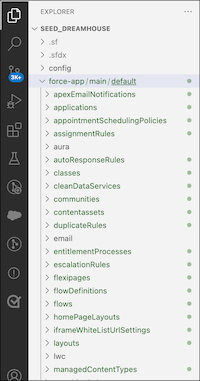
- In VS Code Explorer, expand the force-app folder to see the org
metadata in your local DX project.
If you’re using the default VS Code UI configuration, new files appear as green in the Explorer.
Next: Add and commit the metadata files to the DevOps Center project’s GitHub repository.
