
You are here:
Error: There was an internal data model error. Please reload the page...
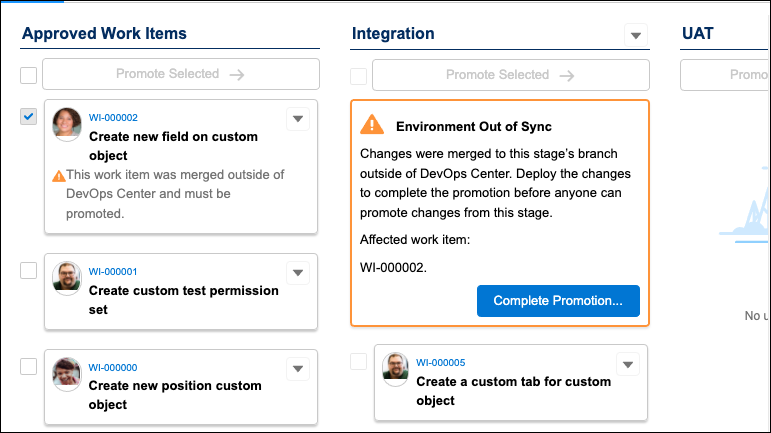
A work item indicates that it was externally merged but you didn’t externally merge it. When you attempt to complete the promotion, you see a red banner with the “internal data model” error message.
Due to event processing delays, a duplicate Work Item Promote (WIP) record was erroneously created.
Find and delete the duplicate Work Item Promote record.
- In the Pipeline Stages view, note the affected work item number, for example, WI-000002.
- Find the duplicate Work Item Promote record.
- In Developer Console, select the Query Editor tab.
- Enter this SOQL query, substituting the example work item number you’re trying to promote. In this example, line breaks were added for readability purposes. If you copy this query, remove the line breaks before running it.
- Look for the record with a null status for
sf_devops_Status__r(1) and a duplicate value for Merge_Result/Remote_Reference forsf_devops_Merge_Result__c,sf_devops_Remote_Reference__c(2).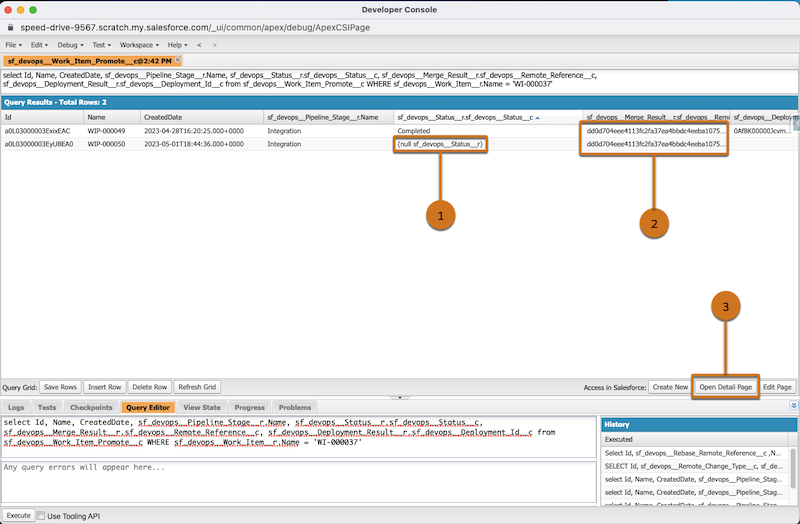
- To open the record, click to highlight the null record, then click Open Detail Page (3).
- Delete the WIP record.
- Back in DevOps Center, refresh the Pipeline Stages view to remove the External Merge message. Now you can promote your changes.
Did this article solve your issue?
Let us know so we can improve!
