
You are here:
Commit Changes to the Source Control Repository
After you decide which changes to include for the work item, commit the changes to the project’s source control repository. When you commit changes, they’re stored in the repository branch that was created when the work item moved to the In Progress stage.
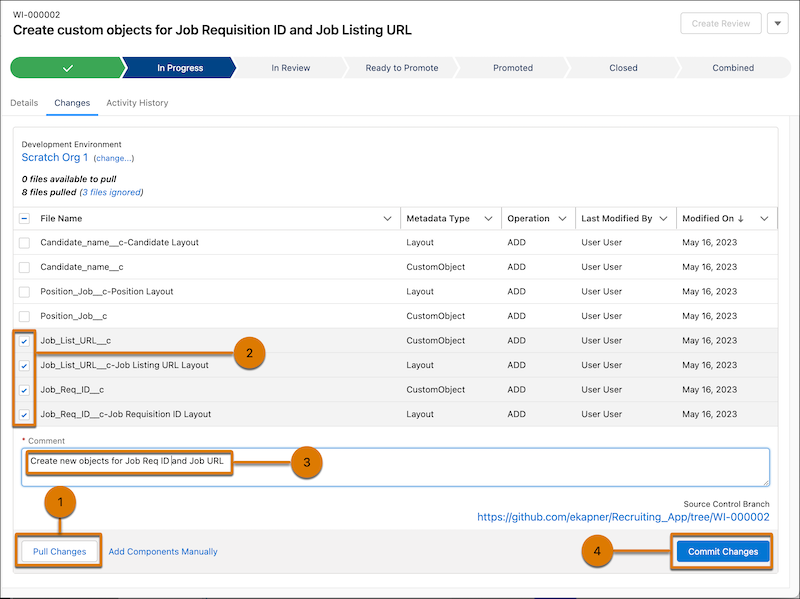
Before you can commit changes, you must pull changes from the development environment (1).
- In the work item Changes tab, select the changes to commit (2).
Only the changes you select and commit become part of the work item. Unselected changes are available to commit in another work item.
- (Optional) Add metadata components manually.
- Add a commit comment. (3)
Include what’s distinctive about the changes, so you can identify an individual commit by more than just its timestamp. A single work item can have multiple commits. You can continue to work in your development environment and commit a new group of changes for the same work item.
- Click Commit Changes (4).
The changes are committed to the work item’s project repository branch.
The branch is named after the work item, so it’s clear where the changes it contains came from. For example, the branch for a work item WI-000002 looks something like:
https://github.com/<username>/<repo-name>/tree/WI-000002https://bitbucket.org/<workspace>/<repo-name>/branch/WI-000002After you commit changes to the repository, the source tracking for these components in your development environment is reset. This reset ensures that changes that are already committed don’t keep showing up when you pull changes from the development environment.
- (Optional) To see the branch in the source control repository, click the Source Control
Branch URL.
The Code page for the branch is shown. Explore the changes you recently committed in the source control repository.
If you see the error Ending position out of bounds:
-1, ask a Salesforce admin to turn off high assurance for authorization providers.
See Troubleshoot DevOps Center Errors for details.
- Stalled Commits
A stalled commit can occur when the updates from the external services back to DevOps Center are interrupted during the commit operation. After you determine when the failure occurred, you can fix it.
