
You are here:
Integrate Test Providers for Unified Testing
Centralize your test management, even when your test assets are in other testing tools and platforms. On the Test Providers tab, you can integrate both Salesforce testing tools and partner test providers. After you configure the test providers, manage and run test suites directly from DevOps Testing.
Required Editions
| Available in: Lightning Experience |
| Available in: Enterprise, Performance, Professional (API access required), Unlimited, and Developer Editions |
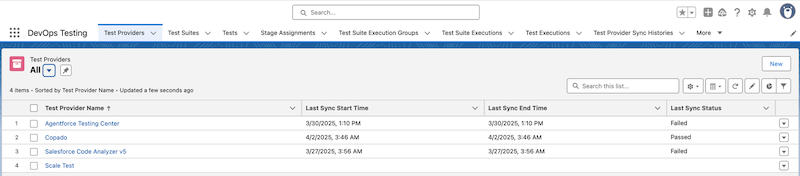
If you use multiple test providers and tools as part of your testing strategy, you can consolidate and run them automatically with DevOps Testing. In addition to Salesforce testing tools, you can find partner test providers on AppExchange. AppExchange makes it easy to discover new test providers within the Salesforce ecosystem that fit your testing needs.
DevOps Testing integrates with multiple Salesforce and partner test providers. After installing the DevOps Testing package, you can install the partner test provider package in your Salesforce org.
DevOps Testing integrates with these partner test providers and tools:
- Copado Robotic Testing
- Provar Automation
- QualityClouds
DevOps Testing also supports test providers from Salesforce, such as Agentforce Testing Center, Apex Unit Testing, Code Analyzer v5, Flow Testing, and Scale Test.
You can check the availability of test providers as you add them. Their status indicates whether they are available, unavailable, already installed, or if a license is required.
The requirements for the Salesforce testing tools are listed in the table.
| Test Provider | Testing Type | Notes |
|---|---|---|
| Agentforce Testing Center | Agent testing |
|
| Apex Unit Testing | Unit testing for Apex classes and triggers | See Testing Apex. |
| Flow Testing | Flow tests | See Testing Your Flow Before Activation. |
| Salesforce Code Analyzer v5 | Code analysis |
|
| Scale Test | Performance testing |
|

- Test Provider Limitations
Before you integrate test providers with DevOps Testing, review these limitations and behaviors. - Configure Test Providers for Active DevOps Center Projects
Install and set up a test provider for your DevOps Center project.
