
Options to Serve a Custom Domain
Salesforce supports three HTTPS options to serve your domain. Whether you serve content for your domain via an HTTPS certificate that you own, through the Salesforce content delivery network (CDN), or through an external service, we require that you use HTTPS. When initial configuration requires that your domain is available before you enable HTTPS, Salesforce also supports a temporary non-HTTPS option.
Required Editions
| Available in: both Salesforce Classic and Lightning Experience |
| Available in: Enterprise, Performance, and Unlimited Editions. |
| Applies to: Salesforce Sites and LWR, Aura, and Visualforce sites |

Unfamiliar with terms like DNS, CDN, and CNAME? Want to review the difference between a DNS resolver and a certificate? See Custom Domain Terminology.
Serve the Domain with Your HTTPS Certificate on Salesforce Servers
With this option, you upload your HTTPS certificate to Salesforce and configure your domain to use that certificate. This option requires a certificate authority (CA)-signed certificate and that the DNS record for your domain point directly to your Salesforce org.
If the DNS record for your domain points to an external service, you can’t use this option. Common examples of an external service include a web application firewall (WAF), a third-party host, or a third-party content delivery network (CDN). To set up a domain that points to an external service, choose the option to use a third-party service or CDN to serve your domain.
This diagram shows the routing of traffic when Salesforce uses your HTTPS certificate
to serve your Experience Cloud site content on your custom domain. Dotted lines
( )
represent DNS configurations, and the solid line (
)
represent DNS configurations, and the solid line ( ) represents
user traffic flow through HTTPS. The gray line represents traffic that originates
outside Salesforce, and the blue lines represent traffic that originates in
Salesforce. In this example, the domain name is www.example.com and the 18-digit org
ID is 00d000000000000013.
) represents
user traffic flow through HTTPS. The gray line represents traffic that originates
outside Salesforce, and the blue lines represent traffic that originates in
Salesforce. In this example, the domain name is www.example.com and the 18-digit org
ID is 00d000000000000013.
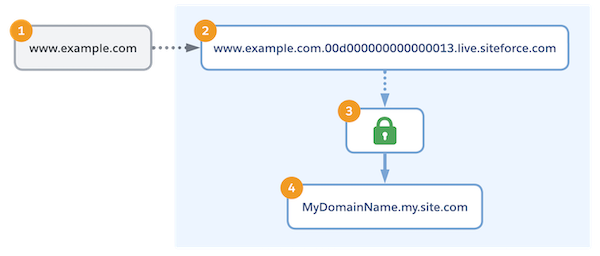
With your DNS provider, you point your custom domain (1) to the Salesforce internal canonical name (CNAME) record for your org (2), which includes your org ID. In Salesforce, your certificate is stored on a secure server (3). Salesforce uses that certificate to serve the content from your Experience Cloud site (4).
For more information on this option, including prerequisites, see Serve a Custom Domain with Your HTTPS Certificate on Salesforce Servers.
Serve the Domain with the Salesforce Content Delivery Network (CDN)
With this option, you optimize page load times and site performance for your Experience Cloud site. Salesforce partners with a CDN provider to efficiently deliver publicly cacheable content to users on your Experience Cloud sites.
The Salesforce CDN is the recommended option for custom domains that serve Digital Experiences, including Experiences built with Experience Cloud, Commerce, and Industries licenses.
If you use Marketing Cloud Account Engagement (Pardot) in a Professional Edition org, the Salesforce CDN is the only HTTPS option available for your custom domains. The Salesforce CDN isn’t available for Salesforce Sites or in Professional Edition orgs without Marketing Cloud Account Engagement.
This diagram shows the routing of traffic when Salesforce serves your custom domain
with the Salesforce CDN. Dotted lines () represent DNS configurations, and the solid
line ()
represents user traffic flow through HTTPS. The gray lines represent traffic that
originates outside Salesforce, and the blue line represents traffic that originates
in Salesforce. In this example, the domain name is www.example.com and the 18-digit
org ID is 00d000000000000013.
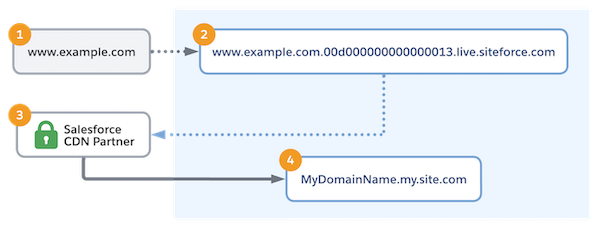
With your DNS provider, you point your custom domain (1) to the Salesforce internal CNAME (2), which includes your org ID. Within Salesforce, user traffic is routed to the Salesforce CDN partner (3), which acts as an intermediary for your Salesforce content (4).

To review the benefits, limitations, and instructions for this option, see Serve Your Experience Cloud Site with the Salesforce Content Delivery Network (CDN).
Use a Third-Party Service or CDN to Serve the Domain
If a non-Salesforce service or host serves your custom domain, you can still serve your site content via that domain. Common examples include a third-party CDN, a web application firewall (WAF), or a third-party hosting service that either provides or uses your HTTPS certificate.
With this configuration option, your third-party service or CDN serves as an intermediary. In other words, traffic flows through the third party. With this configuration option, your domain points to the third-party service.
This diagram shows the routing of traffic when a third-party service or CDN serves content from your Experience Cloud site on your custom domain. In this example, the domain name is www.example.com, the 18-digit org ID is 00d000000000000013, and the org’s target host name is usa00.sfdc-xx18.salesforce.com.
The dashed line ( ) represents the configuration that points your domain to your
third-party service or CDN. The dotted line ()
represents routing through DNS, and the solid lines () represent
user traffic flow through HTTPS. The gray lines represent traffic that originates
outside Salesforce, and the blue lines represent traffic that originates in
Salesforce.
) represents the configuration that points your domain to your
third-party service or CDN. The dotted line ()
represents routing through DNS, and the solid lines () represent
user traffic flow through HTTPS. The gray lines represent traffic that originates
outside Salesforce, and the blue lines represent traffic that originates in
Salesforce.
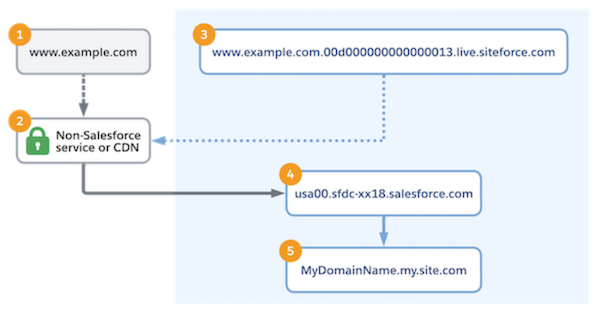
Your custom domain (1) points to the third-party service or CDN (2). For example, you point your custom domain to the third party in DNS. Or you set up a web application filter (WAF) as a proxy.
In Salesforce, you specify the external host name for your domain. The Salesforce CNAME (3) uses that external host name to point to your non-Salesforce service or CDN (2). In the third-party service or CDN, the configuration points to your org’s target host name (4). To identify the domain and serve content from your site (5), Salesforce uses the value passed in the Host HTTP Header of the request from the third-party service or CDN.
For more information on this option, including considerations and prerequisites, see Use a Third-Party Service or CDN to Serve Your Custom Domain.
Use a Temporary Non-HTTPS Domain
Salesforce requires that your custom domain is served via HTTPS. However, some configuration steps can require a temporary non-HTTPS configuration. When your domain serves other content, or to move a custom domain to a new production org, you can use a temporary domain to minimize disruption to your domain. Or when your HTTPS certificate isn’t ready to be uploaded to Salesforce, you can use a temporary domain to start configuring your custom URLs.
This diagram shows the routing of traffic when Salesforce serves your domain as a
temporary non-HTTPS domain. Dotted lines () represent
DNS configurations, and the solid line () represents user traffic flow through HTTP. The
gray line represents traffic that originates outside Salesforce, and the blue lines
represent traffic that originates in Salesforce. In this example, the domain name is
www.example.com and the 18-digit org ID is 00d000000000000013.
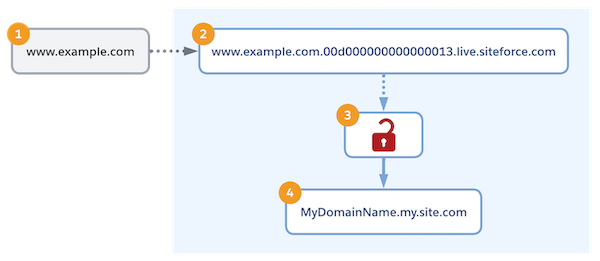
To confirm ownership of your custom domain (1), with your DNS provider, you point the domain to the Salesforce internal CNAME (2), which includes your org ID, via a CNAME or TXT record. If a CNAME record routes traffic to Salesforce, Salesforce uses an HTTP-only endpoint that’s served on a secure server (3) to serve the content from your Experience Cloud site (4). However, the hosted certificate (3) supports only HTTP on the custom domain instead of HTTPS. Also, the returned certificate creates a hostname-mismatch error because that certificate doesn't support the custom domain name.
For more information, see Use a Temporary Non-HTTPS Domain to Serve Your Custom Domain.
