
View Your Custom Domain Details
Get information about your custom domain. For example, scan the expiration dates for your HTTPS certificates that serve your domains. Or get the target host name for your domain that’s served by a third-party service or content delivery network (CDN). Also, you can view and manage the custom URLs associated with the domain, and view alerts about the domain’s DNS configuration.
Required Editions
| Available in: both Salesforce Classic and Lightning Experience |
| Available in: Enterprise, Performance, and Unlimited Editions. |
| Applies to: Salesforce Sites and LWR, Aura, and Visualforce sites |
| User Permissions Needed | |
|---|---|
| To view a domain: | View Setup and Configuration |
| To edit or delete a domain: | Manage Custom Domains |
-
From Setup, in the Quick Find box, enter Domains, and
then select Domains.
The domains list includes your custom domains and the system-managed domains. System-managed domains are the domains that Salesforce serves for your org, including your Experience Cloud sites, Salesforce Sites, and My Domain.
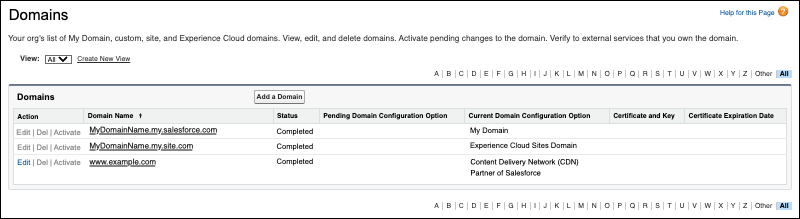
In the domain list, you can see the status of your domain.
Status What It Means Awaiting Activation The provisioning process is complete. To use the updated domain, click Activate. Awaiting Custom URL The domain requires a custom URL to start provisioning. Applies to domains that use the Salesforce Cloud domain configuration option only. Completed The domain is active and in use. Provisioning Salesforce is provisioning the domain. In other words, Salesforce is getting the domain ready for activation. You can also view the domain’s current configuration option. If you saved a change to your domain, the Pending Domain Configuration Option column lists the configuration option that takes effect when you activate the domain.
Domain Configuration Option Definition Content Delivery Network (CDN) Partner of Salesforce A custom domain that uses the domain configuration option, Serve the domain with the Salesforce Content Delivery Network (CDN). Experience Cloud Sites Domain If enhanced domains are deployed, the system-managed domain for your Experience Cloud sites that ends in *.my.site.com.Experience Cloud Sites Force.com Domain If enhanced domains aren’t deployed, the system-managed domain for your Experience Cloud sites that ends in *.force.com.Domain is served by an external host A custom domain that uses the domain configuration option, Use a third-party service or CDN to serve the domain. My Domain Your org’s My Domain login URL. No HTTPS (Temporary) A custom domain that uses the domain configuration option, Use a temporary non-HTTPS domain. Salesforce Cloud A custom domain that uses the domain configuration option, Serve the domain with your HTTPS certificate on Salesforce servers.
For domains with this option in the Current Domain Configuration Option column, the Certificate and Key column includes a hyperlink to the certificate that serves the domain. Also, in the Certificate Expiration Date column, you can see when that certificate expires.
Salesforce Sites Domain If enhanced domains are deployed, the system-managed domain for your Salesforce Sites that ends in *.my.salesforce-sites.com.Salesforce Sites Force.com Domain If enhanced domains aren’t deployed, the system-managed domain for your Salesforce Sites that ends in *.force.com.For system-managed domains, you can’t edit the domain, such as domains that end in .my.site.com or .my.salesforce.com. To update the subdomain name of these domains, change your My Domain. For more information, see My Domain and Plan for a My Domain Change in Salesforce Help. If you click the domain name for those domains, you see the corresponding Setup page. For example, if you click your My Domain name, you see the My Domain Setup page.
-
To view additional information about your custom domain, in the Domain Name
column, click the domain name.
The Domain Detail page shows additional information about your domain. The fields vary based on the configuration option for your domain. Here’s an example of the Domain Detail page for a domain that’s served by a third-party service or CDN.
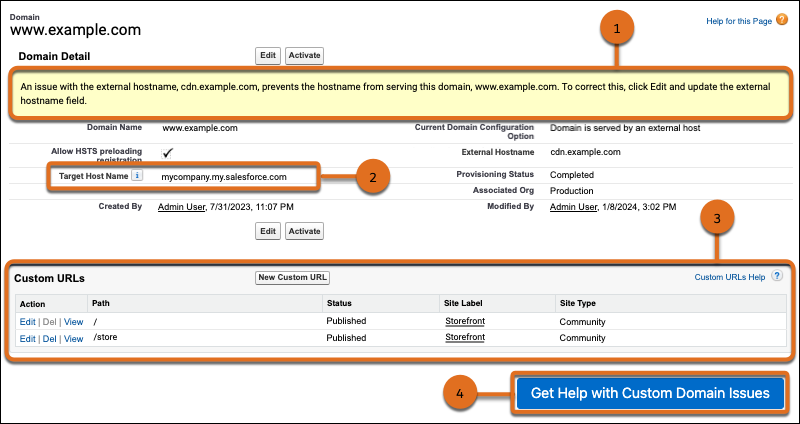
When you access this page, Salesforce validates that your domain points to your Salesforce org. If that validation fails, a warning message provides next steps (1). If that validation succeeds, a message reminds you to keep the DNS record pointed to the internal CNAME for this org.
If your domain is served by an external host, the target host name field shows the value that your third party provider uses to point your domain to your org (2).
To browse or search for information on custom domain setup, maintenance tasks, and common configuration issues, click Get Help with Custom Domain Issues (4).
In the Custom URLs list (3), you can manage the custom URLs associated with this domain. To go to the site associated with a custom URL, click the site label.
These are the custom URL statuses.
Status What It Means Offline The custom URL is associated with an inactive site. Preview The custom URL is active for an Experience Cloud site with a status of Preview. Published The custom URL is active and is associated with a site that is live. Publish Failed There was an unexpected issue with the background publishing operation for site associated with the custom URL. This status is assigned to the custom URL after the background publishing operation was attempted every hour for two weeks without success. Publishing Salesforce is publishing the custom URL in the background. If this custom URL was previously published, the custom URL remains available throughout the publishing process. Awaiting Publish The custom URL is ready to be published from within Site.com Studio.
This status applies only to legacy Site.com sites when no sites of other types exist on the same domain.
Awaiting Unpublish The custom URL was removed but is still published. To finish deleting the custom URL, click Unpublish in Site.com Studio.
This status applies to legacy Site.com sites only.
In Development The custom URL is ready to be published.
This status applies to legacy Site.com sites.
