Align Fields Horizontally in Dynamic Form Field Sections
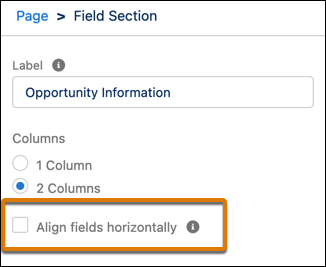
Control field alignment across columns by using the Align fields horizontally property
on Dynamic Forms Field Section components. This property prevents fields in multicolumn Field
Sections from collapsing upward when there’s a gap due to differences in field heights. Fields
remain horizontally aligned with their neighbors in the same row.
Required Editions
Available in: Lightning Experience
Available in: Group, Professional, Enterprise,
Performance, Unlimited, and Developer Editions
User Permissions
Needed
To create and save Lightning pages in the Lightning App Builder:
Customize Application
To enable this property, click a Field Section component on a Dynamic Forms-enabled page in
Lightning App Builder.
Note Even with the property enabled, if a field is hidden because of visibility rules, the
fields in its column still collapse upward to fill the empty space.
Example
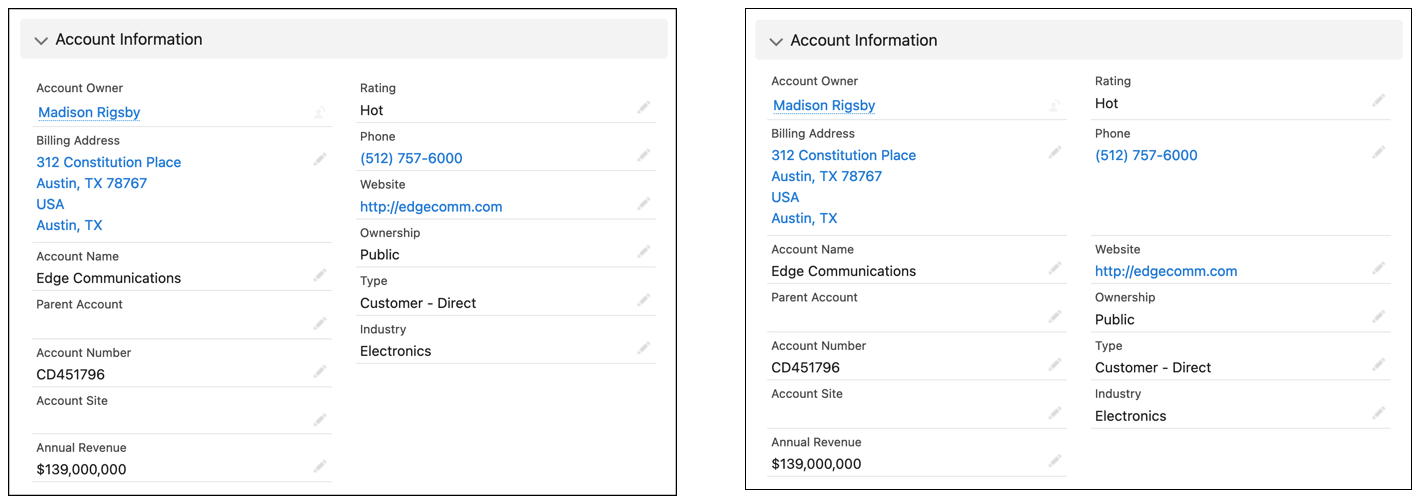
In this example,two versions of the same field section contain account fields. The left image
shows the behavior when the property isn’t enabled. On the right, the horizontal alignment
setting is enabled, causing the Website field to stay aligned horizontally with Account Name
instead of collapsing upward.
We use three kinds of cookies on our websites: required, functional, and advertising. You can choose whether functional and advertising cookies apply. Click on the different cookie categories to find out more about each category and to change the default settings.
Privacy Statement
Required Cookies
Always Active
Required cookies are necessary for basic website functionality. Some examples include: session cookies needed to transmit the website, authentication cookies, and security cookies.
Functional Cookies
Functional cookies enhance functions, performance, and services on the website. Some examples include: cookies used to analyze site traffic, cookies used for market research, and cookies used to display advertising that is not directed to a particular individual.
Advertising Cookies
Advertising cookies track activity across websites in order to understand a viewer’s interests, and direct them specific marketing. Some examples include: cookies used for remarketing, or interest-based advertising.