
Break Up Your Record Details with Dynamic Forms
The more fields that there are on your page layout, the more that the Record Detail component becomes a monolithic block of fields that you can’t customize. With Dynamic Forms, you can migrate the fields and sections from your page layout to individual components in Lightning App Builder. Then you can configure them the same way as the other components on the page - spreading them out across multiple columns and tabs, and dynamically showing and hiding them based on record data, user details, and device type, so that your users get only the fields and sections that they want.
Required Editions
| Available in: Lightning Experience |
Available in: Group, Professional, Enterprise, Performance, Unlimited, and Developer Editions |
Dynamic Forms provides:
- An instant upgrade from page layouts: Place fields and sections wherever you want, and use blank spaces to align fields.
- Dynamic layouts: Use visibility rules to show and hide fields and sections.
- Simpler layout management:
- Manage the fields and sections on your pages in the Lightning App Builder without touching the page layout editor.
- Reduce the number of page layouts and record types you need with component visibility rules.
- Get a single assignment model for the Lightning page instead of the dual model of assigning a Lightning page and a page layout.
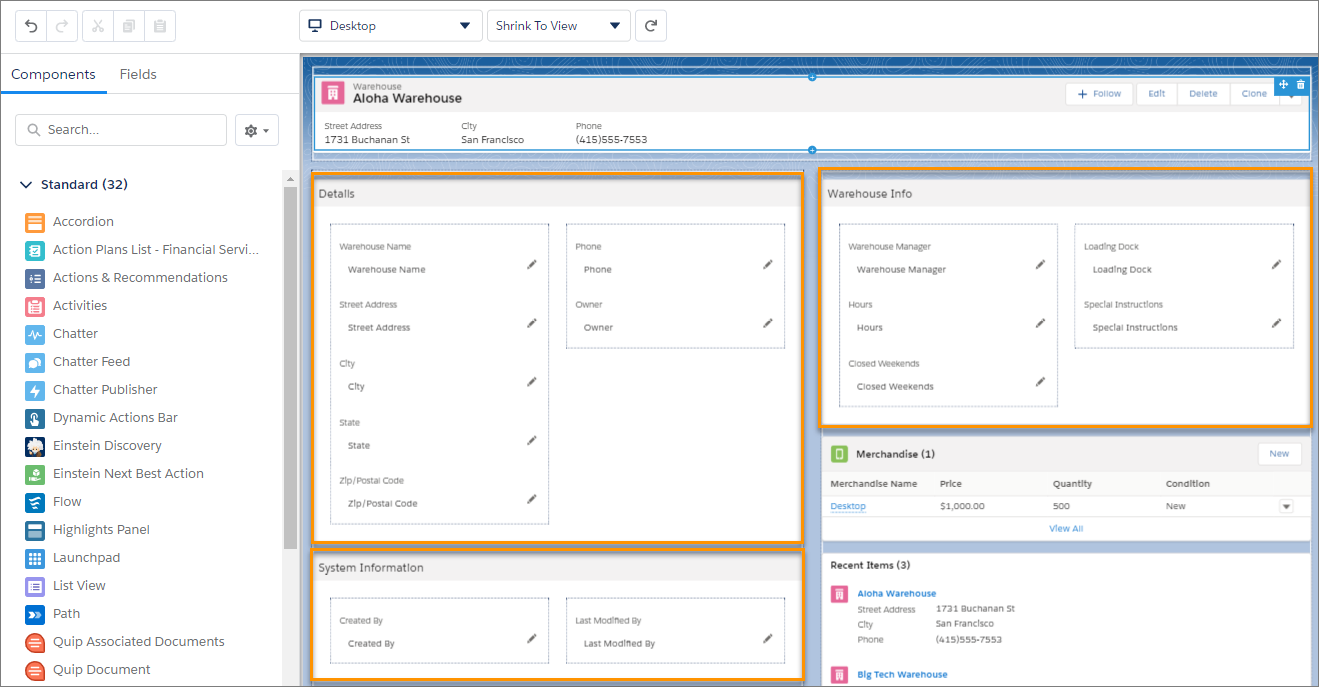
Some pages have Dynamic Forms enabled by default. For those that don't, you can start using Dynamic Forms in two ways.
- Create a Lightning page from scratch, then drag Field and Field Section components onto it.
- Open an existing record page and migrate its record details using the migration wizard.
Dynamic Forms doesn’t only affect how your users see fields on a record page. It also affects what they see when they click to edit, create, or clone a record. On Dynamic Forms-based pages, the fields that users see when creating, editing, or cloning come from the fields on the page, not from the page layout.
Dynamic Forms is supported for most, but not all standard LWC-enabled objects. See LWC Migration for Record Home Pages for a list of LWC-enabled objects. If you open a record page for an object in the Lightning App Builder and don't see a Fields tab in the component panel, then Dynamic Forms isn't supported for that object. As an example, the Note object doesn’t support Dynamic Forms because it has a fixed layout. Dynamic Forms isn’t supported on objects that aren’t LWC-enabled. For example, Campaigns, Products, and Tasks, which aren’t LWC-enabled, use information from page layout.
Section header labels on Dynamic Forms-enabled pages support using the
{!$Label.customLabelName} expression to help define
the label’s value. See Build Localized Component Labels and Attribute Values on Lightning Pages with Custom Labels.

- Migrate a Record Page to Dynamic Forms
Some pages have Dynamic Forms enabled by default. For those that don't, you can migrate the fields and sections from your existing record pages as individual components in the Lightning App Builder. Then you can configure them the same way as the other components on the page, so that your users get only the fields and sections that they want. If you have save options on your account, case, or lead record pages, they are migrated. - Required and Read-Only Fields in Dynamic Forms
Universally required fields retain their status when you’re working with them on a Dynamic Forms-based Lightning page. But you can make other fields required or read-only just for the page that you’re working on. - Cross-Object Fields in Dynamic Forms
Drill into lookup relationship fields from the component palette on Dynamic Forms-enabled pages in the Lightning App Builder, and access fields from related objects. Drag the cross-object fields onto your record page to display relevant data from related objects. - Align Fields Horizontally in Dynamic Form Field Sections
Control field alignment across columns by using the Align fields horizontally property on Dynamic Forms Field Section components. This property prevents fields in multicolumn Field Sections from collapsing upward when there’s a gap due to differences in field heights. Fields remain horizontally aligned with their neighbors in the same row. - Record Page Save Options in Lightning App Builder
With save options, you can define object-specific checkboxes that can be configured as part of a Dynamic Forms-enabled record save. Save options are available when editing an account or when creating, editing, or cloning a case or lead. Optionally, you can set the checkboxes to be selected by default. - Dynamic Forms and Mobile Using the Record Detail - Mobile Component
The Dynamic Forms Field Section component and the Field components that go inside were previously only available on desktop. To support mobile users, the Record Detail - Mobile component gives your mobile users a way to see the record details on their mobile devices on a Dynamic Forms-enabled page. - Enable Dynamic Forms on Mobile
With Dynamic Forms on Mobile, your mobile users can have the same customized experience that your desktop users have. - Dynamic Forms on Mobile Considerations
Keep these considerations in mind when working with Dynamic Forms on Mobile. - Dynamic Forms Tips and Considerations
Keep these tips and considerations in mind when working with Dynamic Forms. - Dynamic Forms Limitations
Keep these general, migration, and packaging limitations in mind when working with Dynamic Forms. - Dynamic Forms Known Issues
Keep these known issues in mind when working with Dynamic Forms.
