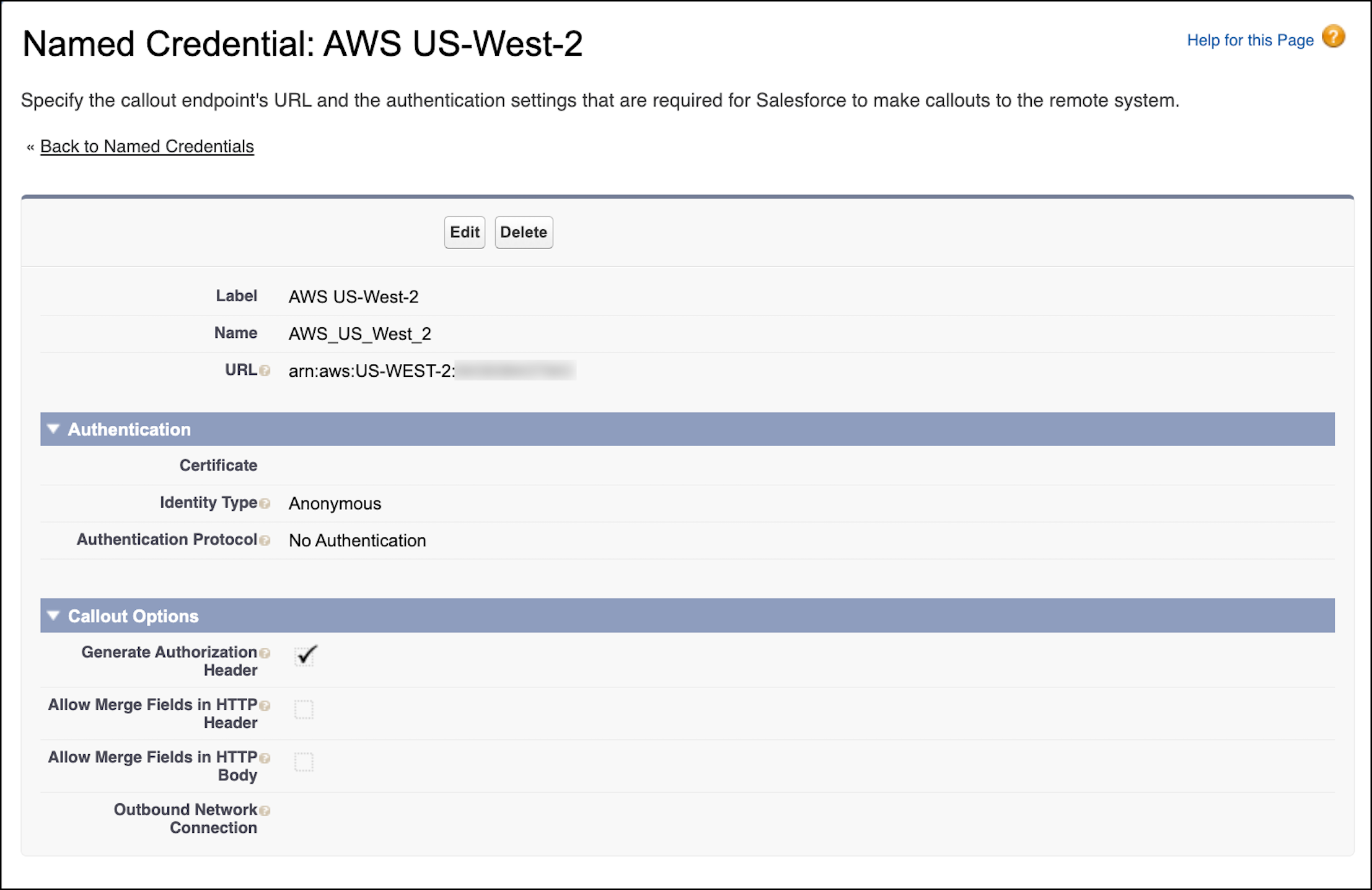
A named credential stores your AWS account information. You use the named credential
later to set up an event relay. You can create a named credential in the Salesforce user
interface in Setup.
Required Editions
User
Permissions Needed
To create a named credential:
Customize Application
From Setup, in the Quick Find box, enter Named
Credentials, and then select Named
Credentials.
Expand the dropdown next to New, and then click
New Legacy.
Complete the fields.
For Label, enter AWS
US-West-2.
For Name, enter
AWS_US_West_2.
For URL, enter a URL in the format arn:aws:aws_region:aws_account_number.
Replace the aws_region placeholder with your AWS
region. Replace the aws_account_number placeholder with
your 12-digit AWS account ID.
The URL is case-sensitive, and aws_region must be
in capital letters. For example, the URL for an account in the US-WEST-2
region has this format: arn:aws:US-WEST-2:XXXXXXXXXXXX. (XXXXXXXXXXXX is a placeholder for the
12-digit AWS account ID.)
Keep the default values for Identity Type and
Authentication Protocol.
Keep Generate Authorization Header
selected.
Save your changes.
Important You can’t modify the AWS account information in a named
credential if it has an associated event relay. The event relay doesn’t pick up the
new settings and can fail to run properly. To change the AWS account information,
delete the associated event relay first. Next, modify the named credential, and then
recreate the event relay with the named credential.
We use three kinds of cookies on our websites: required, functional, and advertising. You can choose whether functional and advertising cookies apply. Click on the different cookie categories to find out more about each category and to change the default settings.
Privacy Statement
Required Cookies
Always Active
Required cookies are necessary for basic website functionality. Some examples include: session cookies needed to transmit the website, authentication cookies, and security cookies.
Functional Cookies
Functional cookies enhance functions, performance, and services on the website. Some examples include: cookies used to analyze site traffic, cookies used for market research, and cookies used to display advertising that is not directed to a particular individual.
Advertising Cookies
Advertising cookies track activity across websites in order to understand a viewer’s interests, and direct them specific marketing. Some examples include: cookies used for remarketing, or interest-based advertising.