You are here:
Event Integration with Amazon Eventbridge
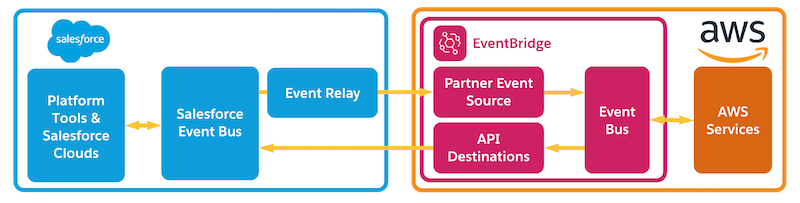
After creating the event relay in Salesforce, the event relay creates a partner event source in EventBridge. You associate the partner event source with an event bus. After you start the event relay in Salesforce, the event bus in EventBridge receives the events published and relayed from the Salesforce event bus. You can process the received events using AWS services.
For more information, see Amazon EventBridge Partner Onboarding Guide in the AWS documentation.
Process Events in Amazon EventBridge Using Rules
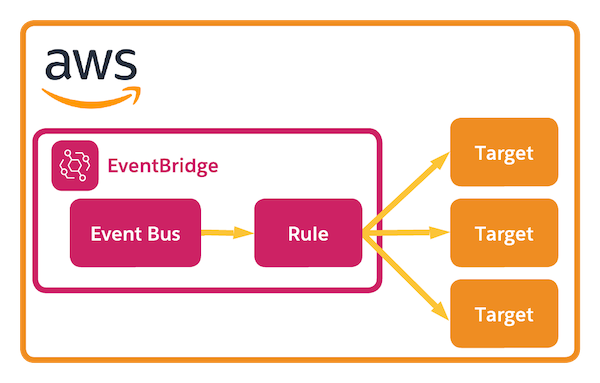
When you publish an event to the Salesforce event bus, Salesforce relays the event to AWS using the connection that is set up through the event relay configuration. After events are received in Amazon EventBridge from Salesforce, you can process the received events in EventBridge using rules.
Rules match incoming events in an event bus and assign them to targets. Use targets, such as AWS services, to perform actions on events. You can add one or more targets to a rule. With rules, you can filter on the payload so that you can send specific events to specific targets. For more information, see Amazon EventBridge rules and Amazon EventBridge targets in the AWS documentation.