
External Lookup Relationship Fields on External Objects
Use an external lookup relationship when the parent is an external object.
Required Editions
An external lookup relationship links a child standard, custom, or external object to a parent external object.
The values of the standard External ID field on the parent external object are matched against the values of the external lookup relationship field. For a child external object, the values of the external lookup relationship field come from the specified External Column Name.
When you sync two external system tables with a lookup relationship field, an external lookup relationship for the mapped external objects is automatically created. This auto mapping happens only if
- The parent and child objects are synced from the same data source.
- The parent object is already synced or the parent and child objects are in the same sync operation.

Note For the OData 2.0 adapter, creating an external lookup relationship is supported only in
the default Olingo library and not supported in OData4J.

Example
- External product catalog item (parent external object) displays a related list of support cases (child standard object).
- External customer (parent external object) displays a related list of external orders (child external object).
Example For the cross-org adapter for Salesforce Connect, suppose that you store contacts and
accounts in the provider org. From the subscriber org, you want to view each account’s related
contacts. To do so, create an external lookup field on the subscriber org’s Contact external
object. Link that external lookup field to the subscriber org’s Account external object. Then
set up the page layouts for the Account external object to include a related list that
displays the related Contact external object records.
Example In this screenshot, a record detail page for the Business_Partner external object
includes two related lists of child objects. This example shows how external lookup
relationships and page layouts enable users to view related data from within and from outside
their Salesforce org on a single page.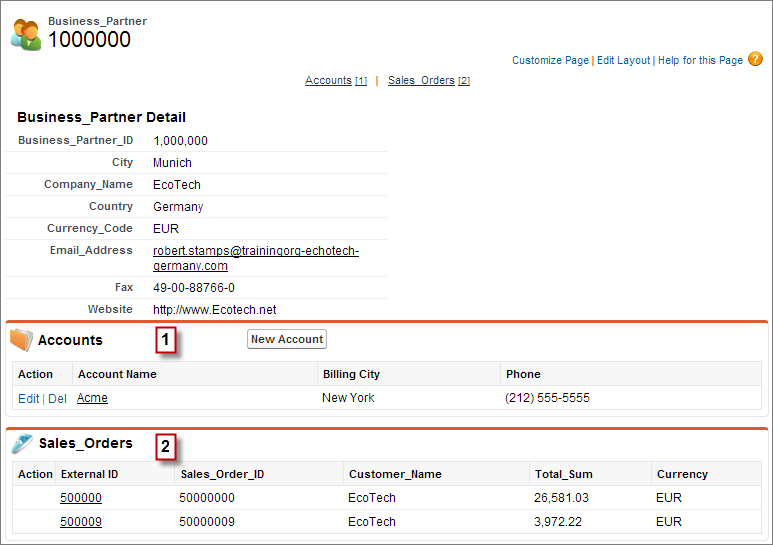
- Account standard object (1)
- Sales_Order external object (2)
Did this article solve your issue?
Let us know so we can improve!
