We use three kinds of cookies on our websites: required, functional, and advertising. You can choose whether functional and advertising cookies apply. Click on the different cookie categories to find out more about each category and to change the default settings.
Privacy Statement
Required Cookies
Always Active
Required cookies are necessary for basic website functionality. Some examples include: session cookies needed to transmit the website, authentication cookies, and security cookies.
Functional Cookies
Functional cookies enhance functions, performance, and services on the website. Some examples include: cookies used to analyze site traffic, cookies used for market research, and cookies used to display advertising that is not directed to a particular individual.
Advertising Cookies
Advertising cookies track activity across websites in order to understand a viewer’s interests, and direct them specific marketing. Some examples include: cookies used for remarketing, or interest-based advertising.
View all External Services auto-generated Apex classes in the Apex Class viewer in
Setup.
Required Editions
Available in: Lightning Experience
Available in: Enterprise, Performance,
Unlimited, and Developer Editions
As an example, let’s examine the BankServices’ Apex classes.
From Setup, in the Quick Find box, enter Apex Classes,
and then select Apex Classes.
Scroll down to Dynamic Apex Classes.
To filter the view, click Create New View.
Enter a View Name.
Under Filter By Additional Fields (optional), select
Field - Class Name
Operator - starts with
Value - “BankService”
Save your changes.
Now the list includes only classes that begin with “BankService”.
To see the external service associated with your class, click
Open under the Action column.
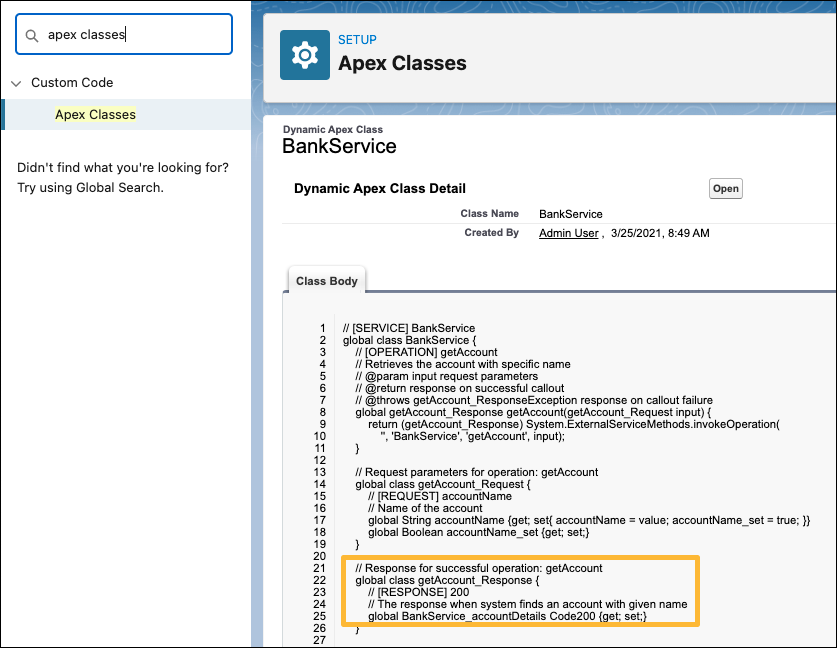
To see details about the Apex class, click the Class Name. In this example, click
BankService. In this detailed view, you can see all of
the Apex names. The order of components is the same as they appeared in the original
JSON-formatted schema. Operations, Requests, and Responses are highlighted in all
caps to make it easier to browse the Apex code. In this partial snippet, you can
view the details for BankService_accountDetails.