
Using the Schema Examples
See how the respective Open API 2.0 and 3.0 examples are implemented with Apex.
Required Editions
| Available in: Lightning Experience |
| Available in: Enterprise, Performance, Unlimited, and Developer Editions |
For Examples 9: allOf Composition and additionalProperties Use in Flow with Apex Unit Tests
The External Services registration MyBank from
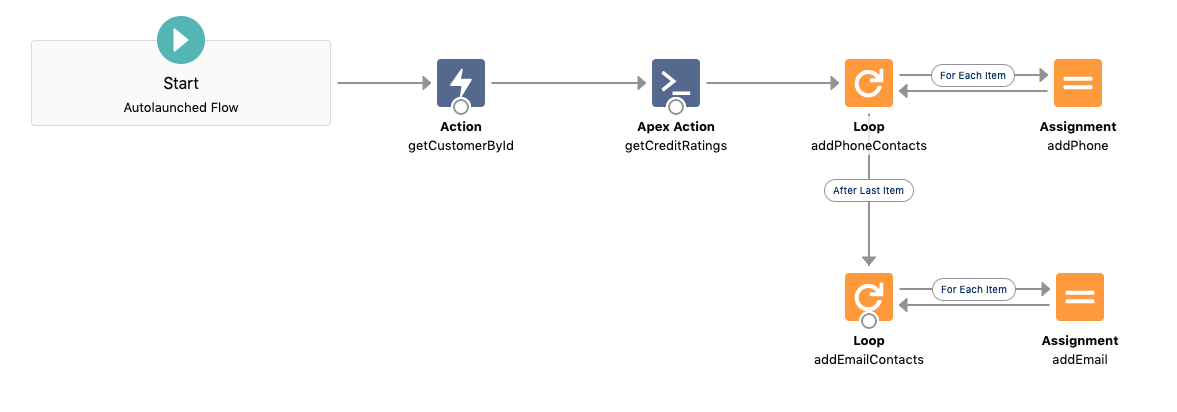
Example 9 (from both OpenAPI 2.0 and 3.0 examples) is invoked by a sample flow that
accesses the dictionary properties with an Apex invocable action. A flow Apex unit
test ties it all together.
public class MyBankGetCreditRatings {
    @InvocableMethod(
        label='Get Credit Ratings'
        description='A list of credit ratings for a customer'
        category='MyBank'
    )
    public static List<CustomerCreditRatings>
    getCreditRatings(List<Customer> inCustomers) {

        List<CustomerCreditRatings> outCreditRatingsList =
            new List<CustomerCreditRatings>();
        for (Customer inCustomer: inCustomers) {
            ExternalService.MyBank_Customer customer = inCustomer.customer;
            CustomerCreditRatings outCreditRatings = new CustomerCreditRatings();
            outCreditRatings.customerId = customer.id;
            outCreditRatings.creditRatings =
                new List<ExternalService.MyBank_CreditRating>();

            Map<String, ExternalService.MyBank_CreditRating> creditRatings =
                customer.properties;
            for (String ratingProperty: creditRatings.keySet()) {
                ExternalService.MyBank_CreditRating creditRating =
                    creditRatings.get(ratingProperty);
                outCreditRatings.creditRatings.add(creditRating);
            }

            outCreditRatingsList.add(outCreditRatings);
        }

        return outCreditRatingsList;
    }

    public class Customer {
        @InvocableVariable(
            label='Customer'
            description='Banking customer'
            required=true
        )
        public ExternalService.MyBank_Customer customer;
    }

    public class CustomerCreditRatings {
        @InvocableVariable(
            label='Customer ID'
            description='Bank customer ID'
            required=true
        )
        public Integer customerId;

        @InvocableVariable(
            label='Credit Ratings'
            description='Credit ratings for a customer'
            required=true
        )
        public List<ExternalService.MyBank_CreditRating> creditRatings;
    }
}
The flow starts by calling the external MyBank
service action getCustomerById to get the
customer details given a customer ID. The Apex invokable flow action getCreditRatings gets the list of credit ratings
from the customer details. Phone and email contact details are formatted as a list
of customer contacts by looping through the phones and emails properties and
assigning the formatted value to the contacts
list.
The HTTP callout mock asserts an expected request and responds with a sample customer as application/json:
public class MyBankGetCustomerCalloutMock implements HttpCalloutMock {
    public HTTPResponse respond(HTTPRequest request) {
        // Assert expected request test data: customer ID in the request path
        System.assertEquals('GET', request.getMethod());
        System.assertEquals('callout:MyBank/v1/customers/42', request.getEndpoint());

        // Send response test data: customer details with sample ratings
        // as additional properties and sample contacts
        HttpResponse response = new HttpResponse();
        response.setHeader('Content-Type', 'application/json');
        response.setBody('{' +
            '"id": 42, "name": "Foo Bar", "phones": [' +
            '  {"primary": true,  "timeOfDay": "Daytime", ' +
            '      "typeOfPhone": "Mobile", "phoneNumber": "555-5555"},' +
            '  {"primary": false, "timeOfDay": "Evening", ' +
            '      "typeOfPhone": "Landline", "phoneNumber": "222-5555"}' +
            '], "emails": [' +
            '  {"primary": true, "timeOfDay": "AllDay", "email": "fooBar@acme.org"}' +
            '],' +
            '"rating1": {"rating": "Rating 1", "score": 0.95}, ' +
            '"rating2": {"rating": "Rating 2", "score": 0.78}' +
        '}');
        response.setStatusCode(200);
        return response;
    }
}
application/json and the JSON properties are
compliant with Apex identifier characters:ExternalService.MyBank_Customer customer = new ExternalService.MyBank_Customer();
customer.id = 42;
...
customer.properties = new Map<String, ExternalService.MyBank_CreditRating>();
ExternalService.MyBank_CreditRating creditRating = new ExternalService.MyBank_CreditRating();
creditRating.rating = 'Rarging 1';
creditRating.score = 0.95;
customer.properties.put('rating1', creditRating);
...
response.setBody(System.JSON.serialize(customer));
....
The Apex unit test sets up the HTTP callout mock and asserts the expected credit ratings and customer contacts:
@IsTest
public class MyBankFlowTest {
    @IsTest
    static public void testGetCustomer() {
        // Set HTTP callout mock to match flow's external service action invocation
        Test.setMock(HttpCalloutMock.class, new MyBankGetCustomerCalloutMock());

        // Set flow input variables and create the flow interview
        Map<String, Object> inputVariables = new Map<String, Object>();
        inputVariables.put('customerId', 42);
        Flow.Interview myBankFlow = Flow.Interview.createInterview('MyBank', inputVariables);

        // Start flow interview with set input variables
        myBankFlow.start();

        // Assert customer's expected credit ratings
        List<ExternalService.MyBank_CreditRating> creditRatings =
            (List<ExternalService.MyBank_CreditRating>)myBankFlow.
                getVariableValue('creditRatings');
        System.assertEquals(2, creditRatings == null ? 0 : creditRatings.size());
        ExternalService.MyBank_CreditRating actualRating = creditRatings.get(1);
        ExternalService.MyBank_CreditRating expectedRating =
            new ExternalService.MyBank_CreditRating();
        expectedRating.rating = 'Rating 2';
        expectedRating.score = 0.78;
        System.assertEquals(expectedRating.toString(), actualRating.toString());

        // Assert customer's contacts:
        List<String> contacts = (List<String>)myBankFlow.getVariableValue('*contacts*');
        System.assertEquals(3, contacts == null ? 0 : contacts.size());
        System.assertEquals('Phone Number: 555-5555', contacts.get(0));
        System.assertEquals('Phone Number: 222-5555', contacts.get(1));
        System.assertEquals('Email: fooBar@acme.org', contacts.get(2));
    }
}
For another example of a flow Apex unit test, see Testing External Services.
For Examples 9: allOf Composition and additionalProperties Use in Apex with Apex Unit Tests
The External Services registration MyBank from
Example 9 (from both OpenAPI 2.0 and 3.0 examples) is invoked by a sample Apex class
that accesses the dictionary properties. An Apex unit test ties it all together.
The class CustomerCreditRating captures the
customer’s detail suitable for further processing. It’s possible to directly use the
external service’s response output data structure. As a good practice, decouple your
business relevant data structure from external dependencies:
public class CustomerCreditRating {
    public Integer Id {get; private set;}
    public String Name {get; private set;}

    private List<String> emails;
    private List<String> phoneNumbers;
    private Map<String, Integer> ratings;

    public CustomerCreditRating(Integer customerId, String name) {
        this.Id = customerId;
        this.Name = name;
        this.emails = new List<String>();
        this.phoneNumbers = new List<String>();
        this.ratings = new Map<String, Integer>();
    }

    public void addEmail(String email) {
        emails.add(email);
    }

    public void addPhoneNumber(String phoneNumber) {
        this.phoneNumbers.add(phoneNumber);
    }

    public List<String> getContacts() {
        List<String> contacts = new List<String>();
        for (String phoneNumber: phoneNumbers) {
            contacts.add('Phone Number: ' + phoneNumber);
        }
        for (String email: emails) {
            contacts.add('Email: ' + email);
        }
        return contacts;
    }

    public void addRating(String ratingType, Integer ratingScore) {
        ratings.put(ratingType, ratingScore);
    }

    public Set<String> getRatingTypes() {
        return ratings.keySet();
    }

    public Integer getRatingScore(String ratingType) {
        return ratings.get(ratingType);
    }
}
The Apex class MyBankCustomerCreditRating starts
by calling the external MyBank service action
getCustomerById to get the customer details
given a customer ID. The Apex method getCreditRating gets the credit rating from the customer details.
Phone and email contact details are formatted as a list of customer contacts by
looping through the phones and emails properties and assigning the formatted value
to the contacts list:
public class MyBankCustomerCreditRating {
    public class MyBankException extends Exception {}

    public CustomerCreditRating getCreditRating(Integer customerId) {
        // Get customer credit rating from an external bank rating service
        // Construct the external service registration MyBank
        ExternalService.MyBank myBank = new ExternalService.MyBank();

        // Make the callout to get the customer by ID.
        // The response is the customer detail for HTTP code 200
        ExternalService.MyBank_Customer customer;
        try {
             ExternalService.MyBank.getCustomersByCustomerId_Request request =
                new ExternalService.MyBank.getCustomersByCustomerId_Request();
             request.customerId = customerId;
             customer = myBank.getCustomersByCustomerId(request).Code200;
        } catch (ExternalService.MyBank.getCustomersByCustomerId_ResponseException e) {
            // An HTTP failure code is thrown as exception -
            // captured and translated to a meaningful error
            throw new MyBankException(
                'Credit rating not available for customer ID: '
                + customerId);
        }

        // Gather the customer name, contacts and credit ratings
        // from the callout's response data
        CustomerCreditRating customerRating =
            new CustomerCreditRating(customerId, customer.name);
        for (ExternalService.MyBank_Email email: customer.emails) {
            customerRating.addEmail(email.email);
        }
        for (ExternalService.MyBank_Phone phone: customer.phones) {
            customerRating.addPhoneNumber(phone.phoneNumber);
        }
        for (String ratingType: customer.properties.keySet()) {
            ExternalService.MyBank_CreditRating rating =
                customer.properties.get(ratingType);
            Integer ratingPercent = (Integer)(rating.score * 100.0);
            customerRating.addRating(ratingType, ratingPercent);
        }

        return customerRating;
    }
}
You can share the same HTTP mock callout class for your Apex integration. The corresponding Apex unit test class tests the Apex credit rating logic:
@IsTest
public class MyBankCustomerRatingTest {
    @IsTest
    static public void testGetCustomerRating() {
        // Set HTTP callout mock to match Apex's external service callout
        Test.setMock(HttpCalloutMock.class, new MyBankGetCustomerCalloutMock());

        // Call the Apex MyBankCustomerRating class
        MyBankCustomerCreditRating myBankCreditRating = new MyBankCustomerCreditRating();
        CustomerCreditRating creditRating = myBankCreditRating.getCreditRating(42);

        // Assert customer's expected credit ratings
        System.assertEquals(2, creditRating.getRatingTypes().size());
        Integer actualRatingScore = creditRating.getRatingScore('rating2');
        Integer expectedRatingScore = 78;
        System.assertEquals(expectedRatingScore, actualRatingScore);

        // Assert customer's contacts:
        List<String> contacts = creditRating.getContacts();
        System.assertEquals(3, contacts.size());
        System.assertEquals('Phone Number: 555-5555', contacts.get(0));
        System.assertEquals('Phone Number: 222-5555', contacts.get(1));
        System.assertEquals('Email: fooBar@acme.org', contacts.get(2));
    }
}
For Examples 10: Polymorphism with allOf and Discriminator
The discriminator directive can be combined with
allOf to define the composition's
polymorphic type. Polymorphic types are marked with the suffix _KT_PT in the Apex object name. Work with
polymorphic extension types through its polymorphic object type.
This example illustrates how to interact with polymorphic types in Apex with the OpenAPI spec from Example 10. Contact is the base type. Phone and Email are polymorphic extension types modeling contact types that can be assigned to a list of contacts for a customer:
// The customer
ExternalService.MyBank_Customer customer = new ExternalService.MyBank_Customer();

// The primary phone contact wrapped as polymorphic type Contact_KT_PT
ExternalService.MyBank_Phone mobile = new ExternalService.MyBank_Phone();
mobile.primary = true;
mobile.typeOfPhone = 'Mobile';
mobile.phoneNumber = '555-5555';
ExternalService.MyBank_Contact_KT_PT cMobile =new ExternalService.MyBank_Contact_KT_PT();
cMobile.phone = mobile; // cMobile is a phone contact

// Customer's secondary home phone contact
ExternalService.MyBank_Phone home = new ExternalService.MyBank_Phone();
home.primary = false;
home.typeOfPhone = 'Home';
home.phoneNumber = '444-4444';
ExternalService.MyBank_Contact_KT_PT cHome = new ExternalService.MyBank_Contact_KT_PT();
cHome.phone = home; // cHome is a phone contact

// Customer's email
ExternalService.MyBank_Email email = new ExternalService.MyBank_Email();
email.primary = true;
email.email = 'someone@somewhere.org';
ExternalService.MyBank_KT_PT cEmail = new ExternalService.MyBank_Contact_KT_PT();
cEmail.email = email; // cEmail is an email contact

// Adding mobile, home phone and email as contacts to the customer contacts list
customer.contacts = new List<ExternalService.MyBank_Contact_KT_PT>();
customer.contacts.add(cMobile);
customer.contacts.add(cHome);
customer.contacts.add(cEmail);

// Send an email to a customer's primary email contacts
for (ExternalService.MyBank_Contact_KT_PT contact: customer.contacts) {
  if (contact.email != null && contact.email.primary) {
    String emailAddress = contact.email.email;
    // Sending email to email address
    ...
  }
}
For Example 11 (Open API 3.0): AnyOf, OneOf, and Discriminator
oneOf or anyOf define the composition's type - either one of the schema
constructs can be used or any of them. Composition schema types can be accessed
through the corresponding composition type's properties as follows:
- A named schema
Namereferenced as composition schema:anyOfNameoroneOfName. - An inline composition schema object:
anyOfObjectoroneOfObject. If more than one inline object is declared in the composition, then the declaration order is added as a sequence number suffix. For example,oneOfObject1,oneOfObject2for first and second composition type respectively. - An inline composition schema array:
anyOfArrayoroneOfArray. If more than one inline array is declared in the composition, then the declaration order is added as a sequence number suffix. For exampleoneOfArray1,oneOfArray2. - An inline composition primitive type:
anyOfTypeNameoroneOfTypeName. If the same type is referenced in the inline composition, then like types are suffixed with their declaration order in the spec - for exampleanyOfString1,anyOfString2.
This example illustrates how to interact with anyOf and oneOf types in Apex
with the OpenAPI spec from Example 11. Contact
is the base type. Phone and Email are polymorphic extension types modeling
contact types that can be assigned to a list of contacts for a customer. A customer
can be identified by any one of social security number, driver's license or first
and last name and optional middle name:
ExternalService.MyBank_Customer customer = new ExternalService.MyBank_Customer();

// Setting the customer ID
customer.id = new ExternalService.MyBank_Customer_id();
// Setting the social security security number
customer.id.anyOfSSN.ssn = '555-55-5555';
// Setting the customer's first and last name without a middle name
customer.id.anyOfFullName = new ExternalService.MyBank_FullName();
customer.id.anyOfFullName.firstName = 'Somefirstname';
customer.id.anyOfFullName.lastName = 'Somelastname';

// Customer contacts
ExternalService.MyBank_Phone mobile = new ExternalService.MyBank_Phone();
mobile.typeOfPhone = 'Mobile';
mobile.phoneNumber = '555-5555';
ExternalService.MyBank_Contact cMobile = new ExternalService.MyBank_Contact();
cMobile.oneOfPhone = mobile;

ExternalService.MyBank_Phone home = new ExternalService.MyBank_Phone();
home.typeOfPhone = 'Home';
home.phoneNumber = '444-4444';
ExternalService.MyBank_Contact cHome = new ExternalService.MyBank_Contact();
cHome.oneOfPhone = home;

ExternalService.MyBank_Email email = new ExternalService.MyBank_Email();
email.email = 'someone@somewhere.org';
ExternalService.MyBank_Contact cEmail = new ExternalService.MyBank_Contact();
cEmail.oneOfEmail = email;

customer.contacts = new List<ExternalService.MyBank_Contact>();
customer.contacts.add(cMobile);
customer.contacts.add(cHome);
customer.contacts.add(cEmail);

// Sending the customer's known identities to the customer's email address
String emailContact = null;
for (ExternalService.MyBank_Contact contact: customer.contacts) {
    if (contact.oneOfEmail != null) {
        emailContact = contact.oneOfEmail.email;
    }
}
if (emailContact != null) {
    String subject = 'Your identity';
    String body = 'These are the identities we\'ve found: \n';
    if (customer.id.anyOfSSN != null) {
        body += '  - Social Security Number: ' + customer.id.anyOfSSN.ssn + '\n';
    }
    if (customer.id.anyOfDriversLicense != null) {
        body += '  - Driver\'s License: ' + customer.id.anyOfDriversLicense.dl + '\n';
    }
    if (customer.id.anyOfFullName != null) {
        body += '  - First name: ' + customer.id.anyOfFullName.firstName + '\n';
        if (customer.id.anyOfFullName.middleName != null) {
            body += '    Middle name: ' + customer.id.anyOfFullName.middleName + '\n';
        }
        body += '    Last name: ' + customer.id.anyOfFullName.lastName + '\n';
    }
    ...
}
For Example 13 (Open API 3.0): Binary File Upload
The example Apex types in this section refer to Example 13: File Upload and Download (OAS 3.0). First, you register an external service with a PUT operation that contains the
name of the file to upload and a binary requestBody. Here, the
external service registration in the org is named s3. This example
first creates an instance of the s3 external service and then
creates an instance of the putObject operation. It sets these input
parameter values on the request object.
key—The name of the file after it’s uploaded to the external system.Contentx2dType—The content type.body—The ID of the file (stored as a ContentDocument) in the org.
You can test this snippet by running it in the Developer Console. The file hello.jpeg will be uploaded to the external location.
// Upload File
ExternalService.s3 fileService = new ExternalService.s3();
ExternalService.s3.putObject_Request request = new ExternalService.s3.putObject_Request();
request.key = 'hello.jpeg';
request.Contentx2dType = 'image/jpeg';
request.body = '123ABC00000123PXYZ';

try {
    ExternalService.s3.putObject_Response response = fileService.putObject(request);

    if (response.responseCode == 200) {
        System.debug('Success |' + response);
    }
} catch (ExternalService.s3.putObject_ResponseException e) {
    if (e.responseCode == 400) {
        System.debug('Bad request: ' + e.Code400);
    } else if (e.responseCode == 404) {
        System.debug('Object not found: ' + e.Code404);
    } else if (e.responseCode == 500) {
        System.debug('Internal server error: ' + e.Code500);
    } else {
        System.debug('Unexpected error: ' + e.defaultResponse);
    }
}
For Example 13 (Open API 3.0): Binary File Download
The example Apex types in this section refer to Example 13: File Upload and Download (OAS 3.0). First, you register an external service with a GET operation that contains the
name of the file to download and a binary content object in the
response. Here, the external service registration in the org is named
s3. This example first creates an instance of the
s3 external service and then creates an instance of the
getObject operation. It sets these input parameter values on
the request object.
key—The name of the file to download from the external system.
You can test this snippet by running it in the Developer Console. The file test.jpeg will be downloaded from the external location.
// Download File
ExternalService.s3 fileService = new ExternalService.s3();
ExternalService.s3.getObject_Request request = new ExternalService.s3.getObject_Request();
request.key = 'test.jpeg';

try {
    ExternalService.s3.getObject_Response response = fileService.getObject(request);

    if (response.responseCode == 200) {
        System.debug('Success |' + response);
    }
} catch (ExternalService.s3.getObject_ResponseException e) {
    if (e.responseCode == 403) {
        System.debug('Access denied: ' + e.Code403);
    } else if (e.responseCode == 404) {
        System.debug('Object not found: ' + e.Code404);
    } else if (e.responseCode == 500) {
        System.debug('Internal server error: ' + e.Code500);
    } else {
        System.debug('Unexpected error: ' + e.defaultResponse);
    }
}
