
使用模式示例
查看如何使用 Apex 实施各自的 Open API 2.0 和 3.0 示例。
所需的 Edition
| 适用于:Lightning Experience |
| 适用于:Enterprise、Performance、Unlimited 和 Developer Edition |
对于示例 9:在带有 Apex 单元测试的流中使用allOf Composition 和 additionalProperties
示例 9 中的外部服务注册MyBank(来自 OpenAPI 2.0 和 3.0 示例)由示例流调用,该示例流通过 Apex 可调用操作访问字典属性。流 Apex 单元测试将所有这些联系在一起。
public class MyBankGetCreditRatings {
    @InvocableMethod(
        label='Get Credit Ratings'
        description='A list of credit ratings for a customer'
        category='MyBank'
    )
    public static List<CustomerCreditRatings>
    getCreditRatings(List<Customer> inCustomers) {

        List<CustomerCreditRatings> outCreditRatingsList =
            new List<CustomerCreditRatings>();
        for (Customer inCustomer: inCustomers) {
            ExternalService.MyBank_Customer customer = inCustomer.customer;
            CustomerCreditRatings outCreditRatings = new CustomerCreditRatings();
            outCreditRatings.customerId = customer.id;
            outCreditRatings.creditRatings =
                new List<ExternalService.MyBank_CreditRating>();

            Map<String, ExternalService.MyBank_CreditRating> creditRatings =
                customer.properties;
            for (String ratingProperty: creditRatings.keySet()) {
                ExternalService.MyBank_CreditRating creditRating =
                    creditRatings.get(ratingProperty);
                outCreditRatings.creditRatings.add(creditRating);
            }

            outCreditRatingsList.add(outCreditRatings);
        }

        return outCreditRatingsList;
    }

    public class Customer {
        @InvocableVariable(
            label='Customer'
            description='Banking customer'
            required=true
        )
        public ExternalService.MyBank_Customer customer;
    }

    public class CustomerCreditRatings {
        @InvocableVariable(
            label='Customer ID'
            description='Bank customer ID'
            required=true
        )
        public Integer customerId;

        @InvocableVariable(
            label='Credit Ratings'
            description='Credit ratings for a customer'
            required=true
        )
        public List<ExternalService.MyBank_CreditRating> creditRatings;
    }
}该流通过调用外部MyBank服务操作getCustomerById来获取给定客户 ID 的客户详细信息。Apex 可调用流操作getCreditRatings从客户详细信息中获取信用评级列表。通过循环使用phones和emails属性,并将格式化值分配到contacts列表,电话和电子邮件联系人详细信息被格式化为客户联系人列表。
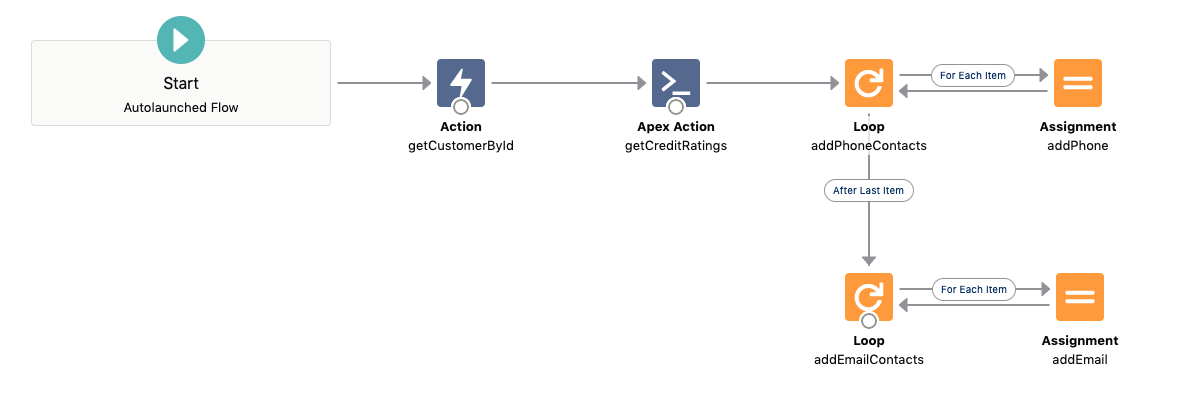
HTTP 标注模拟声明预期的请求,并以示例客户作为 application/json 进行响应:
public class MyBankGetCustomerCalloutMock implements HttpCalloutMock {
    public HTTPResponse respond(HTTPRequest request) {
        // Assert expected request test data: customer ID in the request path
        System.assertEquals('GET', request.getMethod());
        System.assertEquals('callout:MyBank/v1/customers/42', request.getEndpoint());

        // Send response test data: customer details with sample ratings
        // as additional properties and sample contacts
        HttpResponse response = new HttpResponse();
        response.setHeader('Content-Type', 'application/json');
        response.setBody('{' +
            '"id": 42, "name": "Foo Bar", "phones": [' +
            '  {"primary": true,  "timeOfDay": "Daytime", ' +
            '      "typeOfPhone": "Mobile", "phoneNumber": "555-5555"},' +
            '  {"primary": false, "timeOfDay": "Evening", ' +
            '      "typeOfPhone": "Landline", "phoneNumber": "222-5555"}' +
            '], "emails": [' +
            '  {"primary": true, "timeOfDay": "AllDay", "email": "fooBar@acme.org"}' +
            '],' +
            '"rating1": {"rating": "Rating 1", "score": 0.95}, ' +
            '"rating2": {"rating": "Rating 2", "score": 0.78}' +
        '}');
        response.setStatusCode(200);
        return response;
    }
}
application/json,并且 JSON 属性符合 Apex 标识符字符,您也可以使用 JSON 序列化与外部服务响应类型匹配的示例响应:ExternalService.MyBank_Customer customer = new ExternalService.MyBank_Customer();
customer.id = 42;
...
customer.properties = new Map<String, ExternalService.MyBank_CreditRating>();
ExternalService.MyBank_CreditRating creditRating = new ExternalService.MyBank_CreditRating();
creditRating.rating = 'Rarging 1';
creditRating.score = 0.95;
customer.properties.put('rating1', creditRating);
...
response.setBody(System.JSON.serialize(customer));
....
Apex 单元测试设置 HTTP 标注模拟,并插入预期的信用评级和客户联系人:
@IsTest
public class MyBankFlowTest {
    @IsTest
    static public void testGetCustomer() {
        // Set HTTP callout mock to match flow's external service action invocation
        Test.setMock(HttpCalloutMock.class, new MyBankGetCustomerCalloutMock());

        // Set flow input variables and create the flow interview
        Map<String, Object> inputVariables = new Map<String, Object>();
        inputVariables.put('customerId', 42);
        Flow.Interview myBankFlow = Flow.Interview.createInterview('MyBank', inputVariables);

        // Start flow interview with set input variables
        myBankFlow.start();

        // Assert customer's expected credit ratings
        List<ExternalService.MyBank_CreditRating> creditRatings =
            (List<ExternalService.MyBank_CreditRating>)myBankFlow.
                getVariableValue('creditRatings');
        System.assertEquals(2, creditRatings == null ? 0 : creditRatings.size());
        ExternalService.MyBank_CreditRating actualRating = creditRatings.get(1);
        ExternalService.MyBank_CreditRating expectedRating =
            new ExternalService.MyBank_CreditRating();
        expectedRating.rating = 'Rating 2';
        expectedRating.score = 0.78;
        System.assertEquals(expectedRating.toString(), actualRating.toString());

        // Assert customer's contacts:
        List<String> contacts = (List<String>)myBankFlow.getVariableValue('*contacts*');
        System.assertEquals(3, contacts == null ? 0 : contacts.size());
        System.assertEquals('Phone Number: 555-5555', contacts.get(0));
        System.assertEquals('Phone Number: 222-5555', contacts.get(1));
        System.assertEquals('Email: fooBar@acme.org', contacts.get(2));
    }
}
有关流 Apex 单元测试的其他示例,请查看测试外部服务。
对于示例 9:在带有 Apex 单元测试的 Apex 中使用 allOf Composition 和 additionalProperties
示例 9 中的外部服务注册MyBank(来自 OpenAPI 2.0 和 3.0 示例)由访问字典属性的示例 Apex 类调用。Apex 单元测试将所有这些联系在一起。
类CustomerCreditRating捕获适合进一步处理的客户详细信息。可以直接使用外部服务的响应输出数据结构。作为一种良好的实践,将您的业务相关数据结构从外部依赖中分离出来:
public class CustomerCreditRating {
    public Integer Id {get; private set;}
    public String Name {get; private set;}

    private List<String> emails;
    private List<String> phoneNumbers;
    private Map<String, Integer> ratings;

    public CustomerCreditRating(Integer customerId, String name) {
        this.Id = customerId;
        this.Name = name;
        this.emails = new List<String>();
        this.phoneNumbers = new List<String>();
        this.ratings = new Map<String, Integer>();
    }

    public void addEmail(String email) {
        emails.add(email);
    }

    public void addPhoneNumber(String phoneNumber) {
        this.phoneNumbers.add(phoneNumber);
    }

    public List<String> getContacts() {
        List<String> contacts = new List<String>();
        for (String phoneNumber: phoneNumbers) {
            contacts.add('Phone Number: ' + phoneNumber);
        }
        for (String email: emails) {
            contacts.add('Email: ' + email);
        }
        return contacts;
    }

    public void addRating(String ratingType, Integer ratingScore) {
        ratings.put(ratingType, ratingScore);
    }

    public Set<String> getRatingTypes() {
        return ratings.keySet();
    }

    public Integer getRatingScore(String ratingType) {
        return ratings.get(ratingType);
    }
}
Apex 类MyBankCustomerCreditRating通过调用外部MyBank服务操作getCustomerById来获取给定客户 ID 的客户详细信息。Apex方法getCreditRating从客户详细信息中获取信用评级。通过循环phones和emails属性,并将格式化值分配到联系人列表,电话和电子邮件联系人详细信息被格式化为客户联系人列表:
public class MyBankCustomerCreditRating {
    public class MyBankException extends Exception {}

    public CustomerCreditRating getCreditRating(Integer customerId) {
        // Get customer credit rating from an external bank rating service
        // Construct the external service registration MyBank
        ExternalService.MyBank myBank = new ExternalService.MyBank();

        // Make the callout to get the customer by ID.
        // The response is the customer detail for HTTP code 200
        ExternalService.MyBank_Customer customer;
        try {
             ExternalService.MyBank.getCustomersByCustomerId_Request request =
                new ExternalService.MyBank.getCustomersByCustomerId_Request();
             request.customerId = customerId;
             customer = myBank.getCustomersByCustomerId(request).Code200;
        } catch (ExternalService.MyBank.getCustomersByCustomerId_ResponseException e) {
            // An HTTP failure code is thrown as exception -
            // captured and translated to a meaningful error
            throw new MyBankException(
                'Credit rating not available for customer ID: '
                + customerId);
        }

        // Gather the customer name, contacts and credit ratings
        // from the callout's response data
        CustomerCreditRating customerRating =
            new CustomerCreditRating(customerId, customer.name);
        for (ExternalService.MyBank_Email email: customer.emails) {
            customerRating.addEmail(email.email);
        }
        for (ExternalService.MyBank_Phone phone: customer.phones) {
            customerRating.addPhoneNumber(phone.phoneNumber);
        }
        for (String ratingType: customer.properties.keySet()) {
            ExternalService.MyBank_CreditRating rating =
                customer.properties.get(ratingType);
            Integer ratingPercent = (Integer)(rating.score * 100.0);
            customerRating.addRating(ratingType, ratingPercent);
        }

        return customerRating;
    }
}
您可以为 Apex 集成共享相同的 HTTP 模拟标注类。相应的 Apex 单元测试类会测试 Apex 信用评级逻辑:
@IsTest
public class MyBankCustomerRatingTest {
    @IsTest
    static public void testGetCustomerRating() {
        // Set HTTP callout mock to match Apex's external service callout
        Test.setMock(HttpCalloutMock.class, new MyBankGetCustomerCalloutMock());

        // Call the Apex MyBankCustomerRating class
        MyBankCustomerCreditRating myBankCreditRating = new MyBankCustomerCreditRating();
        CustomerCreditRating creditRating = myBankCreditRating.getCreditRating(42);

        // Assert customer's expected credit ratings
        System.assertEquals(2, creditRating.getRatingTypes().size());
        Integer actualRatingScore = creditRating.getRatingScore('rating2');
        Integer expectedRatingScore = 78;
        System.assertEquals(expectedRatingScore, actualRatingScore);

        // Assert customer's contacts:
        List<String> contacts = creditRating.getContacts();
        System.assertEquals(3, contacts.size());
        System.assertEquals('Phone Number: 555-5555', contacts.get(0));
        System.assertEquals('Phone Number: 222-5555', contacts.get(1));
        System.assertEquals('Email: fooBar@acme.org', contacts.get(2));
    }
}
对于示例 10:带 allOf 和 Discriminator 的多态性
discriminator 指令可与 allOf 组合,以定义组合的多态类型。多态类型在 Apex 对象名称中使用后缀_KT_PT标记。通过其多态对象类型,使用多态扩展类型。
此示例说明了如何使用示例 10 中的 OpenAPI 规范与 Apex 中的多态类型进行交互。联系人是基本类型。电话 和电子邮件 是可分配给客户联系人列表的多态扩展类型建模联系人类型:
// The customer
ExternalService.MyBank_Customer customer = new ExternalService.MyBank_Customer();

// The primary phone contact wrapped as polymorphic type Contact_KT_PT
ExternalService.MyBank_Phone mobile = new ExternalService.MyBank_Phone();
mobile.primary = true;
mobile.typeOfPhone = 'Mobile';
mobile.phoneNumber = '555-5555';
ExternalService.MyBank_Contact_KT_PT cMobile =new ExternalService.MyBank_Contact_KT_PT();
cMobile.phone = mobile; // cMobile is a phone contact

// Customer's secondary home phone contact
ExternalService.MyBank_Phone home = new ExternalService.MyBank_Phone();
home.primary = false;
home.typeOfPhone = 'Home';
home.phoneNumber = '444-4444';
ExternalService.MyBank_Contact_KT_PT cHome = new ExternalService.MyBank_Contact_KT_PT();
cHome.phone = home; // cHome is a phone contact

// Customer's email
ExternalService.MyBank_Email email = new ExternalService.MyBank_Email();
email.primary = true;
email.email = 'someone@somewhere.org';
ExternalService.MyBank_KT_PT cEmail = new ExternalService.MyBank_Contact_KT_PT();
cEmail.email = email; // cEmail is an email contact

// Adding mobile, home phone and email as contacts to the customer contacts list
customer.contacts = new List<ExternalService.MyBank_Contact_KT_PT>();
customer.contacts.add(cMobile);
customer.contacts.add(cHome);
customer.contacts.add(cEmail);

// Send an email to a customer's primary email contacts
for (ExternalService.MyBank_Contact_KT_PT contact: customer.contacts) {
  if (contact.email != null && contact.email.primary) {
    String emailAddress = contact.email.email;
    // Sending email to email address
    ...
  }
}
对于示例 11 (Open API 3.0):AnyOf、OneOf 和 Discriminator
oneOf 或 anyOf 定义了组合的类型 - 可以使用其中一个模式结构,也可以使用其中任何一个。通过相应组成类型的属性,可以访问组成模式类型,如下所示:
- 引用为组成模式的命名模式
Name:anyOfName或oneOfName。 - 内联组成模式对象:
anyOfObject或oneOfObject。如果在组成中声明了多个内联对象,则声明顺序会添加为序列号后缀。例如,oneOfObject1,分别为第一个和第二个组成类型的oneOfObject2。 - 内联组成模式数组:
anyOfArray或oneOfArray。如果在组成中声明了多个内联数组,则声明顺序会添加为序列号后缀。例如oneOfArray1、oneOfArray2。 - 内联组成原始类型:
anyOfTypeName或oneOfTypeName。如果在内联组成中引用了相同的类型,则类似的类型会在规格中以其声明顺序为后缀 - 例如anyOfString1,anyOfString2。
该示例说明了如何使用示例 11 中的 OpenAPI 规格与 Apex 中的anyOf和oneOf类型进行交互。Contact是基本类型。Phone和Email是多态扩展类型,用于建模联系人类型,可分配给客户的联系人列表。客户可以通过社会安全号码、驾照或名字和姓氏以及可选的中间名中的任何一个来识别:
ExternalService.MyBank_Customer customer = new ExternalService.MyBank_Customer();

// Setting the customer ID
customer.id = new ExternalService.MyBank_Customer_id();
// Setting the social security security number
customer.id.anyOfSSN.ssn = '555-55-5555';
// Setting the customer's first and last name without a middle name
customer.id.anyOfFullName = new ExternalService.MyBank_FullName();
customer.id.anyOfFullName.firstName = 'Somefirstname';
customer.id.anyOfFullName.lastName = 'Somelastname';

// Customer contacts
ExternalService.MyBank_Phone mobile = new ExternalService.MyBank_Phone();
mobile.typeOfPhone = 'Mobile';
mobile.phoneNumber = '555-5555';
ExternalService.MyBank_Contact cMobile = new ExternalService.MyBank_Contact();
cMobile.oneOfPhone = mobile;

ExternalService.MyBank_Phone home = new ExternalService.MyBank_Phone();
home.typeOfPhone = 'Home';
home.phoneNumber = '444-4444';
ExternalService.MyBank_Contact cHome = new ExternalService.MyBank_Contact();
cHome.oneOfPhone = home;

ExternalService.MyBank_Email email = new ExternalService.MyBank_Email();
email.email = 'someone@somewhere.org';
ExternalService.MyBank_Contact cEmail = new ExternalService.MyBank_Contact();
cEmail.oneOfEmail = email;

customer.contacts = new List<ExternalService.MyBank_Contact>();
customer.contacts.add(cMobile);
customer.contacts.add(cHome);
customer.contacts.add(cEmail);

// Sending the customer's known identities to the customer's email address
String emailContact = null;
for (ExternalService.MyBank_Contact contact: customer.contacts) {
    if (contact.oneOfEmail != null) {
        emailContact = contact.oneOfEmail.email;
    }
}
if (emailContact != null) {
    String subject = 'Your identity';
    String body = 'These are the identities we\'ve found: \n';
    if (customer.id.anyOfSSN != null) {
        body += '  - Social Security Number: ' + customer.id.anyOfSSN.ssn + '\n';
    }
    if (customer.id.anyOfDriversLicense != null) {
        body += '  - Driver\'s License: ' + customer.id.anyOfDriversLicense.dl + '\n';
    }
    if (customer.id.anyOfFullName != null) {
        body += '  - First name: ' + customer.id.anyOfFullName.firstName + '\n';
        if (customer.id.anyOfFullName.middleName != null) {
            body += '    Middle name: ' + customer.id.anyOfFullName.middleName + '\n';
        }
        body += '    Last name: ' + customer.id.anyOfFullName.lastName + '\n';
    }
    ...
}
对于示例 13(Open API 3.0):二进制文件上传
本节中的示例 Apex 类型涉及示例 13:文件上传和下载 (OAS 3.0)。首先,您使用包含要上载的文件的名称和二进制requestBody的 PUT 操作注册外部服务。此处,组织中的外部服务注册名为 s3。此示例首先创建 s3 外部服务的实例,然后创建 putObject 操作的实例。它在request对象上设置这些输入参数值。
key— 上传到外部系统后的文件的名称。Contentx2dType— 内容类型。body— 组织中文件(存储为 ContentDocument)的 ID。
您可以通过在开发人员控制台中运行它来测试此代码片断。文件 hello.jpeg 将上传到外部位置。
// Upload File
ExternalService.s3 fileService = new ExternalService.s3();
ExternalService.s3.putObject_Request request = new ExternalService.s3.putObject_Request();
request.key = 'hello.jpeg';
request.Contentx2dType = 'image/jpeg';
request.body = '123ABC00000123PXYZ';

try {
    ExternalService.s3.putObject_Response response = fileService.putObject(request);

    if (response.responseCode == 200) {
        System.debug('Success |' + response);
    }
} catch (ExternalService.s3.putObject_ResponseException e) {
    if (e.responseCode == 400) {
        System.debug('Bad request: ' + e.Code400);
    } else if (e.responseCode == 404) {
        System.debug('Object not found: ' + e.Code404);
    } else if (e.responseCode == 500) {
        System.debug('Internal server error: ' + e.Code500);
    } else {
        System.debug('Unexpected error: ' + e.defaultResponse);
    }
}
对于示例 13(Open API 3.0):二进制文件下载
本节中的示例 Apex 类型涉及示例 13:文件上传和下载 (OAS 3.0)。首先,您使用 GET 操作注册外部服务,该操作包含要下载的文件的名称和响应中的二进制content对象。此处,组织中的外部服务注册名为 s3。此示例首先创建 s3 外部服务的实例,然后创建 getObject 操作的实例。它在request对象上设置这些输入参数值。
key— 要从外部系统下载的文件的名称。
您可以通过在开发人员控制台中运行它来测试此代码片断。test.jpeg 文件将从外部位置下载。
// Download File
ExternalService.s3 fileService = new ExternalService.s3();
ExternalService.s3.getObject_Request request = new ExternalService.s3.getObject_Request();
request.key = 'test.jpeg';

try {
    ExternalService.s3.getObject_Response response = fileService.getObject(request);

    if (response.responseCode == 200) {
        System.debug('Success |' + response);
    }
} catch (ExternalService.s3.getObject_ResponseException e) {
    if (e.responseCode == 403) {
        System.debug('Access denied: ' + e.Code403);
    } else if (e.responseCode == 404) {
        System.debug('Object not found: ' + e.Code404);
    } else if (e.responseCode == 500) {
        System.debug('Internal server error: ' + e.Code500);
    } else {
        System.debug('Unexpected error: ' + e.defaultResponse);
    }
}
