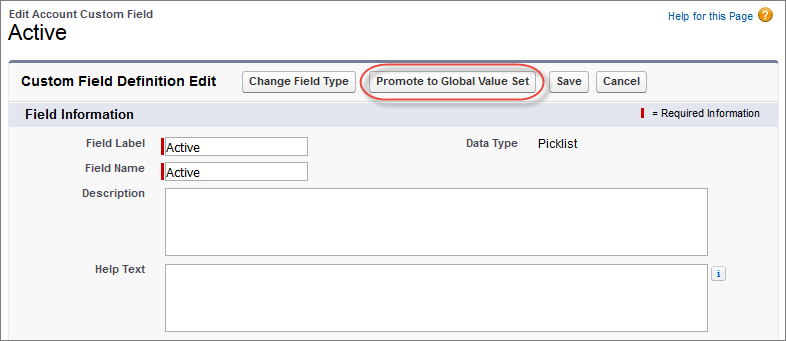
When you create a custom picklist, it’s only available to the current object. To
share the values with other objects, promote the picklist to a global value set. The
original custom picklist references the global value set for its values, and the global
value set is also available to other custom picklists.
Required Editions
Available in: Salesforce Classic and Lightning Experience
Available in: all editions
User
Permissions Needed
To create or change custom fields:
Customize Application
After a picklist is promoted to a global value set, you can’t demote it. You manage
the values in the global value set or edit the custom picklist field to use different
values.
If you need to, first review the considerations information at the end of this topic.
Go to the fields area of the object you want to create a picklist field for.
In the Custom Fields related list, click Edit.
Click Promote to Global Value Set.
Enter a label for the global value set.
Accept the Field Name or edit it.
Optionally, enter a description to identify it when using the values for other
custom picklists.
Click Promote to Global Value Set, again.
You can use the new global value set for other fields and manage the values in
Picklist Value Sets.
When promoting a custom picklist, be aware of these considerations.
You can promote fields that have up to 1,000 values (both active and
inactive).
You can promote only restricted picklists. To promote an unrestricted picklist,
convert it to a restricted picklist.
You can’t promote a field to an existing global value set.
Picklist values translated using Translation workbench have a limit of 40
characters.
You can’t undo a custom picklist field’s association with a global value set. If
you need a picklist field to use a different global value set or different
individual values, delete the custom picklist field, and create a new one in its
place.
We use three kinds of cookies on our websites: required, functional, and advertising. You can choose whether functional and advertising cookies apply. Click on the different cookie categories to find out more about each category and to change the default settings.
Privacy Statement
Required Cookies
Always Active
Required cookies are necessary for basic website functionality. Some examples include: session cookies needed to transmit the website, authentication cookies, and security cookies.
Functional Cookies
Functional cookies enhance functions, performance, and services on the website. Some examples include: cookies used to analyze site traffic, cookies used for market research, and cookies used to display advertising that is not directed to a particular individual.
Advertising Cookies
Advertising cookies track activity across websites in order to understand a viewer’s interests, and direct them specific marketing. Some examples include: cookies used for remarketing, or interest-based advertising.