Get an Explanation for a Formula and Fix Errors with Einstein for Formulas
Use Einstein for Formulas to get an explanation for a formula and fix syntax errors in a
formula used in Formula fields, default field values, and record validation rules. As an admin,
you can use Einstein’s assistance for existing formulas or for the new ones that you
create.
Required Editions
Einstein Generative AI is available in Lightning Experience. Setup for Einstein
Generative AI is available in Lightning Experience.
Available in: Enterprise, Performance, and Unlimited
Editions
Your organization must license Einstein for Formulas to use the feature. Contact your
Salesforce account executive for more information.
In the following scenario, see how Einstein for Formulas can help you fix a formula field.
From Setup, in the Quick Find box, enter Object Manager, and then
select Object Manager. Next, click any object. For example, select
Account.
Select Fields and Relationships, click any existing formula field,
and then click Edit.
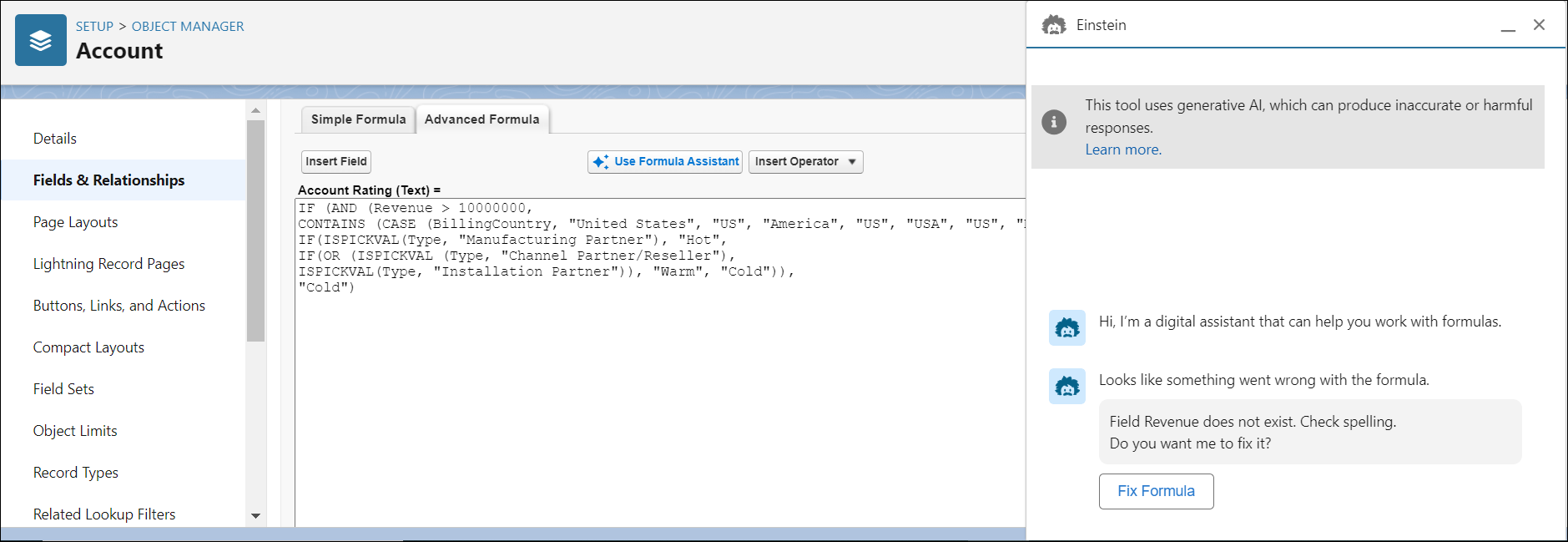
You can view the existing formula in the Formula Editor.
To get assistance for this formula, click Use Formula Assistant on
top of the Formula Editor.
The Einstein panel opens.
If the formula is correct, Einstein asks if you want to receive an explanation for the
formula. Click Explain Formula to proceed.
If there are any syntax errors in the formula, Einstein identifies the error and suggests a
fix for the formula. Click Fix Formula to view the fixed formula.
To copy the updated formula in the Formula Editor, click Use
Formula.
Note The languages supported for the generative response include English, French, German,
Italian, Japanese, and Spanish. If your user’s language isn’t one of the supported languages,
responses are generated in English.
(Optional) To provide feedback to Einstein about the generated explanations and formula
fixes, use the thumbs-up and thumbs-down icons in the panel. If the generated explanation or
the suggested fix for a formula is accurate, use the thumbs-up icon, or use the thumbs-down
icon to select and submit feedback.
Did this article solve your issue?
Let us know so we can improve!
Loading
Salesforce Help | Article
Cookie Consent Manager
General Information
Required Cookies
Functional Cookies
Advertising Cookies
General Information
We use three kinds of cookies on our websites: required, functional, and advertising. You can choose whether functional and advertising cookies apply. Click on the different cookie categories to find out more about each category and to change the default settings.
Privacy Statement
Required Cookies
Always Active
Required cookies are necessary for basic website functionality. Some examples include: session cookies needed to transmit the website, authentication cookies, and security cookies.
Functional Cookies
Functional cookies enhance functions, performance, and services on the website. Some examples include: cookies used to analyze site traffic, cookies used for market research, and cookies used to display advertising that is not directed to a particular individual.
Advertising Cookies
Advertising cookies track activity across websites in order to understand a viewer’s interests, and direct them specific marketing. Some examples include: cookies used for remarketing, or interest-based advertising.