
You are here:
Customize the Select Service Resource and Service Appointment Time Screen
Customize the Select Service Resource and Service Appointment Time screen and the options that appear on the screen.
Required Editions
| Available in: Lightning Experience. |
| Available in: Enterprise and Unlimited Editions |
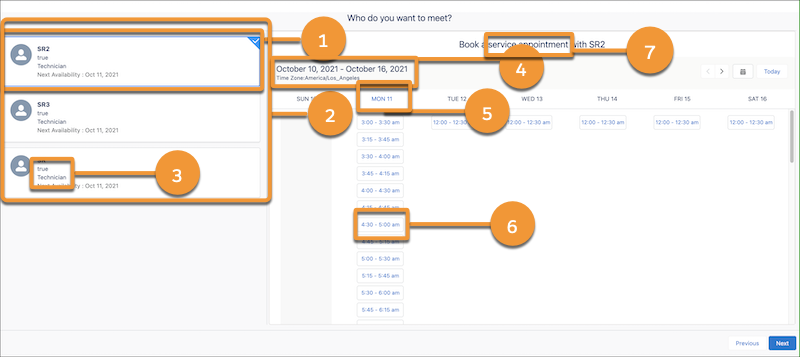
| UI Element | How to Customize the Element |
|---|---|
| The preselected service resource (1) | Flow Screen Component: Select Service Resource and Service Appointment Time |
| The maximum number of service resources that appear on the screen, the order in which service resources are sorted, and the time zone based on which the service resource's available slots appear (2) | Flow Screen Component: Select Service Resource and Service Appointment Time |
| The fields and images that appear on service resource cards (3) | |
| The availability of the Time Zone picklist (4) | Flow Screen Component: Select Service Resource and Service Appointment Time |
| The preselected start date (5) | Flow Screen Component: Select Service Resource and Service Appointment Time |
| The preselected start time and end time (6) | Flow Screen Component: Select Service Resource and Service Appointment Time |
| The field label (7) | Change Labels in Flow Screens |
| The Select Service Resource and Service Appointment Time screen |
Did this article solve your issue?
Let us know so we can improve!
