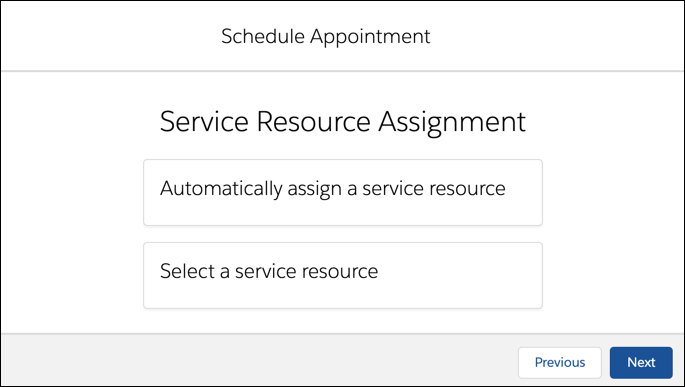
When automatic service resource assignment is enabled, your customers or guest users can
schedule appointments without selecting a service resource. Based on the selected time slot, an
appropriate service resource is automatically assigned to the appointment. You can also configure
your flows to give users the option to manually select a service resource or have one assigned
automatically.
Required Editions
Available in: Lightning Experience.
Available in: Enterprise and Unlimited Editions
User Permissions Needed
To open, edit, or create a flow in Flow Builder:
Manage Flow
To run a flow:
Run Flows
Before you enable automatic service resource assignment, update field-level security for the
Anonymous Booking field on the Service Appointment object to give users edit access.
Use the new Anonymous Booking and Service Resource Booking attributes on your flow screen
component. These attributes are available on the Select Service Resource, Service Resource
Availability, and Select Service Resource and Service Appointment Time flow screen components.
By default, Anonymous Booking is set to False and Service Resource
Booking to True, and there’s no change in your flow's behavior.
Note In Salesforce Scheduler with the Asset Management add-on, a service resource can be a
technician (person) or an asset (meeting room or equipment). Create and assign different sets of
skills for technicians and assets to prevent assets from being automatically assigned as service
resources. For example, mammograms can be a skill for an X-ray technician. And 3D mammogram can
be a skill for an X-ray machine.
From Setup, in the Quick Find box, enter Flows, and then select
Flows.
Create a flow or edit an existing flow that you want to enable automatic resource
assignment for.
Note Before you can edit a flow, you must deactivate it.
On the Manager tab, under Variables, edit the allowAnonymousBooking and
allowResourceBooking variables and set their values according to your requirement.
To skip the resource selection page and automatically assign service resources, set
allowAnonymousBooking to {!$GlobalConstant.True} and
allowResourceBooking to {!$GlobalConstant.False}.
To give users the option to choose between automatic resource assignment and manual
resource selection, set both allowAnonymousBooking and allowResourceBooking to
{!$GlobalConstant.True}.
We use three kinds of cookies on our websites: required, functional, and advertising. You can choose whether functional and advertising cookies apply. Click on the different cookie categories to find out more about each category and to change the default settings.
Privacy Statement
Required Cookies
Always Active
Required cookies are necessary for basic website functionality. Some examples include: session cookies needed to transmit the website, authentication cookies, and security cookies.
Functional Cookies
Functional cookies enhance functions, performance, and services on the website. Some examples include: cookies used to analyze site traffic, cookies used for market research, and cookies used to display advertising that is not directed to a particular individual.
Advertising Cookies
Advertising cookies track activity across websites in order to understand a viewer’s interests, and direct them specific marketing. Some examples include: cookies used for remarketing, or interest-based advertising.